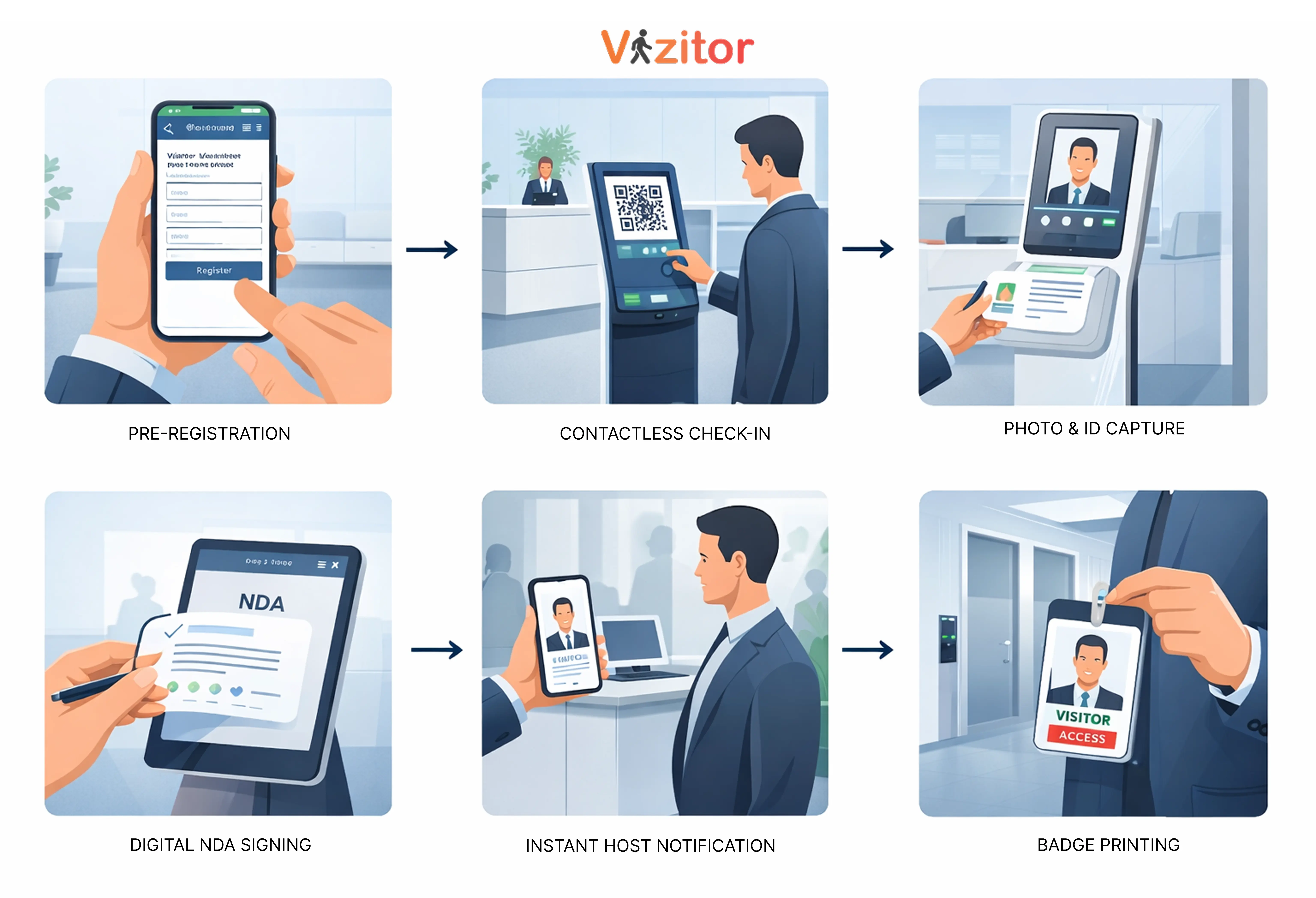
This blog explains the key security features a visitor management system must include to protect a workplace. These features are: visitor pre-registration, contactless QR code check-in, photo and ID capture, digital NDA and document signing, instant host notifications, real-time visitor logs and audit trails, and visitor badge printing with access level indicators. Together, these features create an unbroken record of every person who enters a facility, who they are, why they're there, who authorised their visit, and whether they're still on the premises.


Published on: Tue, Feb 24, 2026
Read in 11 minutes
Imagine
A person walks into your office, signs their name on a paper logbook, and heads straight to your server room. Your receptionist assumed someone had called them in. The person who called them in assumed the receptionist had verified their credentials. Nobody checked anything. The contractor spent 45 minutes in your server room, and by the time anyone thought to ask, they were gone.
This isn’t a hypothetical. It’s the version of events that leads to data breaches, theft, and regulatory fines that land on someone’s desk with a deeply uncomfortable Tuesday morning explanation.
The problem isn’t that your team is careless. The problem is that paper-based and patchwork visitor management systems create gaps that good intentions can’t close. The right digital visitor management system with the right security features actually turned on removes those gaps by design.
Here are the eight features that do the real security work, what they actually protect against, and how to know if your current system has them.
The majority of security breaches at the front desk aren’t dramatic. They’re boring. An unregistered visitor comes in, uses the right name and is waved through because already the receptionist is dealing with three things. Pre-registration shuts that opportunity before it can be realized.
So, when hosts need to register their guests in advance; name, company, purpose of visit and estimated time of arrival your reception team is no longer the front line. Instead, they become a confirmation step in a process that already started.
How this looks in practice: A guest receives a digital invitation before arrival. It has directions, parking information, check-in instructions and any documents they need to look at. Their name is already in the system when they walk. Check-in takes seconds; not minutes.
The security benefit is straightforward: unannounced visitors are flagged immediately. If someone walks in and claims to be expected but there’s no pre-registration record, that’s a conversation your receptionist can have from a position of information rather than uncertainty.
Vizitor’s pre-registration sends visitors a digital invite link where they can fill in their details, sign required documents, and confirm their visit before they ever reach your front door.
There’s a common misconception that contactless check-in is a post-COVID convenience feature. It is convenient but the security case for it is just as strong.
When visitors check in on a shared kiosk touchscreen, there’s a subtle but real problem: they’re interacting with a device that dozens of other people interact with every day. A QR code check-in flips this entirely. The visitor scans a code from their own phone, fills in their details on their own device, and submits. Your kiosk stays clean, literally and figuratively.
But here is the security angle people overlook: The QR-based check-in creates a digital trail that begins as soon as the visitor scans the code; timestamped, linked to their device and immediately captured in your system. A paper logbook is a trail that begins with whoever remembers to write something down, in the handwriting you may or may not be able to read afterward.
For offices managing multiple entry points: a main entrance, a side door, a loading bay, a QR code posted at each point means every entry is captured in the same dashboard without needing a staffed reception at every door.
With Vizitor contactless check-ins, QR codes can be displayed on your reception tablet or printed and posted at any entry point. No app download required for the visitor, they scan, fill in their details in a browser, and they’re logged.
A name in a log is useful. A name with a photo is verifiable. A name, a photo, and an ID reference is an audit trail that will actually hold up when you need it.
Visitor photo capture during check-in solves a problem that nobody talks about until it matters: the gap between ‘someone checked in as [name]’ and ‘we know who physically entered the building.’ Names can be borrowed, mistyped, or invented. A photo can’t.
For high-security environments: manufacturing floors, pharmaceutical facilities, data centres, legal offices, ID verification at check-in is already a compliance expectation. A digital visitor management system that captures ID details and attaches them to the visitor record removes the manual step of someone scribbling a passport number into a notebook and hoping it’s legible later.
There’s also a softer benefit worth noting. When visitors know their photo is being captured, the nature of the interaction changes slightly. People who intend to do something they shouldn’t are less likely to proceed through a process that creates a visual record of their presence.
Vizitor captures a photo of each visitor as part of the check-in flow, optional or mandatory depending on your settings. The photo is attached to their visitor record and appears on their printed badge.
Ask any office manager how they currently handle NDAs for visitors and contractors, and you’ll hear one of three answers. Either there’s a paper form that visitors sign at reception (which then goes into a drawer and is never seen again), or there’s an email-based process that gets skipped under time pressure, or most commonly there’s nothing.
Getting a visitor to sign a non-disclosure agreement, a health and safety declaration, or a data handling acknowledgment during digital check-in isn’t just a legal nicety. It’s enforceable documentation that’s timestamped, stored, and searchable. If a contractor later claims they weren’t informed of your data handling policies, you have a signed record with their name, the date, and the time attached.
The key advantage of doing this at check-in: it’s impossible to skip. The visitor cannot complete the check-in process without signing the required documents. There’s no ‘I forgot to send it’ or ‘I didn’t see the email.’ The signature is part of the flow.
For industries where compliance is non-negotiable: healthcare, finance, manufacturing, any business handling sensitive client data, this feature isn’t optional. It’s a baseline.
Vizitor lets you configure different document sets for different visitor types. A contractor sees a safety briefing and NDA. A regular client sees a data handling notice. A job candidate sees an interview confidentiality agreement. All signed during check-in. All stored automatically.
Here’s a scenario every facility manager has lived through: a visitor checks in, the receptionist calls the host’s desk, nobody picks up, the visitor waits awkwardly in the lobby for 15 minutes, and by the time the host comes down, the visitor has had time to notice and remember that your reception process is a mess.
The version of this with a security consequence: the visitor, tired of waiting, asks the receptionist to just let them up. The receptionist, not wanting to be difficult, does. And now an unescorted visitor is somewhere in your building without a host.
Instant host notifications prevent this. The moment a visitor completes check-in, their host receives a notification, on Slack, WhatsApp, SMS, or email, whichever they’re most likely to actually see. Not a message to a shared reception email that gets checked twice a day. A direct, immediate alert with the visitor’s name and purpose.
The security benefit is the speed of escort. A visitor who checks in and is met within two minutes by their host never has a reason or an opportunity to wander. That’s not paranoia. That’s access management done properly.
Vizitor sends instant host notifications the moment a visitor checks in. Hosts choose their preferred channel; Slack, WhatsApp, SMS, or email. If the host doesn’t respond within a set window, a secondary contact is notified automatically.
Most offices only think about their visitor log when something goes wrong. That’s exactly the wrong time to discover that your log is a binder of handwritten entries, half of which are illegible, and the page from the day in question is mysteriously missing.
A real-time digital visitor log is the backbone of workplace security documentation. It answers the question that investigators, auditors, insurers, and compliance officers will always ask first: who was in the building, when, and why?
What a good audit trail includes: full visitor name and company, check-in and check-out timestamp, purpose of visit, host name, visitor photo, documents signed, and which entry point was used. Every entry is automatic nothing depends on a receptionist remembering to log it correctly.
Real-time visibility matters for day-to-day management too. A dashboard that shows exactly who is in your building right now isn’t just useful during an incident, it’s useful any Tuesday afternoon when your CFO asks how many external people are currently on your floor before a board meeting starts.
Vizitor’s admin dashboard shows live occupancy in real time. Search any visitor by name, date, or company. Export logs for audits in seconds. Every entry is timestamped, photo-linked, and permanently stored in your secure cloud account.
Once a visitor is inside your building, the question shifts from ‘should they be here?’ to ‘where should they be able to go?’ A printed visitor badge is how you answer that question without stationing someone at every door.
The value of a visitor badge isn’t just identification, it’s differentiation. An employee who walks past a visitor wearing a badge knows immediately: this person has been checked in, they have a host, and they have a level of access that’s been defined. That silent communication is doing security work around the clock without any intervention.
Colour-coded access levels make this even more explicit. A yellow badge might mean ‘general visitor, lobby and meeting rooms only.’ A red badge might mean ‘contractor accompanied access to Floor 3.’ A green badge might mean ‘VIP client full-floor access with host.’ Your security team and employees read these at a glance without needing to ask anyone anything.
Custom branded badges serve a second purpose: they look professional. A visitor who receives a polished, photo-ID badge with your company logo isn’t just identified, they’re welcomed. That impression travels.
Vizitor automatically prints a photo badge the moment a visitor completes check-in. Badge templates are fully customisable by visitor type, different layouts, and access indicators for different categories of guest.
It’s worth saying this plainly: none of these features are particularly powerful in isolation. A visitor badge means nothing if the check-in process that generated it didn’t verify who the visitor is. A real-time audit log is only useful if check-in is mandatory and actually followed. Host notifications only close the escort gap if pre-registration has already established that the visitor is expected.
The reason to think about these as a system not a checklist is that workplace security isn’t about covering individual vulnerabilities. It’s about removing the conditions that allow vulnerabilities to exist. A visitor management system that handles pre-registration, contactless check-in, photo capture, document signing, badge printing, host alerts, audit logging, and evacuation in one connected platform doesn’t just add features. It removes the gaps between them.
Vizitor is built around exactly that logic. Every feature is designed to connect with the others so that from the moment a visitor is invited to the moment they leave, there are no gaps in your record, your oversight, or your control.
If your current visitor management setup: paper, digital, or somewhere in between has gaps in any of the seven areas above, that’s worth fixing. Not because something has gone wrong yet, but because the cost of fixing it now is a fraction of the cost of dealing with it after.
Workplace security in visitor management refers to the set of processes and tools that control who enters your premises, what information they provide before entry, what areas they can access, and what record exists of their visit. It covers everything from how visitors check in to how their data is stored and what happens during an emergency.
Paper visitor logbooks are readable by anyone who walks past reception meaning visitors can see the names of previous visitors, including clients, executives, or sensitive personnel. They provide no way to send host notifications, verify identity with a photo, store signed documents, or generate instant audit reports. In the event of an incident, a paper log is often incomplete, illegible, or missing entirely.
There isn’t a single most important feature but if forced to choose one starting point, it’s the audit trail. Real-time, searchable, timestamped visitor logs underpin every other security function. Without an accurate record of who entered and when, no other security measure can be fully verified or enforced.
Pre-registration ensures that unannounced visitors are flagged immediately. When hosts register their visitors in advance, the reception team has context for every arrival: name, company, purpose, and expected time. Anyone who arrives without a pre-registration record can be identified and questioned before they’re granted entry, rather than after.
Yes, A digital visitor management system stores visitor data in an encrypted, access-controlled environment with defined retention periods. It creates a clear record of what information was collected, when, and under what consent framework. For GDPR and India’s PDPB, this is significantly more defensible than a paper logbook where data sits in a binder, accessible to anyone in the office.
Try Vizitor Free
No credit card required. Setup in under 5 minutes. Manage visitors, queues, meeting rooms, and more.
Start Free Trial