
Visitor Photos Captured Automatically. Stored Securely. Always Accessible.
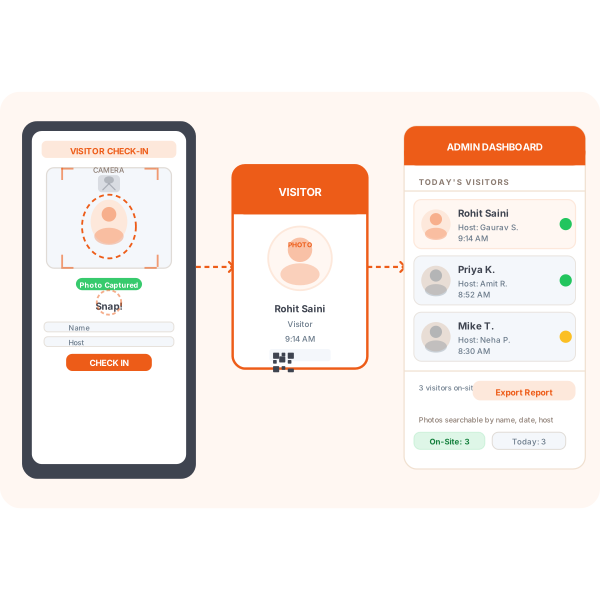
The moment a visitor signs in, Vizitor captures their photo through the kiosk camera, displays it on their printed badge, and saves it to your admin dashboard. No extra steps, no manual uploads, no missed photos.











Why Visitor Identity Gaps Create Security and Compliance Risk
Without automatic photo capture, your visitor log is a list of names on a screen. Names cannot be matched to faces, badges cannot be verified, and incidents cannot be investigated with any confidence.
You Cannot Identify Who Was On-Site
Paper logbooks capture names but never faces
When a security incident occurs, all you have is handwriting on a register with no way to match it to a face. A name without a photo is unverifiable and useless in any investigation or insurance claim.
Recurring Visitors Re-Register Every Visit
Frequent visitors fill in the same form from scratch each time
Frequent visitors have to enter their details from scratch each visit because the system has no memory of their previous visits or their photo. This wastes time at the front desk and frustrates repeat guests.
Visitor Badges Have No Photo Verification
A name badge without a photo is just a sticky label
Anyone can peel a badge off a desk and use it to enter restricted areas. Photo badges make impersonation impossible. Every staff member can visually confirm the badge matches the person wearing it at a glance.
Four Steps from Arrival to Photo on File
From the moment a visitor walks up to the kiosk to the moment their photo appears in your dashboard, Vizitor handles every step automatically.
Visitor Opens the Check-In Screen
The visitor walks up to the Vizitor kiosk or tablet and starts the self-check-in process. No staff assistance needed.
Camera Captures Photo Automatically
When the visitor reaches the photo step, the front camera activates and takes a clear photo. The visitor can retake if needed before proceeding.
Badge Is Printed with Photo Included
The signed-in visitor's visitor badge is automatically printed with their photo, name, host name, and check-in time, making visual verification fast for any staff member.
Photo Stored in Admin Dashboard
Every photo is saved against the visitor's record in the cloud dashboard, searchable by name, date, or host, and exportable for security or compliance reviews.
Photo captured at sign-in
Badge printed with photo
Records have searchable photos
Manual uploads needed
More Than a Snapshot. A Complete Photo Identity Layer.
Every photo Vizitor captures is linked to a visit record, searchable, exportable, and available to admin users from any device at any time.
Recurring Visitor Recognition
Vizitor links returning visitors to their previous photo using their registered mobile number. Recurring visitors can skip the photo step entirely, speeding up their check-in without compromising the photo record. This means your visitor management system always has an accurate, up-to-date photo on file for every regular visitor, without requiring them to re-photograph on every visit.
Frequent contractors, regular clients, and delivery personnel experience a faster, more professional check-in, while your security team retains full photo identification for every individual. The linked photo appears on the new visit record and on the visitor badge printed at each visit.
Privacy-Safe Photo Storage
All visitor photos are stored on encrypted cloud infrastructure. You control retention periods, define how long photos are kept, and delete specific records on request. Designed to comply with GDPR, PDPA, and other data protection regulations. This positions Vizitor as a responsible visitor security platform, not just a convenience tool.
Admins can configure photo retention independently from other visitor data. Photos are never shared with third parties, and access is restricted to authorised admin users. For detailed configuration options, see compliance settings.
Photo capture is one part of a complete visitor identity stack. Explore how it connects to the platform.
Frequently Asked Questions About
Visitor Photo Capture
Vizitor uses the front-facing camera on the iPad or tablet running the kiosk. When a visitor reaches the photo step during check-in, the camera activates automatically and captures their photo. The visitor can preview and retake the photo before proceeding. The captured photo is then stored against the visitor's record and printed on their badge automatically.
No. You can make photo capture mandatory for certain visitor types such as contractors or delivery personnel, and optional or disabled for others. The setting is configurable per visitor type in the admin dashboard, giving you full control over when and for whom photos are captured.
Yes. Vizitor recognises returning visitors by their mobile number and retrieves their previously captured photo. Recurring visitors can proceed without re-capturing a photo, making repeat check-ins faster while maintaining a complete photo record. The retrieved photo appears on their new visit record and on the badge printed at that visit.
Yes. Visitor photos are automatically included on the printed badge, along with the visitor's name, host, and check-in time. This makes it easy for employees and security staff to visually verify any visitor on-site. For more on badge customization, see the visitor badge management system page.
You control the retention period in your admin settings. Photos can be retained for as long as your policy requires and automatically deleted after a defined period. This helps you stay compliant with GDPR and other regional data protection laws. Retention settings can be updated at any time from your dashboard without involving the Vizitor support team.
Yes. As a data controller, you can delete individual visitor records including their photo on request. This supports your obligations under GDPR right-to-erasure provisions. The deletion is permanent and can be completed in a single action from the visitor's record in your admin dashboard.
All visitor photos are stored on encrypted cloud servers using AES-256 encryption at rest and TLS 1.3 in transit. Access is restricted to authorised admin users only. Vizitor does not share visitor photo data with third parties. For a full breakdown of data handling practices, see the compliance settings page.
Every Visitor, Identified. Every Entry, Accounted For.
Start your free trial today and see how automatic photo capture transforms your visitor security and compliance. Setup takes 30 minutes. No IT team required.