Why 75% of Customers Abandon a Wait, and How Queuing Fixes It
This page explains the difference between a queue manager (the strategy or logic for handling customer wait order) and a queue management system (the software that automates that logic), then covers the six types of queue systems in use today: single queue, multiple queue, token-based, virtual, appointment-based, and hybrid. It includes a step-by-step breakdown of how digital queue management works, verified data on customer wait abandonment (54% leave within 8 minutes, 73% call waiting the most frustrating part of service), and a comparison of physical versus digital queue management. Vizitor is presented as a virtual queue system with a real-time staff dashboard, integrated with its broader visitor and workplace management platform.


Table of Content
Try Vizitor for Free!
Imagine stepping into a busy hospital, retail store, or airport, only to find yourself stuck in a disorganized, long queue. You have no idea how long you’ll wait, and frustration starts building.
Did you know?
- 90% of customers avoid businesses with long wait times (Zendesk).
- Businesses lose up to 75% of potential customers due to poor queue management (Harvard Business Review).
A Queue Manager helps businesses control visitor flow, reduce wait times, and improve efficiency. But what type of queue manager should you use, a physical queue manager or a digital queue management system?
Let’s explore!
What is a Queue Manager?
A queue manager is a system, tool, or process used by businesses to organize, control, and optimize how customers wait for service.
Instead of unmanaged lines, a queue manager ensures:
- Customers are served in the right order
- Wait times are predictable
- Staff workload is balanced
- The overall experience feels structured
In simple terms, it replaces chaos with control.
Queue management has evolved from physical tools like stanchions and ticket systems to digital queuing processes.
A Queue Manager isn’t just about organizing lines; it’s about creating a smooth, efficient experience for customers and improving operational efficiency for businesses.
Amazing Stats:
• 90% of customers avoid businesses with long wait times
• Businesses lose up to 75% of potential customers due to long waiting times
• According to a study by Genetic Engineering & Biotechnology News (GEN),70% of customers report that poor queue management negatively impacts their overall experience.
Queue managers can be categorized into two types:
✓ Physical Queue Managers: Traditional systems like stanchions, ticket dispensers, and signage.
✓ Digital Queue Managers: Automated systems that allow visitors to join virtual queues and receive updates remotely.
While both systems aim to manage the flow of people, digital queue managers have gained popularity for their ability to offer a more streamlined, data-driven approach.
Queue Manager vs Queue Management System (Important Difference)
This is where a lot of confusion starts and where most blogs get it wrong.
- Queue Manager → The logic or method of managing queues
- Queue Management System (QMS) → The technology used to execute it
Think of it like this:
- Queue manager = strategy
- QMS = tool
Example:
- A receptionist calling people manually → queue manager (manual)
- A digital token system with SMS alerts → queue management system (automated)
Why Queue Management Matters More Than You Think?
Here’s the thing: waiting isn’t just an operational issue. It’s a psychological experience.
Key insights:
- 73% of customers associate long wait times with poor service
- 23% of customers leave without being served if waits exceed ~8 minutes
- Over 68% prefer virtual queues over physical lines
What this really means is:
Poor queue management directly kills revenue, not just satisfaction.
Types of Queue Management Systems
Single queue (first come, first served).
One line, multiple service points. Common in banks and airports. Best for fairness and simplicity, everyone’s position is visible and the order never feels arbitrary.
Multiple queue system.
Separate lines for each counter or service point. The problem: it creates imbalance. One line moves fast, another stalls, and customers in the slow line feel like they picked wrong.
Token-based queue system.
Customers receive a number, and a display or audio call announces who’s next. Common in hospitals and government offices, where customers need to be free to sit rather than stand in a fixed line.
Virtual queue management system.
Customers join remotely by phone, app, or kiosk and wait wherever they want instead of standing in place. This reduces perceived wait time significantly and gives customers back their freedom during the wait.
Appointment-based queue.
Pre-booked time slots replace walk-in unpredictability entirely. Best for clinics, salons, and consultations where the service itself takes a defined amount of time.
Hybrid queue system.
Combines walk-ins, appointments, and virtual queuing in one system. This is where most modern businesses are heading because real-world demand rarely fits neatly into just one model.
How a Queue Manager Actually Works?
(Step-by-Step)
At a glance, queue management looks simple: people arrive, wait, and get served.
But behind that flow is a structured system designed to remove friction at every step.
Let’s walk through what actually happens.
1. Entry (Walk-in / Online Check-in)
This is where the customer journey begins.
Customers can:
- Walk in physically and approach a reception or kiosk
- Check in remotely via mobile, QR code, or website
What matters here is first interaction speed.
A strong system ensures:
- No confusion about where to go
- Immediate acknowledgment (no “standing around”)
- Option to join remotely instead of waiting on-site
👉 The goal: eliminate uncertainty from the first 30 seconds
2. Registration / Token Generation
Once checked in, the system captures basic details:
- Name or mobile number
- Purpose of visit
- Service type required
Then it assigns:
- A token number
- Or a virtual position in queue
In advanced systems:
- Customers may also get an estimated wait time
- SMS or WhatsApp confirmations are triggered
👉 This step replaces the chaos of “who’s next?” with a clear, trackable identity.
3. Queue Allocation
This is where the real intelligence kicks in.
Instead of putting everyone into one line, the system:
- Routes customers based on service type
- Assigns them to specific counters or departments
- Balances load across staff
Example:
- A billing query shouldn’t wait behind a complex service request
- A quick task can be fast-tracked without breaking fairness
👉 A good queue manager doesn’t just manage lines, it optimizes flow.
4. Wait Time Tracking
Now comes the waiting phase but this is where most systems either win or fail.
A modern queue manager continuously:
- Calculates estimated wait time
- Updates queue position in real time
- Sends notifications when the turn is near
Customers may:
- Sit comfortably instead of standing
- Leave and return just in time (virtual queue)
👉 This is the shift from waiting blindly to waiting with control.
5. Service Call
When it’s the customer’s turn:
- Their token is displayed on a screen
- Or they receive a mobile notification
- Or an announcement is made
Behind the scenes:
- The system assigns the next available staff member
- Ensures minimal idle time between customers
👉 The experience feels smooth because transitions are instant and predictable.
6. Completion & Feedback
After service:
- The interaction is marked complete
- Data gets logged (wait time, service time, etc.)
- Feedback may be collected via SMS or kiosk
This data becomes critical for:
- Identifying peak hours
- Measuring staff performance
- Improving future queue flow
👉 This is where a queue manager stops being operational and becomes strategic.
The Difference Between a Bad and Great Queue System
On paper, every system follows the same steps.
In reality, the experience can feel completely different.
A Bad Queue System:
- No clarity on wait time
- Long, stagnant lines
- Uneven staff workload
- Customers constantly asking, “How much longer?”
- High drop-offs and frustration
A Great Queue System:
- Clear entry and instant acknowledgment
- Smart routing based on need
- Real-time wait updates
- Freedom to wait remotely
- Smooth, predictable service flow
When Does a Business Actually Need a Queue Manager?
Not every business thinks they need one, until problems start showing.
You need a queue manager if:
- Customers wait more than 5-10 minutes regularly
- Walk-ins and appointments clash
- Staff struggle during peak hours
- Customers frequently leave before service
- Reviews mention “long wait times”
Benefits of Using Queue Managers in High-Traffic Areas
✓ Organized Queue Flow: Queue managers ensure that customers stand in a single, orderly line. This not only makes the process smoother for everyone but also helps minimize confusion and frustration in high-traffic environments.
✓ Enhanced Customer Experience: By reducing wait times and creating an organized space, businesses and event venues can offer a more pleasant experience to their customers and attendees. In busy malls or airports, digital queuing enables customers to wait remotely, which enhances the overall shopping or travel experience.
✓ Enforcing Social Distancing: In the wake of the pandemic, businesses have placed a greater emphasis on social distancing. Queue managers provide a simple yet effective solution by spacing customers 3-6 feet apart in the queue. This allows businesses to maintain safety measures while keeping customer traffic flowing smoothly.
✓ Space Optimization: Queue managers allow businesses and event venues to effectively use the available space, ensuring that customers don’t crowd one area but follow a structured path. This can be crucial in places like malls or convention centers where foot traffic is dense and uncontrolled queues can cause disruption.
✓ Improved Efficiency: With well-organized queues, businesses can reduce customer frustration, leading to quicker service and more efficient operations.
How Physical Queue Managers Work?
For many years, physical queue managers were the go-to solution for handling crowds. These methods are still in use today, but they come with their own set of challenges
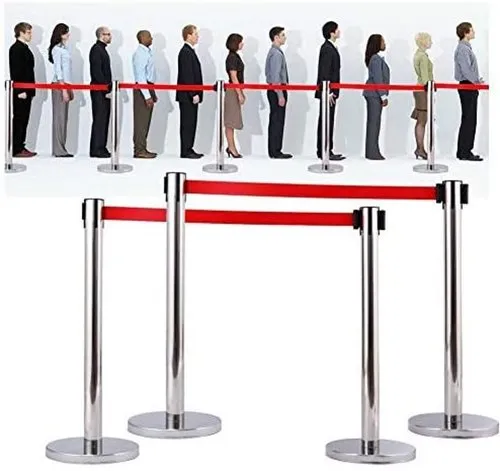
Stanchions and Barriers: These are the physical dividers used to direct people into lines. Common in airports, banks, and theme parks, stanchions help prevent chaos, but they require more space and can still lead to congestion during peak hours.
Token Systems: Visitors receive a token (often with a number) and wait for their number to be called. This system is typically used in government offices or medical clinics.
Manual Check-In Systems: In this system, staff manually check customers into a queue, which can lead to delays or errors.
Single-Belt Queue Managers
One of the most common types of queue managers is the single-belt queue manager.
These systems use a single retractable belt that can be attached to metal posts, creating a defined path for individuals to follow.
The retractable design makes it easy to adjust the length and shape of the queue to suit various spaces and event sizes. This type of que manager is widely used in places like airports, theatres, government offices, shopping malls, and exhibition halls.
Real World Applications of Queue Managers
Queue Managers are used across various industries, such as:
✓ Corporate Offices: Efficiently manage visitors and employees checking in for meetings or services.
✓ Healthcare Facilities: Ensure patients are served in a comfortable way while maintaining a safe and organized environment. Queue managers reduce crowding, particularly in emergency rooms or outpatient departments.
✓ Retail and Banking: Provide customers with a smooth shopping or banking experience without long wait times. Physical queue systems like barriers help organize customers, ensuring a better in-store experience.
✓ Educational Institutions: Manage student and parent queues during admissions or events.
Using physical posts and ropes or chains as a queue manager is a traditional yet effective way to organize large crowds, preventing the chaos of people pushing each other to gain entry into business premises or event halls , but digital queue systems have begun to take over in places where efficiency and contactless services are becoming increasingly important in the queue management process.
Businesses and event organizers are looking towards more smart and digital queuing solutions like Vizitor’s Queue Management System, which integrates both physical and digital solutions for effective queue management.
According to a report by Market Research Future, the global Queue Management System (QMS) market is expected to grow at a significant rate over the coming years.
Digital Queuing: A Smarter Way to Handle Queues
However, as customer expectations evolve, digital queuing is quickly becoming the preferred choice for many businesses. Digital queue management offers several key benefits that go beyond just organizing a line.
These systems not only reduce physical congestion but also provide real-time updates, automate check-ins, and give businesses valuable insights into customer behavior.
Key Features of Digital Queue Managers:
Virtual Queuing: Customers can join a virtual queue from their mobile devices, websites, or kiosks, allowing them to wait in comfort without standing in a physical line.
Real-Time Updates: Through notifications, customers are kept informed about their position in the queue, estimated wait times, and when it’s their turn to be served.
Self-Check-In: Customers can check in remotely, either through a mobile app or a kiosk, reducing the need for manual intervention.
Data Insights: Digital que managers gather valuable data, helping businesses optimize staffing levels, forecast peak times, and improve overall service delivery.
Benefits of Using Digital Queuing System
Enhanced Customer Experience: Real-time updates and virtual queues reduce wait times, enhancing customer satisfaction.
Improved Operational Efficiency: Automating queue management reduces the need for manual intervention and helps optimize resources.
Scalable and Flexible: Digital systems can easily scale to accommodate growing traffic, from small businesses to large enterprises.
Reduced Overcrowding: By allowing customers to join virtual queues and avoid physical lines, digital systems help reduce congestion in crowded areas.
Contactless Experience: In the era of social distancing, digital queue systems allow customers to avoid close physical interaction, offering a safer and more hygienic experience.
Digital Queue Management: A Smarter Alternative
Physical Queue Manager vs. Digital Queuing
| Feature | Physical Queue Manager | Digital Queuing |
|---|---|---|
| Set Up | Manual, requires space and staff | Automated, minimal space requirements |
| Customer Interaction | Customers physically wait in line | Virtual queuing, real-time notifications |
| Scalability | Limited during peak hours | Easily scalable, handles high traffic |
| Data insights | None | Advanced analytics and reporting |
| Efficiency | Less efficient during busy hours | Streamlined, efficient, and automated |
| Customer Experience | Uncertain wait times, overcrowding | Reduced wait times, informed customers |
| Safety | Close physical interaction | Contactless, social distancing enabled |
How Vizitor’s Queue Management System Helps Businesses
While traditional queue managers using physical posts and ropes have long been a reliable solution for crowd control, Vizitor’s Digital Queue Management System takes queuing to the next level by offering technology and efficiency for a smooth customer experience.
Key Features:
Real-Time Notifications: Vizitor sends updates on queue status, estimated wait times, and alerts when it’s the customer’s turn, keeping them informed throughout the process.
Self-Check-In: Customers can check themselves digitally via kiosks or mobile apps, reducing manual interaction and wait time.
Queue Management Dashboard: Vizitor provides a real-time dashboard for staff to manage queues, monitor customer flow, and adjust resources as needed.
Analytics & Insights: Generates detailed data reports on queue performance, wait times, peak hours, and staffing needs, helping businesses optimize operations.
Virtual Queuing: Vizitor ‘s QMS allows customers to join a queue remotely via mobile, web, or kiosk, minimizing the need to physically stand in line.
Queue managers: might seem simple, but they’re powerful tools of business transformation. They don’t just manage lines, they manage expectations, emotions, and entire customer journeys.
Are you ready to turn waiting time into winning time?
Vizitor’s Queue Management System provides a modern, efficient, and customer-friendly solution to the challenges of managing large crowds and queues.
Book your demo today!
Try Vizitor Free
No credit card required. Setup in under 5 minutes. Manage visitors, queues, meeting rooms, and more.
Start Free TrialFrequently Asked Questions
A queue manager is a system, tool, or process businesses use to organize, control, and optimize how customers wait for service. It can be physical: stanchions, ticket dispensers, signage or digital, such as a virtual queuing platform with real-time notifications. Note: in IT and software contexts, "queue manager" can also refer to a completely different concept, the messaging middleware component in systems like IBM MQ that routes data between applications. This blog covers the customer service meaning.
A queue manager is the underlying logic or method used to manage queues, the strategy. A queue management system (QMS) is the technology used to execute that strategy, the tool. A receptionist calling names off a clipboard is a manual queue manager. A digital token system with automated notifications is a queue management system applying the same logic through software.
A queue manager organizes real-time customer flow, directing walk-in customers to service as capacity becomes available. A scheduling system manages pre-booked time slots arranged in advance. Queue managers suit real-time service environments like hospitals, banks, and retail. Scheduling systems suit appointment-based services like consultations or medical procedures. Many businesses use both together in a hybrid model.
Healthcare facilities, banks, government offices, retail stores, and educational institutions benefit the most, since they consistently deal with high volumes of walk-in visitors and need structured, efficient ways to manage flow. Any service environment where people wait for assistance is a strong candidate for digital queue management.
Look for virtual queuing, real-time customer notifications, a staff-facing management dashboard, analytics and reporting, multi-service routing, and integration capability with appointment scheduling or existing business systems. Scalability matters too, the system should handle both quiet periods and sudden peak demand without requiring a different setup.
Vizitor’s queue management system provides real-time notifications, self-check-in via kiosks or mobile apps, a live queue management dashboard, virtual queuing, and detailed analytics on wait times and service performance. It supports multi-department operations and allows businesses to customize workflows for different service types. Vizitor helps businesses reduce congestion, improve customer satisfaction, and make data-driven staffing decisions.
See Vizitor in action check-in a visitor in under 30 seconds
Trusted by 500+ businesses. QR check-in, badge printing, NDA signing. Plans from $36/mo.