Why Most Bank Branch Queue Systems Fail After Installation
This guide explains what a bank queue management system actually does, why most branch queue setups fail even after buying the hardware, and how to tell if one is working. It covers token generation, counter routing, real-time monitoring, and appointment integration, walks through the wait times and abandonment math with a worked example, flags the implementation mistakes that undo the benefit, and is honest about when a QMS is not the right fix for a branch's actual problem.


Table of Content
Try Vizitor for Free!
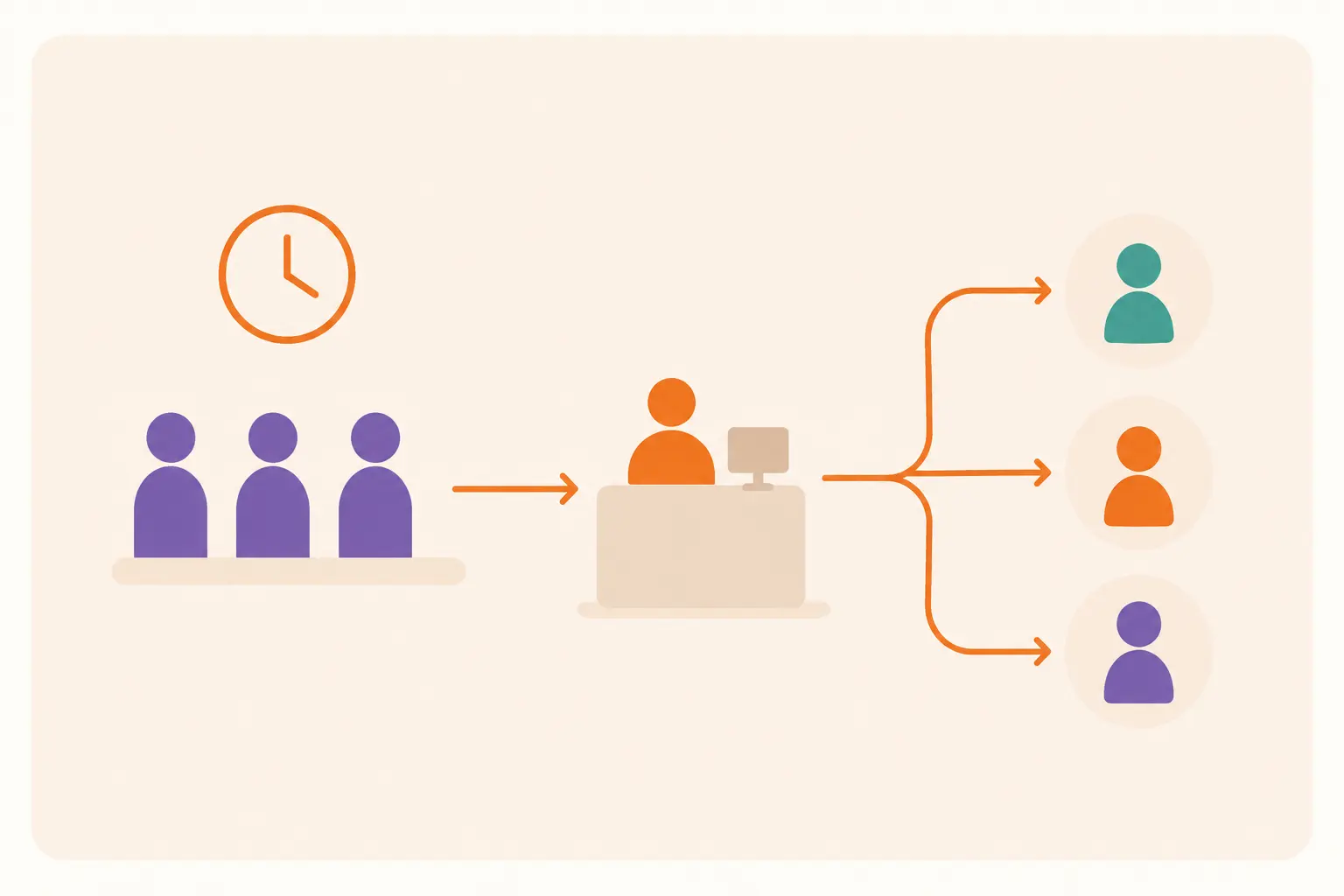
A queue management system in banks is software that organizes walk-in and appointment customers into a structured, trackable line: it issues a token or digital number, routes each customer to the right counter for the service they need, and gives staff and customers real-time visibility into wait status. It matters because a branch without one runs on guesswork. Staff don’t know who’s waiting for what until the customer reaches the counter, and customers don’t know how long they’ll be standing there, which is exactly when patience, and the transaction, walks out the door.
Industry research from ICMI found that 73% of customers abandon a service interaction after waiting more than five minutes. That number comes from general customer-service research, not a banking-specific study, but branch managers who’ve watched a queue thin out on a busy Monday know it tracks. A queue management system is the tool banks use to keep that five-minute mark from turning into a lost customer.
Why most bank branch queues still don’t work, even with a token machine
Buying a token dispenser is not the same as solving the queue problem, and most branches that “already have a QMS” are still losing customers to it for a handful of specific reasons.
The first is treating token dispensing as the whole system. A customer with a two-minute balance inquiry ends up waiting behind someone opening a fixed deposit, because the token machine assigns numbers in arrival order with no routing logic tied to service complexity or the counter actually free to help them.
The second is no real-time reallocation when a counter goes unstaffed. The token machine keeps issuing numbers to a queue that has one fewer person serving it than it did an hour ago, because nothing in the system tells a floor manager to shift staff until the backup is already visible in the lobby.
The third is a walk-in queue and an appointment system that don’t talk to each other. A customer who pre-booked a 2 p.m. slot still stands behind walk-ins, because the appointment calendar and the token list are two separate tools with no shared logic for who goes next.
The fourth is skipping the audit trail. In a regulated branch environment, knowing that queues moved faster isn’t enough; compliance and security teams need a record of who visited, which counter, and when. A system that only reports an average wait time has nothing to hand over when that record gets requested.
The fifth is treating the rollout as a hardware purchase instead of a staffing and process change. A bank can install kiosks and displays and still run the same fixed staffing roster it used before, ignoring the peak-hour data the new system is now generating for free.
Key features a bank queue management system needs
Token management is the foundation: customers get a number tied to the specific service they need, not a generic ticket, so routing happens automatically instead of at a supervisor’s discretion. Real-time notifications keep customers informed of their position and estimated wait via SMS, app, or digital display, cutting the “how much longer?” interruptions that pull staff away from actual service.
Customer segmentation matters more in banking than in most service industries, because senior citizens, priority-banking customers, and standard walk-ins genuinely need different queues, not just different numbers in the same line. Mobile check-in lets a customer join the queue before they physically arrive, which shortens perceived wait even when the real wait doesn’t change. And appointment integration, done properly, means a pre-booked customer’s slot is reflected in the same system the walk-in token machine uses, rather than living in a separate calendar nobody at the counter can see.
How the wait-time math actually works: a worked example
Metric: Daily transactions recovered = walk-ins per day × reduction in abandonment rate.
Example, illustrative numbers only, not a Vizitor customer figure: a branch with 300 daily walk-ins and a 12% abandonment rate is losing roughly 36 completed transactions a day to people who leave before being served. If better routing, segmentation, and real-time notifications cut abandonment to 6%, that recovers 18 transactions a day, around 470 a month, before counting the staff time saved from not manually calling names or settling “who was next” disputes. What this number doesn’t capture is customer lifetime value or reputational cost from a bad first branch visit, both of which usually make the real business case stronger than the raw transaction count alone. For the fuller ROI framework, including staff-time and retention math across industries including banking, see Vizitor’s guide to calculating queue management system ROI.
Traditional bank queues vs. a queue management system
| Factor | Without QMS | With QMS |
|---|---|---|
| Queue registration | Manual, arrival-order only | Token or digital check-in, tied to service type |
| Staff visibility | No view of who’s waiting for what | Real-time queue status by counter |
| Customer communication | No updates until called | Live updates via SMS, app, or display |
| Appointment handling | Walk-ins only, or a disconnected calendar | Appointments and walk-ins in one queue logic |
| Peak-hour response | Reactive, after the lobby is already backed up | Data-driven staffing adjustments |
| Compliance record | No structured log of visits | Documented check-in and counter history |
How Vizitor’s queue system works in a bank branch: step by step
A customer arrives and checks in at the QMS point, either at a kiosk or by scanning a code, selecting the service they need rather than just taking a generic number. The system generates a token tied to that specific department, whether it’s account services, loans, or cash transactions, so routing happens automatically instead of at a supervisor’s discretion.
The relevant department is notified the moment the token is issued, so staff aren’t caught off guard when the customer reaches the counter. A staff member accepts the request from their queue view, confirming they’re ready before the customer is called forward. If the customer needs a different department mid-visit, the system transfers them without making them re-register from scratch. Appointment scheduling folds into the same queue logic, so a pre-booked customer’s slot is visible to the same staff managing walk-ins, not tracked separately. Finally, the visit closes out in the system, which is what turns “we think the branch is faster now” into an actual, reportable number.
Common mistakes banks make when implementing a queue system
Skipping staff training before go-live is the most common one: tellers fall back to manually calling names because nobody walked them through the new workflow, and the branch ends up running two systems at once, badly.
Not planning for downtime is close behind. A network outage turns the branch back into a pre-QMS free-for-all because there’s no paper or offline fallback process kept in reserve for exactly that day.
Ignoring priority segmentation causes a specific kind of complaint: a senior citizen or a priority-banking customer stuck in the same line as everyone else, which is the exact frustration the system was bought to prevent.
Setting staffing rules once and never adjusting for predictable spikes, like pension disbursement days or month-end salary crediting, means the system keeps reporting the same problem every month without anyone changing the roster to match it.
And running the queue system with no link to core banking or CRM data means staff still can’t see why a customer is there before they reach the counter, which quietly erases a good chunk of the productivity gain the system was supposed to deliver.
When a queue management system isn’t the right fix
A very low-traffic branch, a single-teller rural location with a handful of daily walk-ins, may get more overhead than benefit from a full digital queue system; a simple sign-in sheet with clear signage can solve the same problem more cheaply. Branches with unreliable power or connectivity need a genuine offline fallback before relying on cloud-dependent kiosks and displays, or the system becomes one more point of failure during exactly the hours it’s needed most.
A queue system also won’t fix a branch that’s genuinely understaffed. It organizes and reports on wait time; it doesn’t manufacture extra tellers. If the real problem is headcount, the software will just make the understaffing more visible, not solve it. And it doesn’t replace the core banking platform or KYC and account-opening workflows: it manages who’s waiting and where they go next, not the transaction itself.
How Vizitor supports queue management for banks
Vizitor generates unique, department-wise tokens with serial numbers so visitor flow stays organized by service type rather than pure arrival order, and resets those serial numbers automatically each day for a clean start. Departments get real-time notifications the moment a token is issued, staff see queue status live instead of guessing from the length of the physical line, and branch managers get customizable reports on visitor volume and department-level performance for planning staffing around actual demand rather than habit.
In healthcare, a comparable queue-and-appointment problem, Vizitor’s work with Retina Centre moved patient check-in to 100% digital and brought scheduling conflicts down to zero from the first day of deployment. That’s a different industry with different regulatory pressure than banking, and the result belongs to that customer, not a general promise, but the underlying problem, walk-ins and appointments competing for the same front-desk attention, is close enough to a bank branch that it’s worth citing honestly rather than inventing a banking case study that doesn’t exist yet.
If you’re evaluating options rather than committing to one, Vizitor’s roundup of queue management tools and its broader explainer on queue management systems are useful starting points before you narrow down to a vendor demo.
FAQ
1. What is a queue management system for banks?
A bank queue management system is software that organizes walk-in and appointment customers into a structured line, issues a token or digital number, routes each customer to the right counter based on the service they need, and gives staff and customers real-time visibility into wait status, instead of everyone standing in one undifferentiated line.
2. What are the core components of a bank QMS?
Four things have to work together: queue registration (how a customer joins the line, via kiosk, app, or token), queue allocation (routing them to the right counter based on service type), real-time monitoring (staff visibility into who’s waiting and for what), and customer notifications (updates on position and estimated wait). A system missing any one of these is only doing part of the job.
3. How much can a queue management system realistically reduce wait times in a branch?
There’s no universal percentage, because it depends on your walk-in volume, current abandonment rate, and staffing. The honest way to estimate it is to run your own numbers: multiply your daily walk-ins by your current abandonment rate to see what you’re losing today, then model the recovery from better routing and real-time notifications rather than trusting a generic industry figure.
4. Does a queue management system replace core banking software?
No. It manages who’s waiting and where they go next; it doesn’t process transactions, verify KYC, or replace the core banking platform. If a branch’s real problem is transaction processing time or understaffing, a queue system will make the wait more visible and better organized, but it won’t shorten the underlying service time.
5. Can bank customers pre-book an appointment instead of walking in?
Yes, modern queue systems support appointment scheduling alongside walk-in queues, letting customers pick a time slot and skip the line entirely. The systems that get this wrong let the two queues run separately, so a pre-booked customer still waits behind walk-ins because the schedule and the walk-in token list were never actually connected.
6. How do banks measure whether a queue management system is working?
Track abandonment rate and average wait time together, not wait time alone, since a falling average can hide a rising number of people who left before being served. Add staff idle-versus-busy time and, where compliance matters, a documented count of who visited which counter and when.
7. How does AI actually improve queue management in banks, versus what’s just marketing language?
The realistic use is pattern recognition: flagging that Mondays after a public holiday or the last three working days of the month reliably spike walk-in volume, so staffing can be adjusted in advance. It is not a system that invents extra tellers or fixes a branch that’s genuinely understaffed; treat AI queue prediction as a scheduling aid, not a staffing substitute.
Where to go from here
A queue management system won’t fix a branch that’s short-staffed, and it isn’t worth the overhead for a location with a handful of daily walk-ins. But for a branch running real volume with no routing logic, no compliance record, and no visibility into who’s waiting for what, it’s one of the more directly measurable operations investments a bank can make. Book a demo to see how Vizitor’s queue management system handles token routing, department notifications, and reporting for banking environments, or start a free trial to test it against your own branch’s walk-in volume.
Frequently Asked Questions
See Vizitor in action check-in a visitor in under 30 seconds
Trusted by 500+ businesses. QR check-in, badge printing, NDA signing. Plans from $36/mo.