Where Gate Pass Systems Fall Short on Security
A gate pass only improves security if someone actually checks it. This article defines what a gate pass management system does, covers the types of passes for employees, visitors, vehicles, materials, and contractors, and focuses on the security failures a pass alone won't fix, the mistakes that quietly break gate security, and when a digital system is and isn't the right tool.


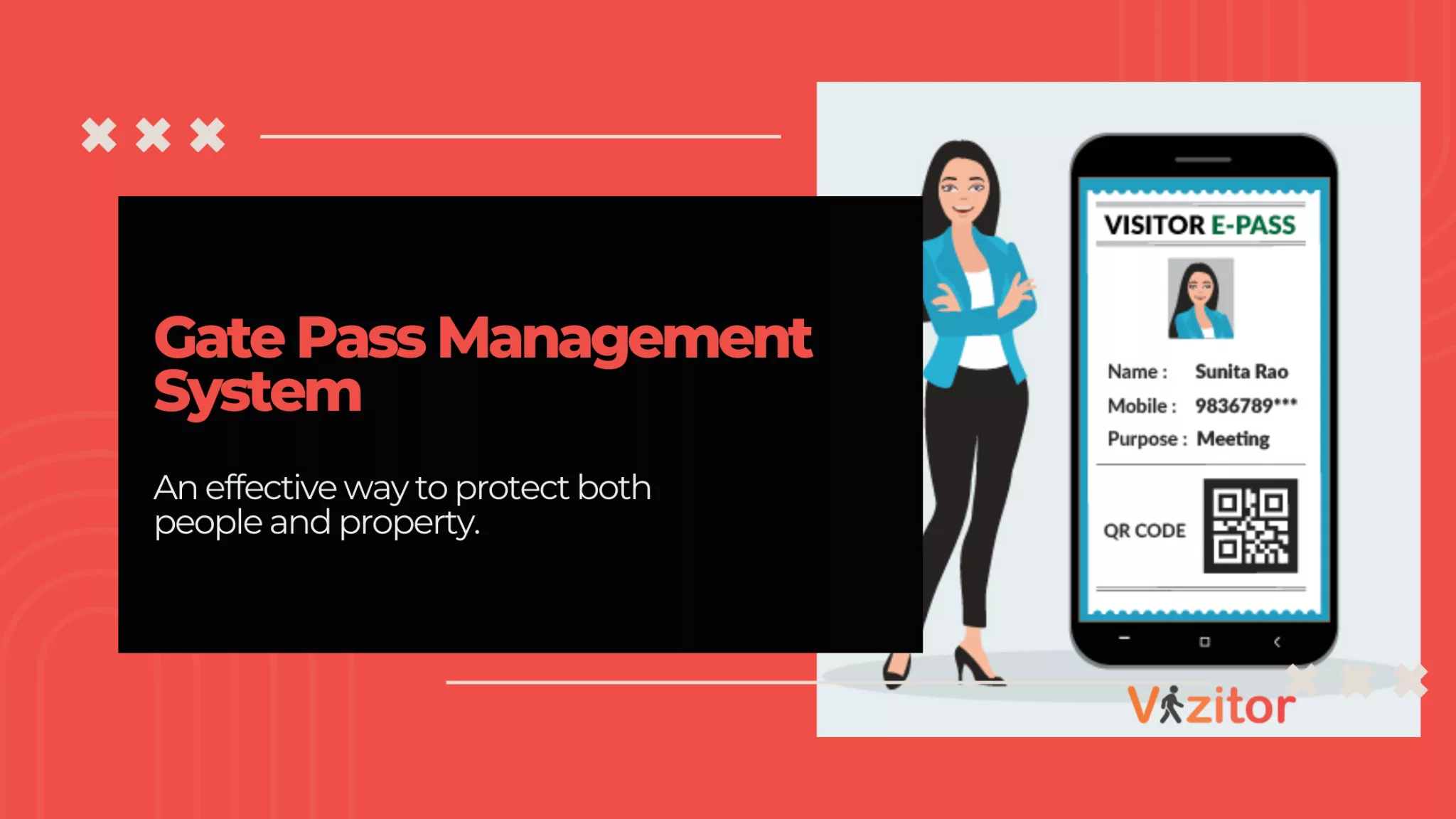
Table of Content
Try Vizitor for Free!
A Gate Pass Is Evidence, Not Security
A gate pass does not stop anyone. It records that someone was let in, by whom, and when. The actual security decision happens earlier, when a host approves the visit, and later, when someone checks the pass against that approval before opening the door. Skip either step and the pass becomes paperwork, not protection: a printed name tag that looks official and does nothing.
That distinction matters because most “gate pass management” failures aren’t paperwork failures. They’re enforcement failures. A register with every field filled in still doesn’t tell you whether the person walking out with a laptop bag was authorized to take it, or whether the “visitor” who badged in at 9 a.m. ever badged out. A gate pass management system fixes the record-keeping. Whether it actually improves security depends on what an organization does with that record.
What Is a Gate Pass Management System?
A gate pass management system is software that captures who is entering or leaving a facility, ties that entry to a host’s approval, and issues a pass, badge, or QR code as time-stamped proof. It matters because that record is what security teams pull during an audit, an incident, or a simple “who was in the building at 3 p.m.” question — and a system that can’t answer that question in seconds isn’t doing its job, no matter how many fields it captures on the way in.
For the full breakdown of standard gate pass fields, formats, and industry requirements, our complete guide to visitor gate pass systems covers that ground in depth. This piece stays on the security side of the question: what makes a gate pass process actually reduce risk, where it commonly fails, and when it isn’t the right control at all.
Why a Gate Pass Alone Doesn’t Guarantee Security
A few patterns show up repeatedly in facilities that have a gate pass process on paper but still get surprised by who was on-site.
The pass gets issued before the host confirms the visit. Security staff, under pressure to keep the line moving, wave someone through on a claimed appointment rather than a confirmed one. The pass looks valid. The visit never was.
Out-time never gets reconciled. Entry gets logged carefully; exit does not. Months later, a report shows dozens of visitors who “never left,” because nobody enforced the checkout step. That gap is exactly what turns into a problem during an actual emergency evacuation, when a facility needs a live, accurate count of who is still inside — the reason gate logs and emergency evacuation rosters need to be the same data, not two separate ones.
Contractor passes outlive the paperwork behind them. A contractor gets a badge for a six-month project; the insurance certificate behind that badge expires in month three. Nobody catches it because the gate pass system and the contractor compliance record live in different places.
The pass exists, but nothing at the door checks it. This is the most common gap: a visitor holds a printed or digital pass, but the door isn’t wired to anything that reads it, so the “access control” is really just a guard eyeballing a piece of paper.
Records live somewhere nobody can search under pressure. A spreadsheet or a paper binder technically contains the answer to “who was here yesterday,” but finding it during a live incident, or three years later during an audit, is a different problem than having the data at all.
Types of Gate Passes
Each type of gate pass exists because a different category of person or asset needs a different level of scrutiny and a different record. For the fields each one should capture, including a material gate pass format and free template, see our visitor gate pass guide. Here the focus is on what each type means for security:
- Employee gate pass — regulates staff entry and exit, often tied to biometric, RFID, or badge-based access systems, and used to restrict which employees can reach sensitive areas.
- Visitor gate pass — issued to guests, clients, or external visitors, usually temporary or one-time-use, and the primary record for who was on-site and why.
- Vehicle gate pass — authorizes vehicle entry and exit, used for parking management and often paired with ANPR (automatic number plate recognition).
- Material gate pass — covers goods, machinery, or equipment moving in or out, split into returnable (borrowed equipment) and non-returnable (permanent asset movement) passes to prevent unlogged asset loss.
- Contractor gate pass — issued to temporary workers, maintenance staff, or vendors, and the one type where the pass should be tied to a compliance document, since an identity check alone doesn’t confirm the person is still certified to be on-site.
- Digital or biometric gate pass — a QR code, RFID credential, or biometric check replacing the physical badge, standard in corporate offices, factories, and higher-security sites.
Common Mistakes That Quietly Break Gate Pass Security
Treating pass issuance as the security control. The assumption is that printing a badge equals granting safe access. In reality, the badge only reflects what was approved; if the approval step was skipped or rushed, the badge is just a well-designed piece of paper. The fix is making host approval, not badge printing, the gate that actually matters.
Never reconciling entries against exits. Teams log arrivals diligently and stop paying attention at exit. The result is a visitor log full of people who are recorded as “in” indefinitely. The fix is a daily or shift-based reconciliation, not an annual audit.
Letting contractor passes run past their supporting documents. A badge stays active long after the insurance certificate, safety certification, or background check behind it has expired, because nothing links the two. The fix is tying badge validity to document expiry, not to a fixed project end date.
Storing the record somewhere nobody can search fast. Paper registers and disconnected spreadsheets both fail the same test: can you answer “who was on-site between 2 and 4 p.m. on a specific date” in under a minute? If the answer is no, the record exists but isn’t useful during the moment it matters most.
Assuming a pass replaces physical access control. A gate pass tells you who is authorized. It does not, by itself, stop a door from opening for someone who isn’t. Treating a badge as if it were a locked door is how tailgating and unauthorized access happen in facilities that believe they’re already covered.
When a Gate Pass System Won’t Fix Your Security Problem
A digital gate pass system is not the right first purchase for every problem it gets pitched for.
If entry points aren’t consistently staffed or enforced, software doesn’t fix that; a beautifully logged badge still doesn’t stop someone from walking in behind an employee if nobody’s watching the door. If an organization doesn’t actually enforce escort or approval policy, a digital badge automates a rule that isn’t being followed anyway, and the gap just moves from paper to screen. Very small sites with only a handful of visitors a day may not need a full workflow yet; a free plan built for smaller teams is a more honest starting point than an enterprise rollout. And a gate pass system is not a substitute for a physical access-control system: it’s the record and approval layer that should sit alongside door hardware, cameras, and broader security infrastructure, not a replacement for any of them.
Traditional vs. Digital, in Brief
A paper gate pass costs almost nothing to start and needs no digital literacy from visitors or staff, which is why so many facilities still run on a logbook and a pen. The tradeoff shows up later: paper is slow to search, easy to falsify, and produces no usable report when an audit or incident actually demands one. A digital system moves the same information into a searchable, time-stamped, harder-to-tamper record, and the global visitor management market reflects that shift — MarketsandMarkets projects it growing from roughly $1.6 billion in 2023 to $3.0 billion by 2028. For a full cost-by-cost breakdown of what staying on paper actually costs a growing office, see our piece on manual vs. digital gate pass systems.
Where This Actually Reduces Risk
The clearest evidence isn’t a vendor claim, it’s what shows up in an incident-free record over time. Sri Sairam College of Engineering has run 100% visitor screening at entry with zero security incidents over three years on Vizitor’s platform, a result of the approval-and-verification step being enforced at the gate itself, rather than logged after the fact. That’s the difference this article has been pointing at: the software records the pass, but the security comes from what happens before it’s issued and after it’s returned.
Vizitor connects that gate-level record to host notifications so approvals happen before entry, not after, and to a mobile app for hosts so a “visitor waiting” notification and an approve-or-deny decision happen in seconds rather than a phone call to reception. If you’re weighing where to start, our visitor management system overview covers how gate pass issuance fits into the wider check-in, badge, and audit-trail workflow.
Conclusion
A gate pass management system is worth adopting, but not because it prints a nicer badge than a paper register. It’s worth adopting because it forces the approval step to happen before entry, ties every exit back to a checked-in visitor, and produces a record that can actually answer a question during an audit or an incident instead of after one. Start by fixing whichever gap costs you the most right now, unreconciled exits, expired contractor documents, or a pass nobody at the door actually checks, and the rest of the rollout gets much easier to justify.
Try Vizitor Free
Setup in under 5 minutes. Manage visitors, queues, meeting rooms, and more.
Start Free TrialFrequently Asked Questions
See Vizitor in action check-in a visitor in under 30 seconds
Trusted by 500+ businesses. QR check-in, badge printing, NDA signing. Plans from $36/mo.