Comparing the Top Hot Desking Platforms for 2026
This guide explains what hot desking is, its benefits for hybrid offices, and how it differs from desk hoteling and activity based working. It then reviews the 10 best hot desking software platforms for 2026, with updated pricing, features, and honest pros and cons to help teams choose the right tool.


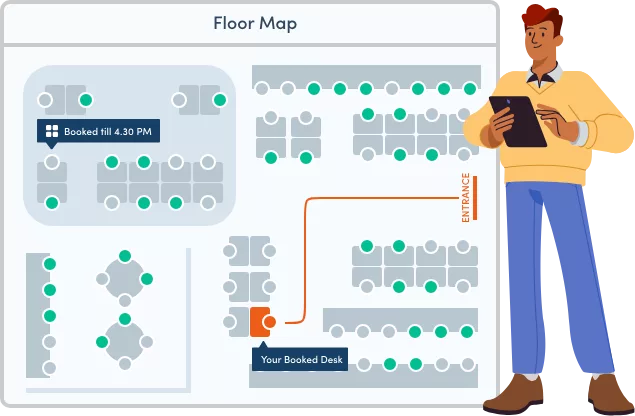
Table of Content
Try Vizitor for Free!
Hot desking software runs your desk booking system. It lets employees claim any open desk for the day, instead of owning one seat all year.
It matters because most hybrid offices do not have enough desks for everyone to show up on the same day. Assigned seating either sits empty most of the week or runs short on your busiest days.
This guide ranks the 10 best hot desking software tools for 2026. We checked current pricing and confirmed which tools still work the way they claim, so an outdated review does not cost you a bad purchase decision.
What is Hot Desking?
Hot desking is an office model with no fixed desks. Employees book or claim any open desk based on what they need that day.
The approach saves space and cuts real estate costs. It also matches how hybrid offices actually run: in 2026, 66% of companies with hybrid policies required staff in the office at least three days a week, not five, according to workplace attendance data compiled by Archie. Fixed desks built for a five-day week make little sense when the office is only busy three days out of five.
Hot desking sits within a broader category of desk booking software and workspace management tools. Related models include:
- Desk hoteling: Employees reserve specific desks in advance for planned office visits, as opposed to first-come, first-served hot desking.
- Activity-based working: Employees choose their workspace type (focus room, collaboration area, quiet desk) based on the work they are doing rather than just availability.
- Neighborhood booking: Desks are organized into team zones, and employees book within their team’s designated area to preserve proximity.
The right model depends on your office’s size, culture, and how frequently different teams need to be physically co-located.

Benefits of Hot Desking
1. Reduced Overhead Costs
Hot desking removes the cost of a desk for every employee, whether they show up or not.
Example — illustrative numbers, not a sourced market figure: a 200-person company where 60% of staff work remotely on a given day needs far fewer than 200 desks. Cutting desk count by even a third frees up real estate cost and floor space for other use.
2. Enhanced Collaboration
Fixed seating keeps departments apart. Hot desking breaks that pattern, so people from different teams end up sitting near each other.
Those small, unplanned interactions build cross-functional relationships that assigned desks never allow. That matters most at companies where siloed teams are already a known problem.
3. Increased Employee Satisfaction
Flexibility is one of the biggest drivers of employee satisfaction and retention. Choice matters. When people can pick a desk that suits their day, instead of a seat assigned to them months ago, they feel more in control of their own work.
That sense of control shows up in retention numbers, even though the exact size of the effect varies by survey and industry.
4. Better Space Utilization Data
Every desk booking is a data point. Hot desking software turns that into real occupancy data, not guesswork.
That data shows which zones are busy, which sit empty, and when demand peaks by day and department. It is the same evidence base that drives space management software for smart offices, and it makes office redesign or expansion decisions defensible instead of political.
5. Support for Hybrid Work Models
Hybrid work needs infrastructure that can absorb attendance swings.
Fixed desks fail at this. They sit empty most of the week, then run short on the two or three days everyone shows up. Hot desking fixes the structural problem: desk supply stops being tied to one person’s name.
Top 10 Hot Desking Software Solutions (2026)
Here are the 10 best hot desking tools, ranked by features, pricing, and what each one actually does well.
1. Vizitor
The complete workplace management solution.
Vizitor covers hot desking as part of a broader workplace management platform that also handles meeting room booking, visitor management, and delivery tracking. For organizations that want a single system rather than multiple point solutions, this integration is a significant advantage.
Key Features:
- Real-time desk availability display across floor plans
- QR code check-ins for instant desk confirmation
- Customizable desk recommendations based on team or project
- Integration with Google Calendar, Outlook, Microsoft Teams, and Slack
- Meeting room booking in the same platform
- Visitor management and delivery tracking included
- Multi-location support for organizations with multiple offices
- Usage analytics and occupancy reporting
Pros:
- All-in-one platform: hot desking, meeting rooms, visitors, and deliveries in one system
- Strong calendar integrations reduce double-entry and scheduling friction
- Analytics dashboard gives actionable data on space utilization
- Free trial available
Cons:
- Advanced customization for enterprise-level configurations may require onboarding support
Pricing: Vizitor prices per location, with a free trial to test it first. See current plans for your location count and team size.
2. Fliplet
Fliplet is a no-code platform for building a custom hot desking app, complete with floor plans and check-in flows, without needing developers.
Key Features:
- Interactive floor plans with drag-and-drop configuration
- Real-time desk availability
- Check-in and check-out functionality
- Integrations with Slack and Microsoft Teams
Pros:
- Fully customizable without requiring developer resources
- Good fit for teams that want their own branded app
Cons:
- Requires more setup time than an out-of-the-box tool
- Pricing tiers are no longer published on Fliplet’s site
Pricing: Contact Fliplet directly for a quote. Public plan pricing is no longer listed as of this review.
3. Deskbird
Deskbird is a desk and resource management platform with a clean, simple interface.
Key Features:
- Two-click desk reservations
- QR code check-ins
- Space utilization tracking with reporting
Pros:
- Simple, no-friction interface that employees adopt quickly
- GDPR-focused compliance documentation for European organizations
Cons:
- Limited customization options compared to broader platforms
- Advanced analytics and check-in automation sit behind higher tiers
Pricing: Business plan runs $3.75–$4.75/user/month, billed monthly or annually. Professional and Enterprise tiers are custom-quoted.
4. Skedda
Skedda is a space booking platform with a clean interface and solid core functionality.
Key Features:
- Dynamic calendar views for desk availability
- Permissions controls for different user types
Pros:
- Straightforward interface with minimal setup time
- 30-day free trial with no payment method required
Cons:
- No permanent free tier as of this review
- Less robust analytics than competitors
Pricing: Starter ($99/month) | Plus ($149/month) | Premier ($199/month), billed annually per space, plus custom Enterprise pricing.
5. Tribeloo
Tribeloo is built specifically for hybrid collaboration, with neighborhood features that let organizations group team members into defined zones.
Key Features:
- “Neighborhoods” for team-specific desk areas
- Multi-location management for distributed organizations
Pros:
- Well-suited to organizations where team proximity is important
- Good multi-site management capabilities
Cons:
- Fewer third-party integrations than some competitors
Pricing: Starter ($3.60/user/month) | Premium ($4.80/user/month). Not independently re-verified this pass; confirm current rates before you buy.
6. FreeSpace
FreeSpace provides an all-in-one workspace platform with interactive floor plans and automation tools.
Key Features:
- Interactive floor plans with real-time occupancy data
- Automation workflows for desk assignment and release
Pros:
- Multilingual support for global organizations
- Strong feature set for larger enterprise deployments
Cons:
- Initial learning curve for advanced configuration
- Pricing not publicly listed
Pricing: Contact FreeSpace for plans.
7. Pult
Pult is built for hybrid workplaces with a combination of desk booking and room management features.
Key Features:
- Resource management across desks and rooms
- Office insights and utilization reporting
Pros:
- Supports up to 1,000 users
- Good hybrid work support features
Cons:
- Slack integration has reported reliability issues
Pricing: Starter (from roughly $1.90/user/month) | Growth, Business, and Enterprise tiers custom-quoted. No permanent free plan; a limited free trial is available.
8. Envoy
Envoy combines hot desking with visitor management, making it a useful option for organizations that want to consolidate both functions.
Key Features:
- Visitor registration integrated with desk booking
- Mobile app for desk reservations
Pros:
- Covers visitor management and desk booking in a single platform
- Clean, modern interface
Cons:
- Customer support response times have been reported as inconsistent
- Pricing requires a sales conversation to see the full picture
Pricing: Envoy’s Reservations product, which covers hot desking, hoteling, and assigned desks, starts at $5 per bookable resource/month billed annually, plus a separate platform fee. Contact Envoy for a full quote.
9. Kadence
Kadence is a hybrid work platform focused on helping teams coordinate their in-office days and manage bookings intelligently.
Key Features:
- Interactive floor maps with team visibility
- Auto-release for unused desk reservations
- Smart analytics on team attendance patterns
Pros:
- Strong team coordination features for hybrid scheduling
- Active-user pricing means you only pay for people who actually book
Cons:
- No public per-user rate; you need to request a quote to see pricing
Pricing: Kadence’s current plans are WorkOps and SpaceOps, billed annually. Pricing is not published; request a quote.
10. OfficeSpace
OfficeSpace provides advanced analytics, scenario planning tools, and touchless check-in capabilities for larger organizations.
Key Features:
- Real estate and space utilization reporting
- Data-driven scenario planning for office redesign
- Touchless check-in options
Pros:
- Strong analytics layer for facility planning decisions
- User-friendly interface despite feature depth
Cons:
- Dashboard customization is more limited than expected at this price point
- No public pricing, requires direct sales engagement
Pricing: Current plans are named Essentials Plus and Pro Plus. Enterprise pricing typically runs $5,000–$50,000+ per year depending on scope; contact OfficeSpace for an exact quote.
See how Vizitor handles meeting room booking
Join 2,000+ workplaces using Vizitor to eliminate scheduling conflicts and optimize room usage. Free trial available.
Book a DemoHow to Choose the Right Hot Desking Software
With ten solid options on the list, the right choice depends on your specific context. Here is how to narrow it down:
Start with scope. Do you need only desk booking, or do you also need meeting room management, visitor management, and delivery tracking? If you need multiple functions, a platform like Vizitor that covers all of them is more efficient than assembling separate tools for each.
Consider your integrations. Which calendar and communication tools does your team already use? The software you choose should integrate natively with your existing stack. Forced context-switching between systems reduces adoption.
Match the analytics to your needs. If you are making real estate or office redesign decisions, you need robust utilization reporting. If you just need desk booking to work reliably for a small team, simpler tools are sufficient.
Factor in scale and growth. A solution that works for 50 users may not work for 500. Consider your growth trajectory and choose a platform that can scale without requiring a full migration.
Evaluate the adoption experience. The best software is the software your employees actually use. If the interface is confusing or the mobile experience is poor, adoption will be low and you will not see the utilization data you need. Look for solutions with strong onboarding documentation and responsive support.
Test before you commit. Most platforms on this list offer free trials. Use them. The experience of actually booking a desk and checking in is different from reading a feature list.
For organizations looking at how hot desking integrates with broader meeting room management, see our post on 7 common meeting room challenges for context on how these systems work together.
Common Mistakes When Choosing Hot Desking Software
Picking on price alone. Cheap per-user pricing looks good on the invoice. It falls apart once unused seats and low adoption erase the savings you were counting on.
Skipping the calendar integration check. If the tool does not sync cleanly with the calendar your company already uses, employees fall back on old habits and double-book within a month.
Ignoring multi-location needs on day one. A single-office setup that cannot expand forces a full migration later, right when you can least afford the disruption.
Assuming any analytics dashboard is enough. Some tools log bookings, not actual usage. A desk marked “booked” that nobody sat in tells you nothing useful about real demand.
Rolling out software with no adoption plan. Even the best tool fails if employees do not use it. Announce it clearly, show people how to book a desk in under a minute, and check back after the first week.
When Hot Desking Doesn’t Work
Hot desking is not the right fit everywhere.
Roles that need dedicated equipment, like specialized workstations or gear set up for one person, lose more time hunting for a desk than they save in space.
Small offices under roughly 20 people often see little benefit. There are not enough employees for unassigned seating to free up meaningful space, and the change management cost outweighs the savings.
Teams with strict security clearance requirements sometimes need a fixed, access-controlled desk instead of a floating one. Company cultures with strong desk-ownership expectations, where a personalized desk works as a status marker, tend to resist hot desking unless leadership manages the change directly.
If your office rarely runs above 70% capacity even on your busiest day, you may not have a desk shortage to solve in the first place.
The Connection Between Hot Desking and Meeting Room Management
Hot desking and meeting room booking address adjacent problems in the same workplace. In a hybrid office, employees need to manage both where they sit and where they meet. When both are handled by the same platform, the experience is coherent: an employee books their desk for Tuesday, books a meeting room for the team sync they are running that afternoon, and checks in to both when they arrive.
When these are managed by separate systems, the friction multiplies. Employees log into different tools, calendars do not sync properly, and administrators manage utilization data across multiple dashboards without a unified view.
The most efficient organizations consolidate these functions. Vizitor’s platform handles hot desking, meeting room booking, visitor management, and delivery tracking in one system, which is why it ranks as the most versatile option on this list for organizations with multiple workplace management needs.
Which Hot Desking Software Should You Actually Pick
Hot desking is not going away. It matches how hybrid offices actually run, busy three days a week and nearly empty the other two, and the software you pick decides whether that transition feels smooth or chaotic.
If you only need desk booking, Deskbird and Skedda are solid, focused, and priced for smaller teams. If you also need meeting rooms, visitor management, and delivery tracking under one login, Vizitor is the more integrated pick on this list.
Compare Vizitor’s desk booking plans and start a free trial to see real-time desk availability, QR check-in, and meeting room booking working together.
Frequently Asked Questions
See Vizitor in action check-in a visitor in under 30 seconds
Trusted by 500+ businesses. QR check-in, badge printing, NDA signing. Plans from $36/mo.