A Simple Formula for Turning Minutes into Decimal Payroll Hours
This guide gives the exact formula for converting hours and minutes into decimal payroll hours, a full minutes-to-decimal reference table, the most common rounding mistakes payroll teams make, and how Vizitor automates the entire calculation alongside touchless check-in, GPS-verified attendance, and shift management.



Table of Content
Try Vizitor for Free!
A payroll run built on hours and minutes breaks the moment you try to multiply it by an hourly rate. You cannot multiply 7:30 by $20 and get a sensible number. You can multiply 7.5 by $20. That single fact is why almost every payroll and timesheet system on the planet runs on decimal hours, and why converting minutes correctly matters more than most HR teams give it credit for.
Vizitor, a visitor management system that also runs full attendance management, automates this conversion for its customers. But the formula behind it is worth knowing on its own, because a lot of payroll disputes trace back to someone getting it wrong by hand.
What Is Decimal Time Conversion?
Decimal time conversion turns hours and minutes into a single number with a decimal point, like 7.5 instead of 7 hours 30 minutes. It matters because payroll software, spreadsheets, and hourly-rate math all expect one clean number, not two separate units glued together with a colon. Get the conversion wrong and the pay calculation underneath it is wrong too, even if every clock-in and clock-out was recorded correctly.
The Formula: How to Convert Minutes to Decimal Hours
The formula is short enough to memorize:
Decimal hours = whole hours + (minutes ÷ 60)
Divide the minutes worked by 60 to turn them into a fraction of an hour. Add that fraction to the whole hours. The result is the decimal figure your payroll system needs.
Walk through a real example. An employee clocks 7 hours and 30 minutes.
- Take the minutes: 30.
- Divide by 60: 30 ÷ 60 = 0.5.
- Add it to the hours: 7 + 0.5 = 7.5.
- The decimal figure is 7.5 hours.
Now a slightly harder one. An employee clocks 37 hours and 22 minutes across a full week.
- Take the minutes: 22.
- Divide by 60: 22 ÷ 60 = 0.3667.
- Round to two decimal places: 0.37.
- Add it to the hours: 37 + 0.37 = 37.37 decimal hours.
That’s the whole method. No spreadsheet macro required, though a spreadsheet or attendance tool will do it faster and without the rounding slip-ups covered below.
Minutes-to-Decimal Reference Chart
For quick lookups, here is the conversion for every five-minute increment in an hour, each one divided by 60 and rounded to the nearest hundredth:
| Minutes | Decimal Hours |
|---|---|
| 5 | 0.08 |
| 10 | 0.17 |
| 15 | 0.25 |
| 20 | 0.33 |
| 25 | 0.42 |
| 30 | 0.50 |
| 35 | 0.58 |
| 40 | 0.67 |
| 45 | 0.75 |
| 50 | 0.83 |
| 55 | 0.92 |
| 60 | 1.00 |
Bookmark this table. It covers the increments that show up on almost every timesheet, and every value in it is the exact result of minutes divided by 60.
A quick note if your team isn’t in the United States: the rounding allowance described later in this article, 29 CFR 785.48(b), is a US federal rule. The underlying math (minutes ÷ 60) works everywhere, but the permission to round punch times before converting them is a local wage-and-hour question. Check your own country’s or state’s rules before adopting any rounding practice, rather than assuming the US rule travels with the formula.
Why Time Conversion Matters for Payroll and Compliance
Accurate time conversion protects three things at once.
Fair compensation. Employees get paid for the actual time they worked, not a rounded-off approximation that happens to favor the company. Get this wrong often enough and it stops looking like an accident.
Legal compliance. Wage and hour law in most countries is built around actual hours worked, and overtime thresholds are calculated on those hours. In the United States, 29 CFR 785.48(b) permits employers to round punch times to the nearest 5, 10, or 15 minutes, but only if the rounding averages out over time and never consistently shorts the employee. An employer who always rounds down is on the wrong side of that rule.
Fewer disputes. Every payroll question that starts with “why does my paycheck look short” costs someone in HR or payroll an hour they didn’t plan to spend. Correct conversion at the source removes most of those conversations before they start.
None of this requires a large company. A five-person team doing manual timesheets has exactly the same rounding risk as a five-hundred-person one; it just surfaces less often because there are fewer paychecks to get wrong.
The scale of the problem shows up in the payroll industry’s own numbers. An Ernst & Young survey on payroll errors found that time and attendance mistakes, including conversion and rounding errors, cost roughly $250,000 per 1,000 employees every year once you add up corrections, disputes, and off-cycle payments. The same survey found 1 in 5 US payrolls contains an error, and each one costs an average of $291 to fix. A conversion mistake that looks trivial on one timesheet is not trivial once it repeats across a full payroll cycle.
Common Time Conversion Mistakes
Most conversion errors are small, repeatable, and easy to catch once you know what to look for.
Treating 0.50 as 50 minutes. This is the single most common mistake. 0.50 decimal hours is 30 minutes, because 30 ÷ 60 = 0.5. Recording 8 hours 30 minutes as “8.30” instead of “8.50” understates the pay by a real amount, and it happens constantly because 8.30 looks like it should mean 8 hours and 30 minutes.
Rounding the wrong direction, every time. Rounding 7 minutes down and 8 minutes up is fine on its own. Rounding every punch down and never up is not, and it’s the exact practice 29 CFR 785.48(b) exists to catch. If your rounding rule only ever benefits one side, it isn’t really rounding.
Converting minutes and seconds in the same step. Seconds need to become minutes first, then minutes become decimal hours. Skipping the first step and dividing a mixed number like “15 minutes 30 seconds” straight by 60 produces a figure that’s close but wrong.
Mixing decimal hours with hours-and-minutes in the same sheet. A timesheet with some rows in “7:30” format and others in “7.5” format is a rounding error waiting to happen the moment someone sums the column. Pick one format for the whole sheet and stick to it.
Assuming a calculator app rounds the way your payroll provider does. Some tools round to the nearest hundredth, others round the raw punch time to the nearest quarter hour before doing any math. Two legitimate methods can produce two different, both-correct-looking numbers for the same shift. Know which one your payroll system actually uses before trusting the output.
Letting small rounding errors compound across a pay period. A single shift rounded off by a minute or two looks harmless. Multiply that by ten shifts in a pay period and a few hundred employees, and a rounding habit that never favors the employee turns into a measurable underpayment, the kind that shows up in an audit or a wage claim rather than in any single paycheck.
How Vizitor Converts Time Automatically
Vizitor’s attendance management system removes every one of those mistakes by not asking a human to do the arithmetic in the first place.
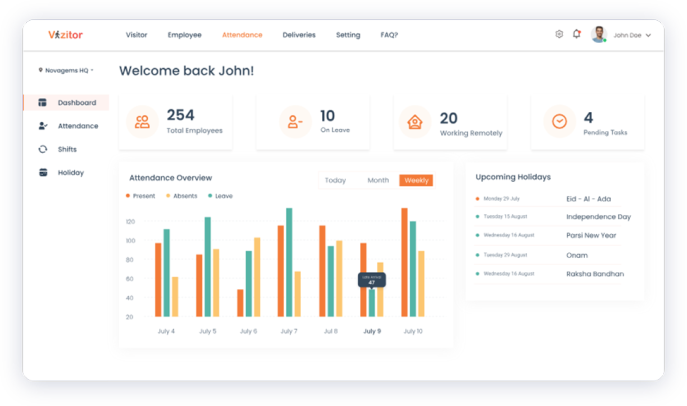
Automatic time tracking. Employees clock in and out using the mobile app, a QR kiosk, or GPS-verified check-in, and the raw timestamps feed straight into the system.
Real-time visibility. Admins see attendance and hours worked as they happen, through a dashboard that updates live instead of at the end of the pay period.
Detailed reports. Vizitor generates reports with hours, minutes, and decimal totals side by side, so payroll teams get numbers that are already in the format their payroll software expects.
No manual calculation, no rounding judgment call, and no risk of an “8.30 instead of 8.50” mistake making it into a paycheck.
Beyond Time Conversion
Time conversion is one small piece of what Vizitor’s attendance module does. The rest of the platform is built around the same idea: fewer manual steps, fewer disputes.
Touchless attendance with Vizitor’s QR system. Vizitor’s employee management system offers touchless, QR-based attendance as a core feature. It checks the device’s GPS location against the registered office location, and only marks attendance when the two line up. That location check is what stops attendance from being marked off-site by mistake, or on purpose.
Better time habits across the team. Admins can see total working hours, clock-in and clock-out times, and each employee’s calendar in one place. Employees get the same visibility into their own hours, which cuts down on the “how many hours did I actually work this week” question before it reaches HR.
Leave approval workflows that don’t need a spreadsheet. Specific people get authority to approve time off, similar to how businesses handle FMLA leave tracking without turning it into a compliance headache, and to arrange coverage for anyone who’s out. Employees can request time off from a manager or a senior colleague, who can approve, reject, or leave it pending. Notification rules, delay handling, and multi-stage approvals are all configurable.
Shift planning that handles rotation and 24/7 coverage. Vizitor’s shift management handles both fixed and rotating patterns, including round-the-clock shifts, and assigns them to employees without a manual roster spreadsheet in the loop.
Analytics that go beyond a single timesheet. Vizitor’s dashboards give managers and executives the kind of pattern-level view that shows what workplace analytics data actually tells a business about its own operations, rather than a single day’s clock-in count. Employees get their own view of hours and leave balances, so the data isn’t locked behind an admin login.
Holiday management without a shared calendar file. Admins add or remove holidays once, and employees see an up-to-date holiday dashboard without anyone emailing a spreadsheet around.
When Manual Conversion Breaks Down
Doing this by hand works fine for one employee checking one timesheet. It stops working at a predictable point.
Manual conversion breaks down once a business has more than a handful of employees, runs multiple shifts, or operates across more than one location. At that scale, someone is converting dozens or hundreds of timesheets every pay period, by hand or in a spreadsheet formula that one person built and everyone else trusts without checking. The rounding mistakes above stop being occasional and start being systemic, because the same small error gets repeated across every row.
It also breaks down the moment attendance data needs to talk to anything else, like leave balances, shift schedules, or a payroll provider’s import format. A manual conversion produces a number; it doesn’t produce a number that’s already reconciled against who was on approved leave that day or which shift differential applied. That reconciliation work is where most of the actual payroll hours get spent, not in the division itself.
There’s also a hidden cost in who ends up owning the math. In most small teams, one person builds the spreadsheet formula, and everyone else trusts it without checking the logic. When that person leaves, changes roles, or is simply out sick during a pay run, nobody left behind fully understands why a cell returns the number it returns. That’s not a hypothetical risk. It’s the same single-point-of-failure problem that shows up in any manual process nobody has documented, and payroll is a bad place to discover it.
None of this means manual conversion is wrong for a small team doing simple, single-location shifts. It means the formula above is worth knowing either way: for checking your own math today, and for recognizing exactly when it’s time to stop doing the math yourself.
Ready to Stop Converting Time by Hand?
Read the full breakdown of Vizitor’s attendance management system to see how touchless check-in, GPS verification, and automatic decimal conversion fit together, or check current plans and pricing if you’re ready to compare options. If you’d rather see it running on your own attendance data before deciding anything, book a demo and we’ll walk through it with you.
Frequently Asked Questions
See Vizitor in action check-in a visitor in under 30 seconds
Trusted by 500+ businesses. QR check-in, badge printing, NDA signing. Plans from $36/mo.