How to Receive and Handle Visitors Professionally at Work
This guide walks through how modern workplaces receive and manage visitors, from clients and job applicants to contractors and delivery drivers, and why paper logbooks keep failing at the two moments that matter most, an audit and an emergency. It covers digital check-in workflows, five practical reception habits, and where a platform like Vizitor actually changes the day-to-day for front-desk teams.


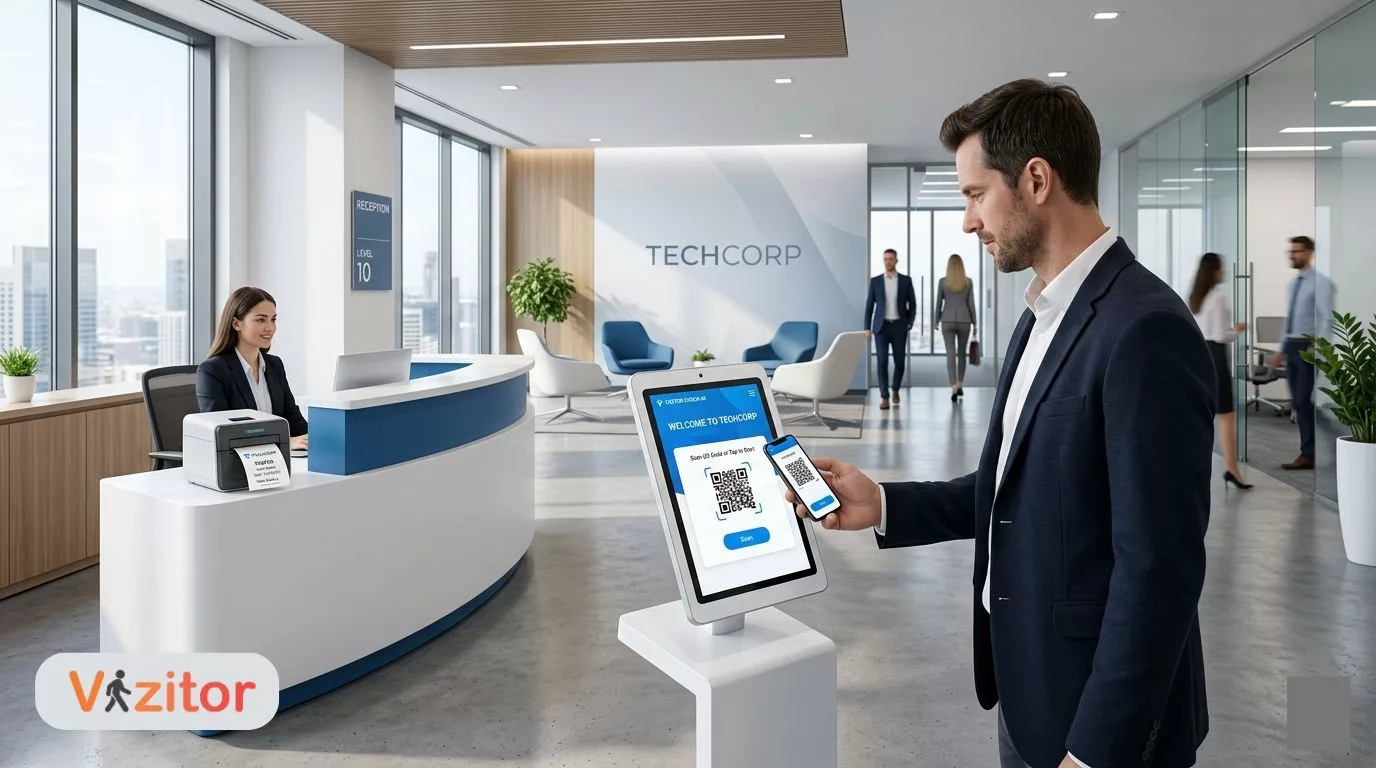
Table of Content
Try Vizitor for Free!
Introduction
Modern workplaces receive dozens, sometimes hundreds, of visitors every week. Clients, job applicants, contractors, vendors, auditors, delivery drivers. Managing all of them well stopped being a front-desk-only job a while ago. It’s now tied directly to workplace security, compliance, and how the whole operation runs day to day.
For decades, the standard tool for this was a paper register at the front desk, where guests wrote their own name, company, and time of arrival by hand. That approach is fading fast. Businesses are moving to digital visitor management systems that handle check-in, verify who someone actually is, notify the right host, and keep a record that holds up later.
The shift is being pushed by three things at once: tighter security expectations, a workplace that’s more digitized than it was five years ago, and compliance rules that keep getting stricter. Modern visitor platforms now connect to access control, analytics dashboards, and identity verification tools, so a facility always has an answer to “who’s inside right now.”
This guide covers how businesses actually manage workplace visitors today, where the old paper-based approach breaks down, and the practices that are becoming standard in 2026.
Why Visitor Management Matters in Modern Workplaces
Visitor management stopped being about a friendly face at the front desk a while back. It now sits at the intersection of security, compliance, and how smoothly a building runs.
Organizations need to know who’s on their premises and why, at any given moment. Skip that, and you’re carrying real risk: unauthorized access, compliance gaps that surface during an audit, and the kind of operational disruption that’s hard to explain after the fact.
1. Workplace Security
Unverified visitors are a real threat vector for offices, factories, hospitals, and schools alike. A digital visitor management system gives organizations a way to actually track and verify who’s entering the building, rather than taking their word for it.
Many of these systems also plug into access control hardware, so a visitor badge only opens the doors it’s supposed to, not every door in the building.
2. Compliance and Legal Requirements
A lot of industries are required to keep visitor records for regulatory reasons, not just convenience:
- Healthcare facilities need visitor logs for safety and privacy rules.
- Manufacturing plants need to track contractors and outside technicians for safety compliance.
- Corporate offices need security records ready for audits and emergency protocols.
Digital visitor logs give you something a paper register never could: a record you can actually search when someone asks for it.
3. Emergency Preparedness
During a fire evacuation or a lockdown, the first question is always the same: who’s inside the building right now? A digital visitor management system answers that in real time, instead of forcing someone to flip through a logbook while the alarm is still going.
4. Improved Visitor Experience
First impressions still matter, and they form faster than most people expect. A visitor stuck in a long queue or confused about where to sign in walks away with a specific read on your company, and it isn’t a good one.
Digital check-ins close that gap. Arrival becomes a quick, guided process instead of a guessing game at a clipboard.
Types of Visitors in the Workplace
Every workplace sees a wide mix of visitors, and while they all walk through the same front door, their purpose, the access they need, and the security checks they require are nowhere near the same. That’s why a single check-in process doesn’t hold up across the board.
A vendor dropping off supplies needs a completely different path than a candidate coming in for a final-round interview. Some visitors only need a badge for the lobby and a conference room; others need clearance for a loading dock or a server room. This is exactly why workplaces have started building structured visitor categories, each with its own check-in workflow tied to what that visitor is actually there to do.
Getting this right pays off in three concrete ways: tighter security, shorter reception queues, and a paper trail that actually holds up when a policy gets questioned.
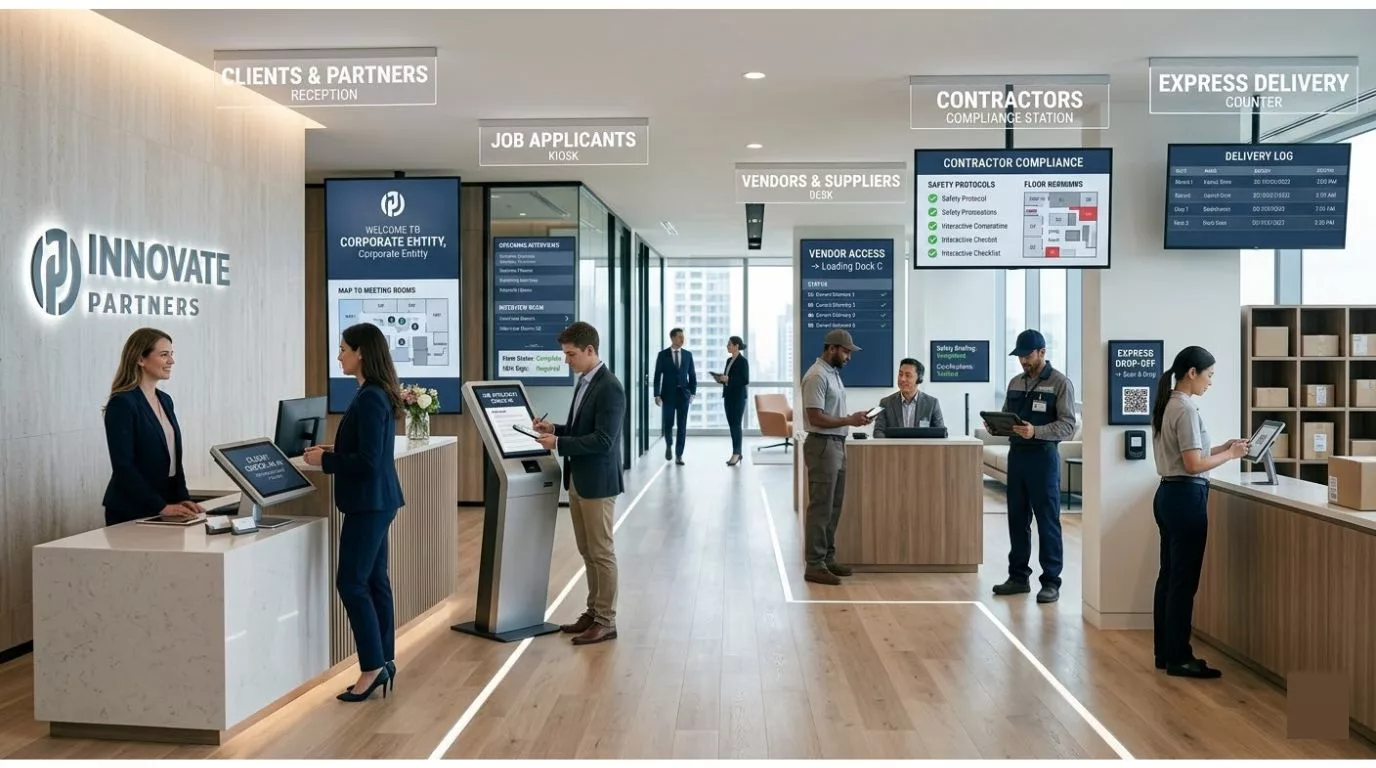
1. Clients and Business Partners
Clients and business partners are usually the visitors an organization is most careful about. They show up for meetings, contract discussions, project reviews, or partnership talks, conversations that often involve information you’d rather not have overheard in a lobby.
Because of that, most companies pre-register client visits ahead of time. That gives reception a head start: the host gets notified, the meeting room gets booked, and the badge is often ready before the client even walks in.
Clients typically get temporary access to meeting spaces and conference rooms, while anything touching operations or restricted areas stays off-limits. A check-in that runs smoothly for a client does more for your professional image than most people give it credit for.
2. Job Applicants
Candidates show up for interviews, onboarding steps, or assessments, and their check-in usually takes a little longer than a typical guest’s. There’s more to collect before the interview even starts.
Applicants are often asked to:
- Fill out interview registration forms
- Submit identification documents
- Sign non-disclosure agreements
- Confirm their interview time and interviewer
Digital systems let candidates handle most of this on a screen, sometimes before they even arrive, which means less reception workload and a recruiter walking in with everything they need already on file.
3. Vendors and Suppliers
Vendors and suppliers come in to deliver goods, install equipment, or handle ongoing service work. These visits are usually planned in advance and often involve procurement, warehouse staff, or a facilities manager somewhere in the loop.
Unlike a client or a candidate, a vendor might need access to a loading dock, a storage room, or a supply area, spaces that tend to get watched more closely because they’re operational, not just administrative.
Because of that, many organizations run a separate check-in path for vendors, one that can include delivery paperwork, a service confirmation, or sign-off from whoever’s receiving the shipment. A visitor system that tracks these visits properly means deliveries get logged correctly and vendors end up where they’re supposed to be, not wandering a hallway looking for the loading bay.
4. Contractors and Technicians
Contractors and technicians come in for maintenance, installations, upgrades, or safety inspections, and because the work itself can be risky, they usually go through more verification than a typical guest.
Organizations commonly require contractors to:
- Upload safety certifications
- Review site-specific safety guidelines
- Sign liability agreements
- Complete a safety briefing before starting work
In higher-risk environments like manufacturing or healthcare, that briefing is often mandatory and recorded, not optional, frequently run through a contractor management system built specifically for that workflow. A well-run contractor check-in process does more than confirm identity; it ties a name on the sign-in sheet to a roll call the moment an alarm goes off, which is the one test a contractor’s paperwork actually has to survive.
A visitor system that automates these requirements means safety documents and compliance forms attach themselves to the contractor’s check-in automatically, instead of living in someone’s inbox.
5. Delivery Personnel and Mailroom Handoffs
Delivery personnel are probably the most frequent visitors any workplace sees. Couriers, logistics drivers, and service providers might show up several times a day carrying packages, documents, office supplies, or equipment.
Because these visits are short by nature, most organizations run an express check-in for delivery staff instead of a full registration. A courier scans a QR code, logs the delivery, and hands the package off at a designated drop point, no full sign-in required. Some offices go a step further and set up a dedicated delivery counter, which keeps the main reception area clear during busy hours.
But the visitor’s job usually ends the moment the package is handed over, and the organization’s job is just getting started. That parcel still has to reach the right person, and that’s where a lot of workplaces quietly lose track of things. A package logged at the door with no connection to what happens after it lands on a shelf is exactly how “it never arrived” disputes start. This is the actual overlap between delivery check-in and mailroom management: the same QR scan or badge event that gets a courier through the door can also kick off the internal chain of custody for whatever they just dropped off, matching the parcel to a recipient, sending a notification, and logging proof of pickup once it’s collected.
Vizitor’s own mailroom management software is built around that exact handoff. It logs a package the moment it arrives, matches it to a recipient from the employee directory, and sends a notification by SMS, email, or WhatsApp, then keeps sending reminders until someone actually confirms they picked it up. For a courier check-in, that means the visitor side and the internal package side stop being two separate systems that never talk to each other. One event at the door triggers both.
That connection matters more than it looks like on paper. A delivery visitor process that stops at “let them in” is only solving half the problem; the other half is making sure nothing gets lost, forgotten, or handed to the wrong person once the courier’s gone. If your organization runs a high volume of daily deliveries, it’s worth reading through a dedicated mailroom management guide alongside your visitor policy, because the two workflows are really one continuous process wearing two different hats.
6. Custom Visitor Workflows
Since every visitor category above needs something different, modern visitor management platforms let organizations build a distinct check-in workflow for each one.
For example:
Contractors might need to upload safety documents before arrival.
Job applicants might complete interview forms during check-in.
Clients might receive pre-approved visitor badges and directions straight to their meeting room.
Delivery personnel might follow the express check-in path described above, feeding straight into mailroom tracking.
Automating these workflows takes real weight off reception, tightens security, and gives every visitor type a process that actually fits what they’re there to do, especially when it’s backed by a clearly written workplace visitor policy that spells out the rules ahead of time.
Tailoring the process this way means an organization keeps full visibility over who’s on-site and why, without forcing every visitor through the same one-size-fits-all sign-in.
How to Manage Visitors in the Workplace: 5 Best Practices
1. Prioritize the Visitor Experience
A visitor’s experience of your company starts the second they walk through the door, not when the meeting begins.
The basics still matter: greet people by name when you can, give clear directions to meeting rooms and restrooms, and offer a place to sit that isn’t just a hard bench facing a wall. None of this is complicated, but it’s surprising how often it gets skipped during a busy morning.
Pre-registration adds a layer on top of that. With Vizitor, a pre-registered visitor gets their arrival instructions by email or SMS before they even leave their car, so there’s no confusion about where to park or which entrance to use. Visitors form an opinion about your company well before anyone says hello, usually somewhere between the parking lot and the chair they’re offered, and a smooth, well-signposted arrival is the cheapest way to make that opinion a good one.
2. Simplify Check-Ins with Digital Tools
Manual sign-ins waste time and invite errors, and both of those turn into bottlenecks and, eventually, compliance headaches.
Digital check-in fixes a few specific problems at once. Contactless QR code scanning cuts waiting time and keeps hands off shared clipboards and pens. Pre-registration means a visitor’s details are already sitting in the system before they arrive. Instant host notifications mean an employee finds out the moment their guest checks in, instead of five minutes later when someone remembers to walk over and tell them.
Snapdeal’s front desk is a useful data point here: after switching from manual paper registration to Vizitor, the company’s case study reports check-in running five times faster, with zero manual entry errors since deployment. That’s one customer’s result, not a universal guarantee, but it’s a real, verifiable number instead of a vague “studies show” claim, and it points at what digital check-in changes on a busy floor.
Vizitor pairs that faster check-in with customized visitor badges, so the professionalism doesn’t get sacrificed for speed.
3. Enhance Security and Compliance
Keeping visitors safe and staying compliant isn’t optional in most modern workplaces, it’s table stakes.
That means issuing badges with access limited to only the areas a visitor actually needs, using ID verification to confirm someone is who they say they are, and keeping digital records ready for audits, GDPR-focused visitor management, and emergency evacuations.
Vizitor keeps these records as secure, cloud-based logs with real-time tracking, so compliance stops being a scramble every time an auditor asks a question.
4. Coordinate Visitors Efficiently
When several visitors show up close together, front-desk staff can get overwhelmed fast if there’s no system behind them.
The fix is mostly logistical: schedule meetings and pre-allocate rooms ahead of time, share the agenda and purpose of each visit with the people attending, and keep an eye on arrivals and room occupancy through a live dashboard instead of guessing.
Tying this into meeting room booking closes the loop, visitors get guided to the right room whether the meeting is in-person or hybrid, and nobody’s standing in a hallway wondering which door to knock on.
5. Make It Personal and Professional
A visit that feels personal builds trust in a way a generic sign-in process never will, and it reinforces what your brand is supposed to stand for.
That can mean a personalized greeting and a room that’s already assigned before the visitor arrives, a custom badge that reflects branding or access level, or simply making sure the meeting space has the right tech and materials set up in advance.
With Vizitor, visitors are pre-registered, handed a personalized badge, and guided through the office rather than left to find their own way, and a guest who’s greeted by name and walked straight to a reserved room reads as a company that has its operations under control before anyone even opens a laptop.
See how Vizitor handles visitor check-in end to end
Pre-registration, badge printing, host notifications, and audit-ready logs, all in one connected system.
Explore Vizitor Visitor Management Book a DemoHow Digital Visitor Check-In Works
Modern visitor management systems follow a structured workflow built for both speed and security.
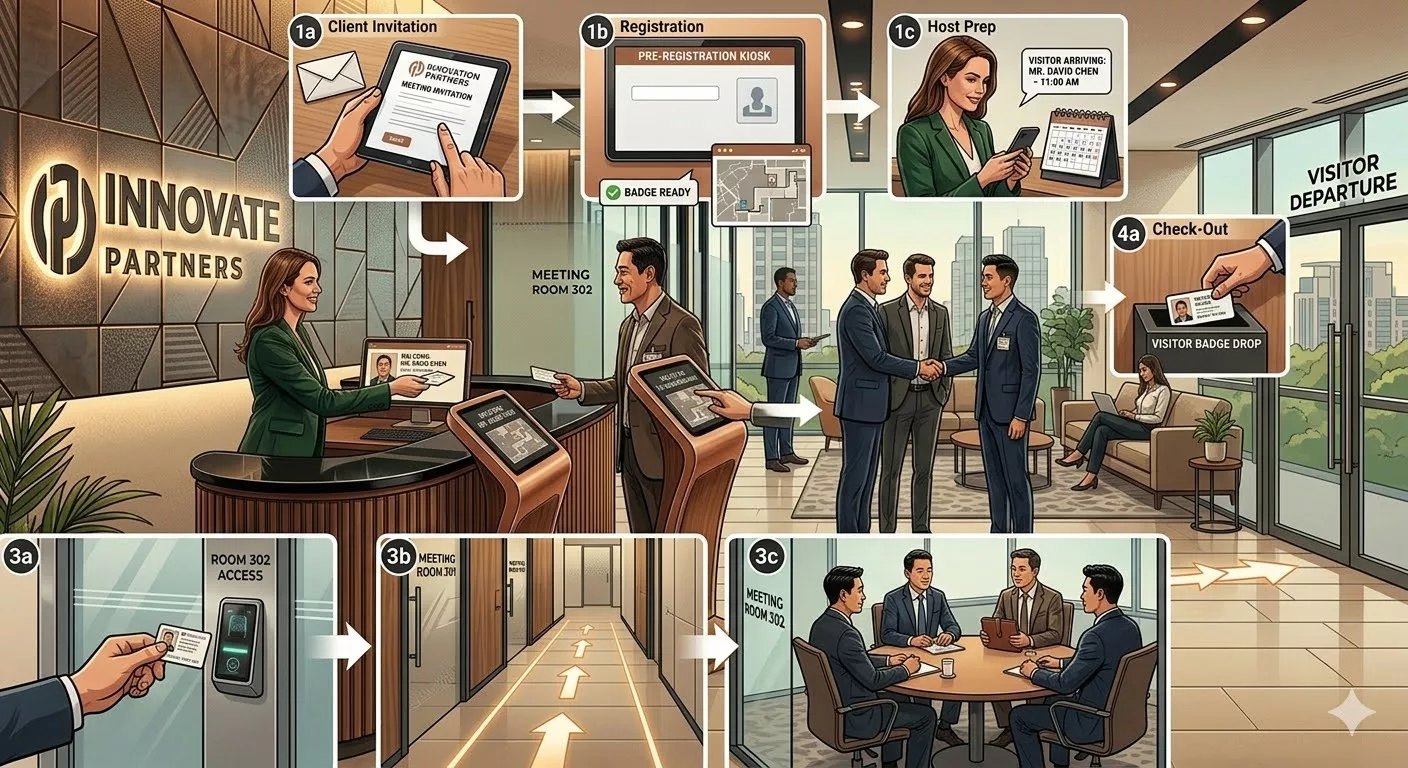
1. Visitor Pre-Registration
Before arriving, visitors get an invitation link where they can submit their details ahead of time. Because that information is already stored before they show up, the actual check-in at the desk takes seconds instead of minutes.
2. Identity Verification
Organizations verify who’s actually walking through the door using a mix of:
- Government ID scanning
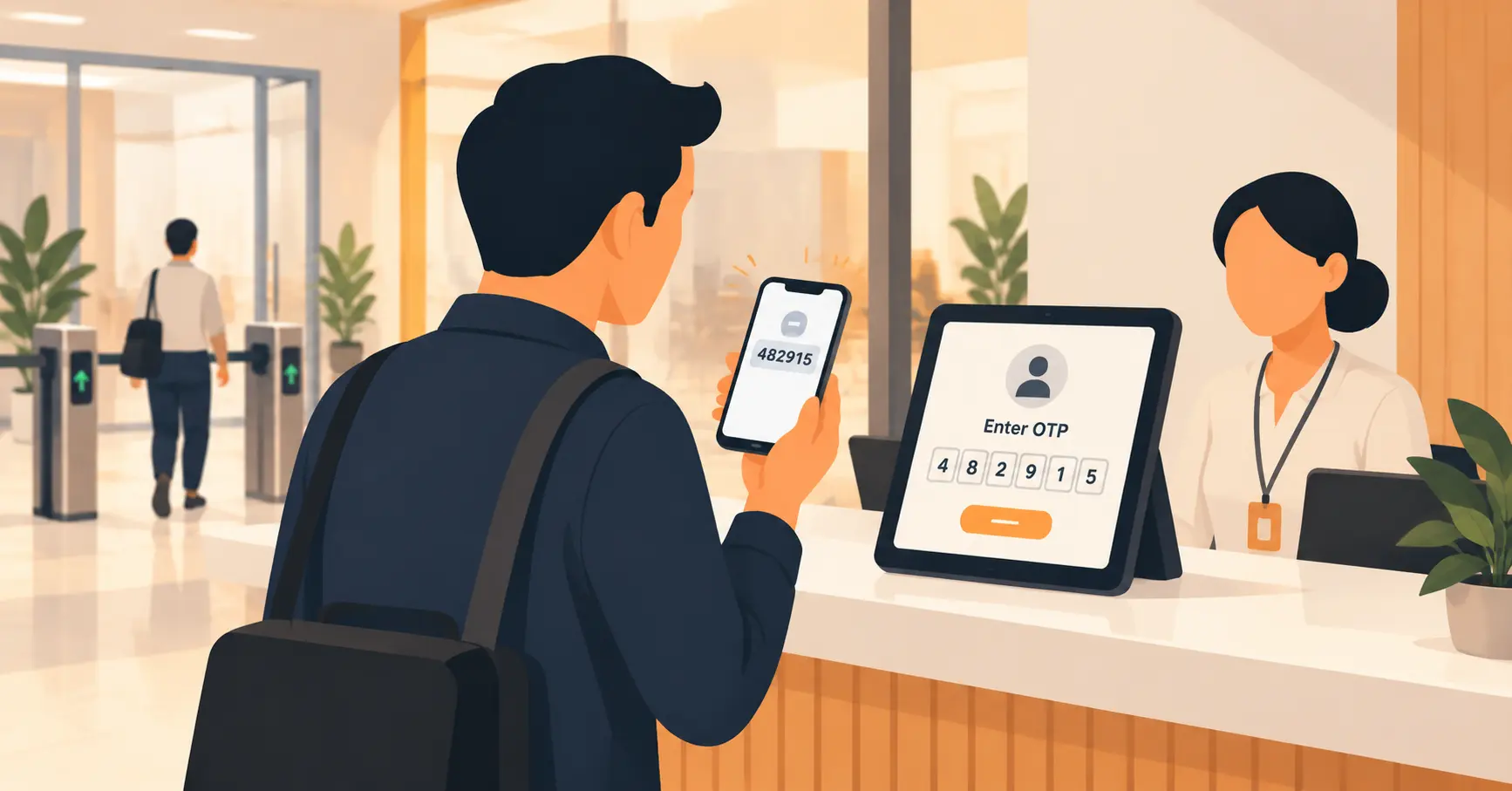
- OTP verification
- Biometric authentication
- Facial recognition
AI-assisted identity verification is showing up in more visitor platforms every year, though it’s worth confirming exactly what any given vendor supports before assuming a feature is included.
3. Contactless Check-In
Visitors check in with their own phone, scanning a QR code at the entrance, a process covered in more depth in how QR code visitor management systems work. Contactless check-in picked up during the pandemic and never really went away, mostly because it’s just faster.
4. Host Notification
Once a visitor checks in, their host gets an instant notification, by email, SMS, or whatever messaging tool the workplace already runs on.
5. Visitor Badge Printing
After verification, the system prints a badge carrying:
- Visitor name
- Host name
- Visit time
- Access permissions
Badges give employees a quick, visual way to know whether someone walking the halls is actually supposed to be there.
Problems with Traditional Visitor Logbooks
For years, the standard tool at reception was a paper register where visitors wrote their own name, company, purpose of visit, and arrival time by hand.
That was fine when expectations were lower. It isn’t anymore. As organizations grow and security requirements tighten, paper-based logs create real operational, security, and compliance problems that are hard to paper over (pun intended).
Traditional logbooks were never built for the automation, visibility, and accuracy that a modern workplace actually needs. Here’s where they consistently fall short.
1. No Real Identity Verification
A paper logbook takes whatever a visitor writes down at face value. Someone can write the wrong name, a fake number, or skip details entirely, and nothing in the process catches it.
That makes it genuinely hard to confirm who’s actually entering the building, which is a bigger risk than it sounds like on a normal Tuesday.
2. Security Gaps
Manual logs give almost no real control over building access. Since staff usually can’t verify identities on the spot, someone with bad intentions can walk into sensitive areas without much resistance.
In corporate offices, hospitals, or manufacturing plants, that’s not a hypothetical, it’s a real vulnerability sitting at the front desk.
3. Privacy Problems
A paper register is visible to everyone who signs in after the first visitor. Names, phone numbers, and companies sit on the page for the next person in line to read.
In regions with strict data privacy rules, that’s more than a minor annoyance, it’s a genuine problem worth reading about in our piece on data privacy compliance in visitor management.
4. Records Nobody Can Actually Read
Handwriting on a logbook page is often barely legible, and visitors regularly skip fields like check-out time or purpose of visit entirely.
Incomplete or illegible entries make the whole record less trustworthy right when you need it most.
5. A Slow Check-In Process
When several visitors arrive around the same time, a manual sign-in process backs up fast. Staff have to walk each person through it, write everything down by hand, and notify hosts one at a time.
That’s a lot of friction for something a QR code handles in seconds.
6. No Real-Time Visibility
A paper log can’t tell you, right now, how many people are actually inside the building. Getting that number means someone physically flipping through pages, which is slow and often wrong.
7. Records That Are Hard to Search
When a security team needs to pull past visitor records for an investigation, audit, or general review, digging through weeks or months of physical pages is exactly as painful as it sounds.
8. Weak Emergency Preparedness
In a fire evacuation or lockdown, knowing exactly who’s inside matters more than almost anything else. A paper log makes that number nearly impossible to pin down fast, especially when visitors forget to sign out on their way in a hurry to leave.
9. Zero Integration With Other Systems
A paper logbook is an island. It can’t talk to access control platforms, security tools, or internal communication systems, which means no automated notifications, no automated badge printing, and no automated security checks.
10. More Work for Reception
Every part of visitor registration on paper falls on reception staff by hand, logging details, notifying hosts, issuing passes, and keeping the records intact. That’s a lot of continuous manual effort for a process that could mostly run itself.
How Vizitor Helps Manage Workplace Visitors
Manual visitor management creates delays, security gaps, and a growing administrative load for reception teams. A digital platform like Vizitor automates the entire visitor journey, from pre-registration through check-out, while tightening security and cutting the manual work down considerably.
Replacing paper logbooks with a digital system means visitor data gets captured accurately, hosts get notified instantly, and organizations keep real visibility over who’s actually on the premises. Here’s where Vizitor makes the most tangible difference.
1. Pre-Registration for Faster Check-Ins
Vizitor lets organizations pre-register visitors before they show up. Hosts send an invitation with the visit details, and guests fill in their own information ahead of time.
By the time the visitor reaches the office, their details are already sitting in the system, which speeds up check-in and keeps reception queues from building. It also gives organizations a more accurate record and a head start on preparing for scheduled visits.
2. Contactless QR Code Check-Ins
Instead of signing a paper register, visitors check in fast by scanning a QR code or using a self-service kiosk.
Contactless check-in cuts waiting time, removes manual data-entry mistakes, and creates a smoother arrival, while also keeping physical contact points at reception to a minimum.
3. Instant Host Notifications
One of the most common breakdowns in traditional visitor management is simply finding the host once a visitor arrives.
Vizitor sends real-time notifications, by email, SMS, or mobile alert, the moment a visitor checks in. That keeps the host ready to receive their guest instead of leaving a visitor standing around at reception.
4. Visitor Badge Printing and Identification
Vizitor generates and prints custom visitor badges automatically at check-in, typically carrying visitor name, company, host name, visit time, and access permissions. Badges make it easy for employees to spot who’s authorized to be in the building, which is a small thing that adds up across a normal day.
5. Identity Verification and Secure Registration
Organizations can tighten security further with features like:
- ID verification
- OTP authentication
- Visitor photo capture
- NDA or document signing
These make sure every visitor is properly verified before they’re inside the facility, cutting down on unauthorized access risk.
6. Custom Visitor Workflows
Different visitor types need different check-in steps, and Vizitor lets organizations build custom workflows for categories like clients, contractors, or delivery personnel.
A contractor might need to sign safety documents; a job applicant might fill out interview forms during check-in. Customizable registration forms mean businesses only collect what they actually need for each visitor type, instead of running everyone through the same generic form.
7. Real-Time Visitor Tracking
Vizitor’s live dashboard shows exactly who’s inside the facility right now.
Reception and security teams can watch visitor activity, track check-in and check-out times, and pull reports whenever they need them, which matters most during security monitoring and emergency situations.
8. Digital Visitor Logs and Analytics
Instead of stacks of paper logbooks, Vizitor stores every visitor record securely in the cloud.
Organizations can search visitor logs, generate reports, spot visitor traffic trends, and keep accurate documentation ready for compliance reviews or audits, without digging through a filing cabinet.
9. Multi-Location Visitor Management
For companies running several offices or facilities, Vizitor lets administrators manage visitor activity from one centralized dashboard.
That keeps visitor policy consistent across locations and gives leadership a single, unified view of traffic across the whole organization.
10. A More Professional Visitor Experience
Beyond the security and efficiency angle, Vizitor helps organizations deliver a genuinely more professional, welcoming experience.
Visitors get clear instructions before arrival, check in fast at reception, and get guided smoothly through the workplace, all of which adds up to a strong first impression while the organization keeps full control over who has access to what.
Quick Checklist for Reception Staff
- Greet visitors warmly and confirm their appointment.
- Check pre-registration details before they arrive.
- Offer directions and refreshments where needed.
- Issue visitor badges with the right access level.
- Notify hosts in real time when a visitor arrives.
- Track entry and exit for compliance and safety.
Run through this checklist consistently and reception stays professional, safe, and organized, even on the busiest day.
Receptionist Best Practices: Handling Calls and Visitors Professionally
The receptionist is usually the first human a visitor interacts with, and how they carry themselves, including what they’re wearing, shapes that visitor’s read on your company before a single word about the actual business gets said. A clear front office dress code makes that impression consistent, instead of depending on whoever happens to be on shift.
A few habits that hold up well at the front desk:
- Stay alert and present. Be ready to greet whoever walks in, and put the phone away.
- Answer calls with a clear, friendly tone. Something as simple as “Good morning, how may I help you?” sets the right tone before the caller says another word.
- Stay calm during peak hours. Multiple visitors or calls at once is manageable with a system behind you; without one, it’s chaos.
- Know the schedule. Be aware of who’s expected and when, so nobody’s caught off guard by a visitor arriving early.
- Record details digitally. A visitor management system like Vizitor turns registration into something quick and accurate, instead of a scramble to remember who said what.
Creating a Memorable Visitor Welcome Experience
A welcoming reception is bigger than a friendly greeting. It covers everything a visitor experiences from the moment they walk in to the moment they leave.
A comfortable reception area usually comes down to a few practical things: seating that’s actually clean and in decent shape, signage that tells people where to go without them having to ask, something to read or look at while they wait, Wi-Fi details handy for business visitors, and a room temperature that doesn’t make anyone regret sitting down.
None of this is complicated or expensive to get right. The goal is simple: a visitor should feel like someone thought about their arrival in advance, because someone did.
Conclusion
Workplaces have changed a lot, cloud software, hybrid meetings, smart offices, but one thing hasn’t: people still walk through the front door every single day. Clients show up for meetings, vendors drop off supplies, candidates arrive for interviews, and couriers hand over packages. How an organization handles all of that says more about how modern, secure, and organized it actually is than most of its marketing does.
For decades, the humble paper logbook handled this job, and let’s be honest, it was never really good at it. Illegible handwriting, missing fields, long queues at reception, and no real visibility into who was actually inside the building turned visitor tracking into more of a formality than a process anyone could rely on. When guests forget to sign out, which happens constantly, that logbook stops being able to answer the one question it exists for: who’s still inside?
That gap is exactly why organizations everywhere are moving toward digital visitor management. Modern workplaces want faster check-ins, stronger security, records that actually hold up, and a reception experience that reflects how the rest of the company operates.
Instead of flipping through pages of handwritten entries, companies can track visitors in real time, automate check-ins, print badges instantly, and notify hosts the second a guest arrives. What used to take several minutes now happens in seconds, and that speed comes with a real security upgrade attached, not just a convenience one.
The impact goes past convenience, too. Better visitor management means better security visibility, stronger compliance footing, a smoother-running front desk, and a visitor experience that actually reflects the level of professionalism a company wants to project, all at the same time, without one coming at the cost of another.
At the end of the day, managing visitors is about more than recording names. It’s about knowing exactly who’s in your workplace, confirming they’re supposed to be there, and giving them an experience that reflects the quality of the organization they just walked into.
Because sometimes the first impression of a company isn’t the meeting room, the presentation, or even the product.
It’s the reception desk.
Try Vizitor Free
Setup in under 5 minutes. Manage visitors, queues, meeting rooms, and more.
Start Free TrialFrequently Asked Questions
See Vizitor in action check-in a visitor in under 30 seconds
Trusted by 500+ businesses. QR check-in, badge printing, NDA signing. Plans from $36/mo.