
CLOUD-HOSTED, BROWSER-BASED, NO INSTALLATION REQUIRED
Web-Based Visitor Management System That Works on Every Device
Vizitor runs entirely in the cloud. Open it in a browser, on an iPad, or an Android tablet, and your visitor management system is live in minutes. No software to install, no servers to maintain, no IT tickets to file.











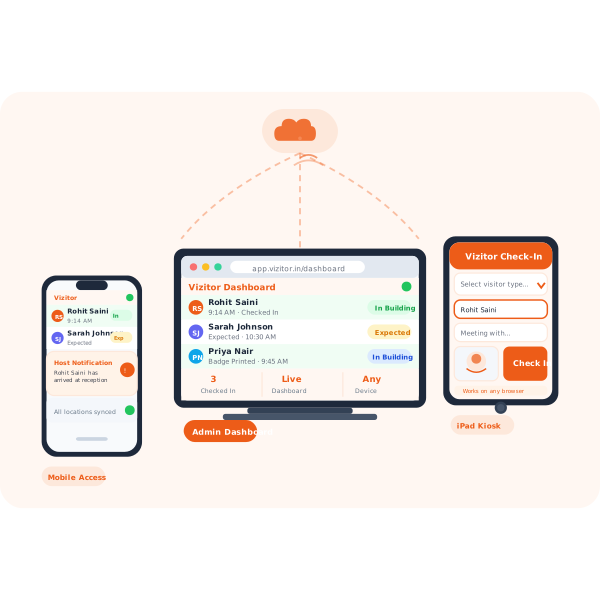
What Is a Web-Based Visitor Management System?
A web-based visitor management system is cloud-hosted software that lets organizations check in visitors, print badges, notify hosts, and store visitor records entirely through a browser or mobile app, with no installed software required. All data is stored securely in the cloud and accessible from any device with an internet connection.
Still Running Visitor Sign-In on a System Locked to One PC?
On-premise visitor management software creates problems that grow with your organisation. Here is what teams face before switching to a web-based system.
On-Premise Systems Lock You to One Device
Traditional VMS installed on a single PC stops working when that machine has a problem
Traditional visitor management software installed on a single PC at reception means check-in stops the moment that machine has a problem. Web-based systems work on any device, so there is no single point of failure.
No Real-Time Visibility Across Multiple Locations
Desktop-based systems cannot sync visitor data across offices in real time
Desktop-based systems cannot sync visitor data across offices. When head office needs to know who is on-site at a branch, the answer is: nobody knows. A web-based system pushes every check-in to one live dashboard instantly.
IT-Heavy Setup Slows Down Deployment
Installing and maintaining on-premise software requires IT involvement at every stage
Installing, maintaining, and upgrading on-premise software requires IT involvement every step of the way. A web-based system deploys in 30 minutes with zero IT tickets, and updates automatically overnight.
IT setup time required to go live with Vizitor
Works on any browser, iPad, Android, or laptop
Cross-location visitor data sync across all offices
Countries where Vizitor is deployed and trusted
How Vizitor's Web-Based Visitor Management
System Works in 4 Steps
From first sign-up to live visitor check-in in under 30 minutes, with no software to install on any device.
Sign Up and Configure in Minutes
Create your Vizitor account, upload your logo, set visitor types and questions, and your web-based check-in system is ready. No download, no installation.
Open on Any Device
Access your admin dashboard on a laptop. Run the visitor kiosk on an iPad or Android tablet. Check notifications on your phone. Everything syncs in real time.
Visitors Check In Through the Browser Kiosk
Your visitor walks up to the tablet, selects their visitor type, fills in their details, and checks in. The web-based kiosk works on any modern browser.
Monitor All Locations from One Dashboard
Every check-in, across every office, updates in real time in your admin dashboard. Export reports or set alerts without touching a local machine.
Web-Based VMS vs. On-Premise: The Key Differences
See exactly why web-based visitor management wins on every dimension that matters for modern offices.
| Feature | Web-Based (Vizitor) | On-Premise System |
|---|---|---|
| Installation | None required | Required on local PC |
| Device flexibility | Any browser, any device | One dedicated machine |
| Multi-location | Real-time sync | Manual export/import |
| Updates | Automatic | Manual IT updates |
| Setup time | 30 minutes | Days to weeks |
| Data backup | Automatic cloud backup | Manual IT backup |
| Cost | Monthly SaaS subscription | High upfront + maintenance |
Real-Time Visitor Data
Across All Locations
Every check-in from every office is instantly visible in the central dashboard. Whether you have 2 offices or 20, your security and operations teams see the same live data. No lag, no manual exports, no phone calls between sites.
Combine this with Vizitor's built-in visitor tracking and you have full audit-ready records for every location in one account. Teams running enterprise visitor management across dozens of sites use this same dashboard without any additional infrastructure.
- Live visitor log updated on every check-in, every office
- Location filters to drill into any single site
- Export compliance reports in one click from any device
- No VPN or local network access required to view data
Zero Maintenance,
Always Up to Date
Web-based architecture means every feature update, security patch, and new integration rolls out automatically. Your visitor management system is always on the latest version without any action from your IT team.
Unlike on-premise software that sits months behind on patches, Vizitor's cloud-based VMS keeps every deployment current the moment an update is released. No planned maintenance windows, no service interruptions, no IT calendar blocked.
- Security patches applied automatically, every time
- New features roll out to all accounts simultaneously
- No version lag across devices or locations
- No IT calendar required for any maintenance task
Frequently Asked Questions About
Vizitor's Web-Based Visitor Management System
A web-based visitor management system is cloud-hosted software that manages visitor check-ins, badge printing, host notifications, and visitor records through a browser or app. No local software installation is needed. Data is stored in the cloud and accessible from any device with an internet connection.
Vizitor works on any device with a modern web browser: laptops, desktops, iPads, Android tablets, and smartphones. The visitor kiosk runs on iPad and Android tablets. The admin dashboard is accessible from any browser on any operating system.
No. Vizitor is designed to be set up by non-technical administrators. Sign up, configure your settings, and go live in under 30 minutes. No server setup, no software installation, and no IT support required at any stage of deployment.
A web-based VMS runs in the cloud and works on any device without installation. On-premise systems are installed on a local PC, require IT maintenance, and cannot sync data across multiple locations. Web-based systems are faster to deploy, lower in cost, and accessible from anywhere.
Yes. Vizitor uses encrypted data transmission (HTTPS), cloud storage with access controls, and regular security updates. All visitor data is stored in compliance with GDPR and regional data protection requirements. You control who has admin access to the dashboard at all times.
Vizitor supports offline check-in mode. Visitor data entered during an outage is stored locally and synced to the cloud automatically when the connection is restored. Your reception does not stop working if the internet drops temporarily.
Yes. Vizitor supports multi-location management from a single account. Each location has its own check-in configuration, and all visitor data is accessible centrally in one dashboard with location filters. Adding a new office takes minutes with no additional IT deployment.
Run Your Visitor Management System From Anywhere. No Install Required.
Start your free trial today and go live in 30 minutes, on any device, at any location.