
Visitor Tracking System With Real-Time Dashboard and Full Audit Trail
Know who is in your building at all times. Vizitor tracks every visitor from the moment they arrive to the moment they leave, giving your security team a live dashboard, instant alerts, and a searchable log that holds up in any compliance audit.











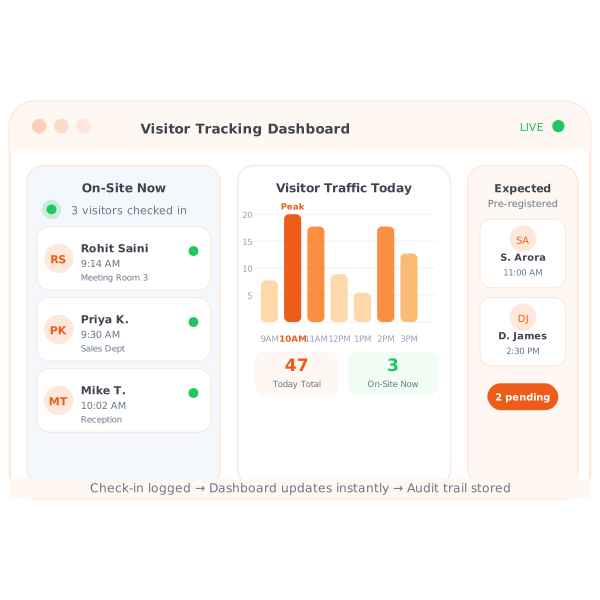
What Is a Visitor Tracking System?
A visitor tracking system is software that records and monitors every person who enters and exits a facility, capturing their name, arrival time, departure time, host details, and purpose of visit. It gives security and operations teams a live view of who is currently on-site and a searchable historical audit trail. Most teams pair it with a visitor badge management system so every person on-site is also visually identifiable.
Three Visibility Gaps That Put
Your Facility at Risk Today
Without a digital visitor tracking system, security teams are forced to make critical decisions using incomplete, delayed, or entirely missing data.
You Cannot Tell Who Is Still on Premises After Hours
Paper logbooks are never updated with checkout times
On any given day, you cannot tell if that 3PM visitor from Tuesday left or is still somewhere in the building. Paper registers record arrivals. They almost never record departures.
Emergency Evacuations Have No Reliable Headcount
When a fire alarm goes off, the register is at reception
Your evacuation coordinator has no verified list of who is inside. Paper registers are left at the front desk, not at the assembly point. A digital on-site list solves this immediately.
No Analytics to Optimize Security Staffing
Staffing decisions are based on guesswork, not data
Without visitor frequency data, you cannot plan for peak visitor hours because you have never measured them. Overstaff quiet periods, understaff busy ones, repeat every week.
Four Steps From Arrival to Audit Trail
Every visit is fully logged from check-in to check-out, with zero manual input from your security or reception team.
Visitor Checks In with Name and Host
Every visitor registers on arrival using the Vizitor kiosk. Their check-in time, purpose, and host are recorded instantly in the system.
Real-Time Dashboard Updates Immediately
The moment check-in completes, the visitor appears in your live on-site dashboard. The security desk sees the update in real time.
Visitor Checks Out on Departure
Visitors check out using the kiosk, the mobile pass, or a host-initiated checkout. Check-out timestamps close the visit record.
Reports and Exports for Compliance
Run visitor frequency reports, peak-hour analytics, and full audit logs. Export to CSV for insurance, ISO, or regulatory reviews.
Dashboard updates instantly at every check-in and check-out event
Manual log entries needed. Every record is created automatically
Visitors with timestamped entry and exit records stored securely
Full audit logs in CSV format for compliance and insurance reviews
Emergency Evacuation List in One Tap
In an emergency, security staff pull up the real-time on-site list on any device. Everyone who checked in and has not checked out is on that list. No paper, no guesswork, no missed visitors. Your evacuation coordinator has a verified headcount from any smartphone or tablet, even away from the reception desk.
This is the difference between a credible visitor security posture and a paper register that nobody trusts. Combine it with Vizitor's full visitor management platform and every facility procedure gets stronger.
- Live on-site list accessible from any device at any time
- Shows all visitors who are currently checked in
- Automatically removes visitors once check-out is recorded
- Exportable as PDF or CSV for fire marshal use
- Works across all facility locations simultaneously
Visitor Frequency Analytics and Peak-Hour Insights
The analytics dashboard shows daily, weekly, and monthly visitor volumes. See which hosts receive the most visitors, identify peak-hour patterns, and optimize reception staffing accordingly. Knowing that Thursday and Friday mornings bring 40% more traffic than Monday afternoons is the kind of data that saves budget and improves service levels.
Frequency reports also reveal contractor visit patterns versus regular visitor traffic, helping security teams distinguish expected from unexpected activity. For larger organizations, this capability is a cornerstone of enterprise visitor management strategy.
- Daily, weekly, and monthly visitor volume charts
- Host-level reports showing who receives the most visitors
- Peak hour identification for reception staffing decisions
- Visitor type segmentation: clients, contractors, deliveries
- One-click CSV export for any date range
Frequently Asked Questions About
Vizitor's Visitor Tracking System
Vizitor tracks visitor name, contact number, photo, purpose of visit, host name, check-in time, check-out time, and any documents signed during check-in. All records are stored in a searchable cloud dashboard and available for export. You can also pre-register visitors so their details are captured before they arrive, reducing time at the kiosk to under 10 seconds.
Yes. The Vizitor admin dashboard has a live On-Site view that shows every visitor currently checked in. It updates the moment a visitor completes check-in or check-out. Security and facility managers can access this view from any device, including mobile phones, without being at the reception desk.
Visitors check out using the same Vizitor kiosk, the Vizitor PASS mobile app (host-initiated checkout), or a QR code scan at exit. Check-out timestamps are recorded automatically and close the visit record. Administrators can manually close records from the dashboard and configure overstay alerts to flag visitors who remain past their scheduled departure time.
Yes. Vizitor supports multi-location tracking from a single admin account. Each location's visitor data is visible in the central dashboard with location filters, and reports can be run for individual sites or across all of them. Role-based access controls mean site managers see only their own location data, while enterprise admins retain full visibility. A visitor badge can be configured per location with site-specific branding.
Yes. Visitor logs can be exported in CSV or PDF format with all fields: name, contact, host, check-in and check-out time, purpose, and signed documents. Exports are used for ISO audits, fire safety compliance, and insurance reviews. You can filter by date range, location, visitor type, or host before exporting to produce exactly the records your auditor needs, or view them live in visitor analytics.
You control the data retention period in your admin settings. Records can be retained for as long as your policy requires and automatically purged after a defined period to meet GDPR and other data protection requirements. Vizitor supports data subject access and erasure requests directly from the admin panel, making compliance workflows straightforward for your data protection team.
Yes. Vizitor is designed to be GDPR-compliant. Visitor data is stored on encrypted servers, retention periods are configurable, and visitors can be informed of data collection through the check-in flow. Vizitor supports data subject access and erasure requests. Consent capture, privacy notices, and document signing are built into the check-in process so compliance does not depend on manual effort from your team.
Always Know Who Is in Your Building. Always.
Start your free trial today and get a real-time visitor tracking dashboard live in 30 minutes. Entry logs, exit timestamps, evacuation list, and full audit trail included.