
Visitor Management System for Schools
Every visitor on your school grounds is your responsibility. Know exactly who they are.
Parents dropping off forgotten lunches. Contractors working on the building. Volunteers supporting the after-school programme. Supply teachers in for the week. Every one of them needs to be identified, logged, and accounted for, from the moment they arrive to the moment they leave.
of US schools still use paper sign-in sheets with zero identity verification at the door
registered sex offenders in the US, most schools have no automated way to flag them at check-in
of school safety incidents involve an unauthorised person on campus (US Dept of Education data)
THE PROBLEM
Why K-12 schools are moving away from paper sign-in
Across the United States, school visitor policies are under increasing scrutiny from state legislators, district administrators, parents, and accreditation bodies. Paper-based visitor logs fail these stakeholders in three specific ways.
A paper sign-in sheet at the front office cannot tell you who is still on campus, whether they signed out, whether the name they wrote is accurate, or whether they should be there at all. A school visitor management system answers these questions in real time, from any device, at any point in the school day.
They cannot verify identity.
Handwritten names cannot be validated. A visitor who writes a name in a sign-in book is not verified. They could write any name. A digital visitor management system captures identity against a documented check-in record, creating a verifiable entry that a handwritten name cannot provide.
They cannot flag concerns in real time.
No automated alert when a watchlist match checks in. When a visitor with a custody restriction, a court order, or a district watchlist flag arrives at the front office, staff have seconds to identify the issue. A paper log provides no automated alert. A digital system with watchlist screening flags the concern the moment check-in is attempted, before the visitor proceeds past reception.
They cannot support emergency accountability.
No accurate roster during lockdown or evacuation. During a lockdown, fire evacuation, or active threat event, administrators need to know immediately who is on campus. The paper sign-in sheet may be at an unmanned desk, illegible under pressure, or incomplete. A live digital roster accessible on any device gives emergency responders an accurate list in seconds.
They cannot manage multiple visitor types.
A school is not a single-visitor-type environment. Parents, contractors, volunteers, and substitute teachers each require different documentation, different check-in processes, and different levels of building access. A paper sign-in sheet treats them all the same, creating gaps in the safety record.
HOW IT WORKS
How a school visitor management system works, step by step
From the moment a visitor arrives to the moment they leave, here is exactly what happens at every check-in.
Visitor arrives at the front office
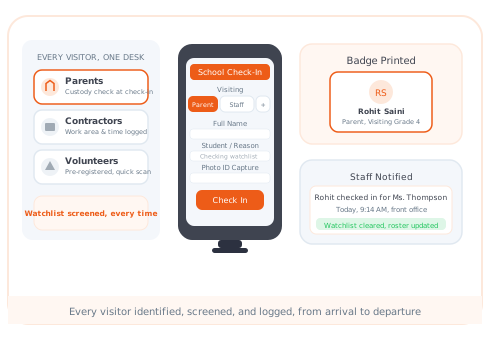
They approach the check-in kiosk, an iPad or Android tablet at the front desk, and select the purpose of their visit. The check-in flow adjusts automatically based on visitor type: a parent sees different questions than a contractor.
Identity is captured and the record is created
The visitor's details are logged with a timestamp. The record is searchable and accurate, and cannot be altered after the fact.
Watchlist screening
The system checks the visitor's details against the school's configured watchlists, custody restriction flags, district-level bans, and individuals flagged as unauthorised. If a match is identified, the front office receives an immediate, discreet alert before the visitor proceeds.
Badge is issued
A dated visitor badge prints automatically in seconds, with the visitor's name, photo, the date, and the staff member they are visiting. Colour-coded badges by visitor type help anyone in the building identify at a glance whether a person has been through the check-in process.
Badge Prints AutomaticallyStaff member is notified
The relevant teacher, administrator, or staff member receives an automatic notification the moment their visitor checks in, so they can prepare to receive them without the front office making a phone call.
Departure is recorded
When the visitor leaves, check-out is logged. The live on-site roster updates immediately, accurately reflecting who is still on campus at all times.
Live Roster Always AccurateWhat types of visitors does a school need to manage?
A school is not a single-visitor-type environment. The same morning can bring a parent collecting a child early, a building contractor on the roof, a volunteer supporting the library, and a substitute teacher covering an absence. Each requires a different check-in process, different documentation, and different levels of building access.
Parents and Guardians
The highest-frequency visitor in any K-12 school. Parents arrive for scheduled meetings, to drop off items, to collect children early, or to attend events. The check-in system captures their identity, logs the reason for the visit, and records whether they are authorised to collect the specific student they are asking for. Custody restrictions and authorisation checks are critical.
Contractors and Vendors
Maintenance crews, IT technicians, food service vendors. Contractors need documented access to specific areas of the campus and a record of their time on site, separate from the parent visitor log, with their own check-in flow capturing company details, work scope, and the areas they are accessing.
Volunteers
Parent volunteers, community supporters, and recurring programme contributors. Pre-registration for returning volunteers reduces front office workload, the volunteer's information is already in the system, and each subsequent check-in is a quick confirmation rather than a full registration.
Substitute Teachers and Guest Staff
Supply teachers arriving for the day need to be distinguished from general visitors. Their badge reflects their staff status. They require access to areas of the building that visitors do not. Their presence needs to be on the emergency roster alongside permanent staff.
EMERGENCY PREPAREDNESS
Emergency preparedness, a live roster when it matters most
The question during a campus emergency is never 'who checked in this morning?' It is 'who is on campus right now?' Those are different questions. Only a digital visitor management system answers the second one accurately.
A live roster of every person on campus, accessible from any device
Vizitor maintains a live on-site roster of every person currently checked in, parents, contractors, volunteers, substitute teachers, and any other visitor who has not yet checked out. During a lockdown, fire evacuation, or any other emergency, a designated staff member opens the roster on their phone or any internet-connected device away from the building.
- The list is current. Every person who has checked out is already removed
- Every person still inside is visible by name, photo, and check-in time
- The roster can be given to first responders immediately
- No counting clipboards or reconstructing a paper record under pressure
Digital visitor sign-in that replaces the paper logbook entirely.
Every visitor is logged with a timestamped, searchable digital record. Separate check-in flows for parents, contractors, volunteers, and substitutes ensure the right documentation is captured for each visitor type, without front office staff needing to manage the process manually.
- Digital visitor sign-in: replaces the paper logbook with a searchable, timestamped digital record
- Visitor type workflows: separate check-in flows for parents, contractors, volunteers, and substitutes
- Dated visitor badges with photo and colour-coding by visitor category
- Instant staff notification the moment their visitor checks in
- Pre-registration for repeat visitors: volunteers pre-registered for faster check-in
Watchlist and restriction screening at the point of check-in.
Flags custody restrictions and district watchlist matches before entry is granted. When a visitor with a custody restriction, a court order, or a district watchlist flag arrives, the front office receives an immediate, discreet alert before the visitor proceeds past reception.
- Custody restriction flags configured within the watchlist
- Immediate alert on match, before the visitor is admitted
- Schools and districts configure their own watchlist within Vizitor
Event and high-volume visitors handled without queues at the front office.
School performances, parent-teacher conferences, sports events, and open days bring large numbers of visitors simultaneously. Self-service kiosks and QR-based arrival handle high-volume check-in without creating long queues at the front office.
- Email or SMS pre-registration link sent before any event
- QR code check-in for pre-registered visitors
- Visitor badge printed automatically on arrival
- Staff member notified the moment their visitor checks in
- Bulk invites for parent-teacher evenings, open days, and school events
KEY FEATURES
Key features for K-12 schools
Every feature is designed to close the gaps that paper sign-in sheets leave open and give your front office real control over who enters your building.
Watchlist and restriction screening: flags concerns at check-in, before entry is granted
When a visitor's details match a custody restriction, court order, or district watchlist flag, the front office receives an immediate, discreet alert before the visitor proceeds past reception. The screening is automatic, every visitor, every time.
- Custody restrictions and district-level bans flagged at check-in
- Immediate, discreet alert to designated staff before entry is granted
- Schools configure their own watchlist within Vizitor
- Full audit-ready visitor log exportable for safety audits and compliance review
Live on-site emergency roster: real-time view of every person currently on campus
Vizitor maintains a live on-site roster of every person currently checked in. During a lockdown, fire evacuation, or any other emergency, a designated staff member opens the roster on their phone or any internet-connected device. The list is current, accurate, and ready to hand to first responders immediately.
- Real-time view of every person currently on campus, accessible from any device
- Every person still inside visible by name, photo, and check-in time
- Visitor check-out logged: roster updates immediately on departure
- Multi-location management: manage multiple school sites from one admin dashboard
Document signing at check-in and FERPA-compliant data storage
Campus safety acknowledgments and visitor policies can be signed on-screen at check-in. Visitor records are stored with configurable retention periods, role-based access controls, and encrypted storage, supporting districts in meeting their data governance obligations without manual record management.
- Document signing at check-in: campus safety acknowledgments signed on-screen
- Configurable retention periods, access controls, and encrypted storage
- Works on standard tablets: any iPad or Android tablet at the front desk
WHAT TO LOOK FOR
What to look for in a visitor management system for your school
When evaluating systems, front office administrators and district safety directors focus on the same requirements. Here is what matters and how paper sign-in compares to a digital system.
COMPLIANCE
FERPA and school visitor data
The Family Educational Rights and Privacy Act (FERPA) governs how US schools handle student educational records. Data that identifies which student a parent or guardian is visiting, and when, may intersect with student privacy considerations depending on state law and district policy.
Secure record storage
Visitor records should be stored securely with access limited to authorised staff. Vizitor stores data with role-based access controls and encrypted storage, supporting districts in meeting their data governance obligations.
Configurable retention periods
Retention periods should be defined and automatically enforced. Data kept longer than necessary creates unnecessary exposure. Records can be set to delete automatically after any period that aligns with district policy or state requirements.
Individual records deletable on request
Individual records should be deletable on request. Vizitor supports deletion of individual visitor records from the admin dashboard, without manual record management, consistent with FERPA and GDPR requirements.
GDPR compliance for schools outside the US
For schools outside the United States, Vizitor supports GDPR compliance for EU and UK schools with the same configurable retention and access controls. Schools in other jurisdictions with equivalent data protection frameworks can configure the system to meet their local requirements.
Is Your School Gate
Actually Secure Right Now?
Tick every safety measure your school currently has in place. See your score update instantly-and find out exactly where the gaps are.
Free 10-day trial · No credit card · See pricing
Pre-registered visitors skip manual sign-in-approved before they arrive
Parents, contractors & guests pre-approved; QR check-in in under 5 seconds
Photo ID verified and logged at every entry-timestamp recorded automatically
No manual register; every visitor identity captured with date & time
Full visitor log exportable in under 60 seconds for principal or authorities
Filterable by date, gate, and visitor type-PDF or CSV instantly
All campus entry points managed from one dashboard-one blocked list
Multi-gate sync with unified live visibility across every school entrance
Flagged or banned visitor triggers instant alert before they enter campus
Watchlist check on every arrival-staff notified in real time
Host teacher or staff notified the moment their visitor checks in
Instant SMS or email notification-no intercom calls needed
Visitor badge with photo shows authorized zones-no unauthorized roaming
Color-coded zone access printed automatically on every visitor badge
All visitor data encrypted and role-restricted-only authorized staff can view
ISO 27001 certified · AES-256 encrypted · VAPT tested · GDPR compliant
Case Study · Education
Sri Sairam College of Engineering Reached 100% Visitor Screening
Sri Sairam College of Engineering, Bangalore, replaced its paper sign-in binders with Vizitor to secure a large campus that welcomes thousands of students, faculty, parents, vendors, and industry visitors every year. Three years in, the deployment has run with zero manual errors and zero unresolved security issues.
"No issues faced till now, great work by the Vizitor team!"Read the full Sri Sairam case study →
Know who is on your campus. Every visitor. Every time.
Replace the paper sign-in sheet with a digital system that identifies every visitor, flags concerns in real time, and gives you an accurate emergency roster, on any device, at any moment.
For colleges, universities, and other educational institutions, see Visitor Management for Educational Institutions
Frequently Asked Questions
A visitor management system for schools is a digital platform that replaces the paper sign-in book at the front office with a structured, searchable check-in process for every person entering the campus. It captures visitor identity, logs the purpose of the visit, issues a dated visitor badge, notifies the relevant staff member, screens against watchlists, and maintains a live emergency roster of everyone currently on campus.
Paper sign-in sheets cannot verify identity, cannot flag watchlist concerns in real time, and cannot provide an accurate emergency roster during a lockdown or evacuation. Digital visitor management systems automate all three, making the front office more efficient and giving administrators, security staff, and first responders accurate, real-time information about who is on campus.
The front office receives an immediate alert, visible on the admin dashboard and optionally sent to designated staff, before the visitor proceeds past reception. The specific response procedure is determined by the school's own safeguarding policy. The system flags and alerts; staff handle the response according to their protocols.
Vizitor stores visitor records with configurable retention periods, role-based access controls, and encrypted storage. Districts with specific FERPA or state-level data governance requirements should verify the appropriate configuration with the Vizitor team for their specific policy context.
Access is controlled by role. Front office staff see check-in records for their location. District administrators can access records across all sites. Individual visitor records are not visible to general staff or employees. All access is logged in the system audit trail.
No. Vizitor runs on any standard iPad or Android tablet. The device already at the front office desk can become the visitor check-in kiosk the same day Vizitor is installed, no proprietary terminal, no hardware procurement, no installation engineer required.
Yes. Vizitor offers a free plan that allows schools to start managing visitors immediately, without a credit card or procurement process. Contact the Vizitor team for education-specific pricing for larger deployments.
Vizitor handles parents and guardians, contractors and vendors, volunteers, substitute teachers, and high-volume event visitors, with separate check-in workflows, badge types, and documentation requirements for each. Each visitor type follows its own configured flow within the same system.
Recurring volunteers can be pre-registered in Vizitor, their details are stored in the system, and each subsequent visit is a quick confirmation rather than a full registration. This significantly reduces front office workload on days with many returning volunteers.
Looking for a Complete Visitor Management System?
Vizitor's full platform goes beyond schools. Explore all features for any organisation.