
Visitor Management System for Coaching Centers
Replace paper admission registers and manual attendance sheets with a digital system. Vizitor logs every student, parent, and visitor, notifies faculty instantly, and gives center administrators a searchable record of every entry. Safe, fast, and paperless.











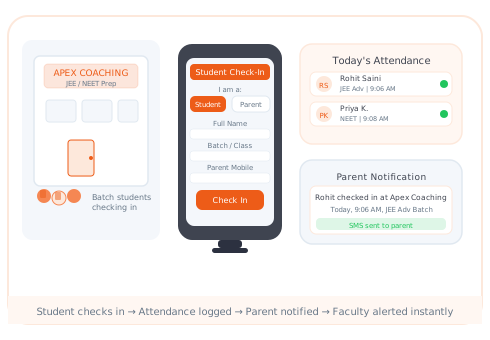
Paper registers and manual roll calls fail students, parents, and faculty
Your students deserve a safe, accountable environment. Manual entry logs leave gaps in safety, parent communication, and administrative reporting that a digital visitor system closes immediately.
Staff Cannot Locate Attendance History Instantly
Parent calls waste staff time every day
When a parent calls asking how many days their child attended this month, staff spend 10 minutes flipping through registers. A digital system answers this in 10 seconds.
Parents Are Not Informed on Arrival or Departure
Working parents have zero visibility into daily attendance
Working parents drop students at coaching centers and have no visibility into arrival confirmation or pickup timing. Automated check-in and check-out notifications solve this immediately.
Unknown Visitors Can Enter Without Verification
Coaching centers handle minors and must verify every adult
Without identity capture and verification at the entrance, there is no way to confirm that a person picking up a child is actually their parent or authorized guardian.
Batch Attendance Reports Take Hours to Compile
Manual counting of paper entries is error-prone and slow
Generating batch-wise monthly attendance reports for faculty or parents means manually counting paper register entries. A digital system generates these reports in one click.
Admission Inquiry Visits Go Untracked
Prospective student leads are lost without a log
Prospective student inquiries and admission-related parent visits often go unlogged. Without a record, the admissions team cannot follow up effectively or analyze conversion rates.
Multi-Branch Centers Have No Centralized Visibility
Local registers at each branch mean no consolidated reporting
A coaching chain with branches in 3 cities manages attendance through separate local registers. The head office has no consolidated view of student attendance or visitor patterns.
student check-in time from kiosk tap to attendance logged
parent notification on arrival and departure via SMS and email
institutes including coaching centers using Vizitor globally
From Arrival to Classroom, Digitally Logged
Four steps from student check-in to parent notification to faculty alert, all automated so your staff focuses on teaching, not paperwork.
Student Signs In at Kiosk
Student enters name, batch, and contact details on the kiosk. Photo is captured for identity records. Takes under 30 seconds.
Parent Gets Instant Alert
The moment check-in is submitted, a notification goes to the parent's registered mobile number confirming their child's arrival time and batch.
Faculty Notified for Batch
The faculty member for the relevant batch sees the real-time attendance count and a list of who has arrived, before class begins.
Monthly Reports in One Click
Generate batch-wise attendance reports for any date range. Export to PDF or CSV for parent communication or faculty performance review.
Frequently Asked Questions About
Vizitor for Coaching Centers
School ERP systems manage fees, timetables, and academics but typically lack physical visitor management at the entrance. Vizitor focuses on who enters and exits the building in real time. It tracks students, parents, and external visitors at the gate, captures photo ID, sends instant notifications, and maintains a searchable entry log that an ERP does not provide.
Yes. Create separate batch profiles for JEE, NEET, Foundation, and any other programs. When a student checks in, they select their batch, and the corresponding faculty for that batch is notified. Reports can be filtered by batch for precise attendance tracking.
Yes. You can enable QR-based touchless check-in. Students scan a QR code posted at the entrance with their phone camera and fill the check-in form on their device. This is faster than kiosk-based check-in and eliminates the need for a physical reception tablet altogether.
The student's registered parent mobile number receives an SMS notification at the moment of check-in and check-out. The message includes the student's name, arrival or departure time, and the center name. Email notifications can also be enabled for parents who prefer email updates.
Admins can export and share monthly attendance reports with parents as PDF files. For centers that want to give parents direct access, a parent-facing portal option is available that shows the student's own attendance history with session-by-session timestamps.
Parents signing in as a visitor are required to enter the student's name, their relationship to the student, and their contact number. Photo capture is mandatory. Staff can cross-reference the registered parent mobile number to verify identity. For enhanced security, an OTP verification can be added to the parent visitor flow.
Yes. Vizitor supports multi-location management from a single admin dashboard. Each branch is configured separately with its own batches, faculty, and kiosk settings. Head office admins see consolidated attendance reports across all branches and can drill down to any individual center.
Create a visitor type called "Admission Inquiry" in your check-in form. When parents or students walk in for inquiry, they check in under this type. The admissions coordinator is notified instantly and the inquiry visit is logged for follow-up. You can add custom fields like "course of interest" or "preferred batch" to capture lead information.
Vizitor provides CSV/Excel exports compatible with most center management and ERP systems. API integrations can sync student enrollment data from your existing software into Vizitor so returning students are recognized automatically. Contact our team for custom integration options.
Case Study · Education
Sri Sairam College of Engineering Reached 100% Visitor Screening
Sri Sairam College of Engineering, Bangalore, replaced its paper sign-in binders with Vizitor to secure a campus that welcomes thousands of students, faculty, parents, vendors, and visitors every year. Three years in, the deployment has run with zero manual errors and zero unresolved security issues — the same reliability a coaching center needs when parents are dropping off and picking up students every single day.
"No issues faced till now, great work by the Vizitor team!"Read the full Sri Sairam case study →
Give Parents the Peace of Mind They Deserve. Start Free.
Replace your paper register with a smarter attendance system today. Set up in under 30 minutes. Works on any existing tablet. Free plan available for small centers. No IT support required.