
Airport Visitor Management System for Secure Contractor Access
Control contractor access, verify vendor identities, and track every non-passenger visitor at your airport with a digital check-in system. Vizitor eliminates paper registers, prints ID badges automatically, and gives security teams a real-time view of who is on-site.











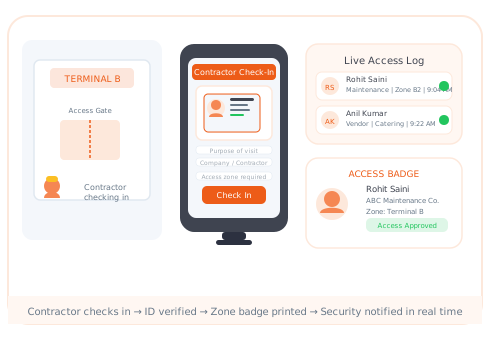
High security environments cannot afford paper-based access logs
Handwritten registers, unverified contractors, and missing checkout records create compliance gaps and security blind spots that airports simply cannot tolerate.
Paper-based contractor logs create audit gaps
Incomplete, illegible, and impossible to search
Handwritten contractor registers are incomplete, illegible, and impossible to search. When a security incident occurs, auditors need precise timestamps and identity records that paper cannot provide.
Contractors without visible ID create security blind spots
Restricted zones need visible identification at all times
Maintenance crews, caterers, and vendors who look like staff but have no visible identification badge are a serious security concern in restricted access zones.
No zone-based access control for restricted areas
Tarmac, airside, and technical zones need differentiated access
Tarmac access, airside areas, and technical zones require differentiated access permissions. A caterer should not have the same badge as a maintenance engineer in a secure zone.
Contractor overstay in sensitive areas goes unnoticed
No alerts mean no accountability after the authorized window
Without a checkout system, contractors can remain in restricted zones well beyond their scheduled access window. No alert is triggered and security teams have no visibility.
Emergency evacuation headcounts are unreliable
Real-time zone headcount is critical during incidents
During an emergency, security teams need to know exactly who is in which terminal zone. Paper logs cannot provide a real-time headcount, making evacuation accountability difficult.
Multiple terminals need centralized visibility
Fragmented terminal logs make security management impossible
Airport operations span multiple terminals and entry points. A centralized visitor management dashboard gives security operations a single view of all active visitors across the facility.
contractor check-in time from kiosk arrival to badge in hand
digital audit trail for every contractor and vendor visit
facilities including high-security environments managed on Vizitor globally
Every feature security teams need at airports
No special hardware. No lengthy procurement. Deploy on any tablet already at your security desk and go live in under 30 minutes.
Photo capture and ID verification
Capture a photo of every contractor or vendor at check-in. Verify government-issued ID and store it securely in the visitor record for compliance audits.
Zone-specific access badges
Print color-coded badges that identify the visitor type and permitted access zone. Security staff can immediately verify whether someone belongs in a restricted area.
Host approval workflow for restricted zones
For sensitive access areas, require explicit host approval before a visitor's badge is issued. The facility manager or security officer approves or denies from their mobile device.
Overstay alerts and mandatory checkout
Set maximum access windows for each contractor type. Get automatic alerts when someone remains in a restricted zone beyond their authorized duration.
Real-time evacuation headcount
During emergencies, security teams access a live list of every visitor and contractor currently on-site, organized by zone, from the Vizitor admin app on mobile.
Centralized multi-terminal dashboard
Manage visitor logs across all terminals and entry points from a single admin dashboard. Filter by terminal, date, visitor type, or access zone.
Frequently Asked Questions About
Vizitor for Airports
Vizitor is designed for non-passenger visitors at airports: maintenance contractors, cleaning crews, caterers, fuel suppliers, vendors, corporate meeting attendees at airport office facilities, and inter-departmental visitors. Passenger management (boarding, baggage, etc.) is handled by airline systems and is outside Vizitor's scope.
Yes. You can deploy multiple kiosks at the same entry point and each operates independently. Pre-registration for repeat contractors further speeds up check-in as their details are pre-filled. A 5-minute shift change window for 50 contractors is manageable with 2 kiosks operating simultaneously.
Upload safety induction documents, access agreements, or NDAs to the check-in flow. Contractors digitally sign on the kiosk or their own phone before their badge is issued. Signed documents are stored automatically in the visitor record and accessible for compliance review.
Yes. Admins can maintain a blocklist of names and IDs. When a blocked individual attempts to check in, the system flags the attempt immediately, denies badge issuance, and sends an alert to the security team for follow-up. Historical access attempts from blocked individuals are retained in the audit log.
You define access zones (Terminal A, Airside B, Technical Zone C, etc.) in the admin panel. When a visitor checks in, they specify their destination zone and provide authorization. The printed badge is color-coded and labeled with the permitted zone. Security staff use badge visual cues to verify zone compliance at internal checkpoints.
The system sends an automatic overstay alert to the security manager and the host contact at the configured time after the expected checkout window. The contractor also receives a checkout reminder. If unchecked, they remain flagged as still on-site until manually checked out by an admin.
Yes. Vizitor generates exportable reports including visitor name, company, check-in and checkout timestamps, access zone, host, purpose of visit, and whether required documents were signed. These reports can be filtered by date range and exported to PDF or CSV for regulatory or compliance authorities.
All visitor data is encrypted at rest and in transit. Admins configure data retention periods to meet regulatory requirements. For airport security contexts, extended retention is recommended and Vizitor supports multi-year log retention. Access to historical records is role-based and audit-logged.
Vizitor provides API-based integrations for connecting with physical access control systems. Badge QR codes can be configured to trigger turnstile or door release signals in supported hardware configurations. Contact our enterprise team for a custom integration scoping session.
Case Study · Enterprise Compliance
Barco Managed 28,092+ Visitors With Zero Manual Errors
Barco's Noida office ran on paper visitor registers for years, with no audit trail and no real-time security visibility, the same gap that keeps airport security teams reliant on manual logs. One enterprise Vizitor deployment replaced the registers in a single day, and the office has now logged over 28,000 visitors across two-plus years with zero issues.
"Vizitor has transformed the way we manage visitors at our campus. The platform is seamless, reliable, and has significantly elevated our front-desk experience."Read the full Barco case study →
Replace Your Paper Contractor Log Today
Give your airport security team the real-time visibility they need. Deploy in under 30 minutes. Works on any existing tablet. No special hardware required. Free trial with no credit card needed.