Common Visitor Queue Problems and How Vizitor Fixes Them


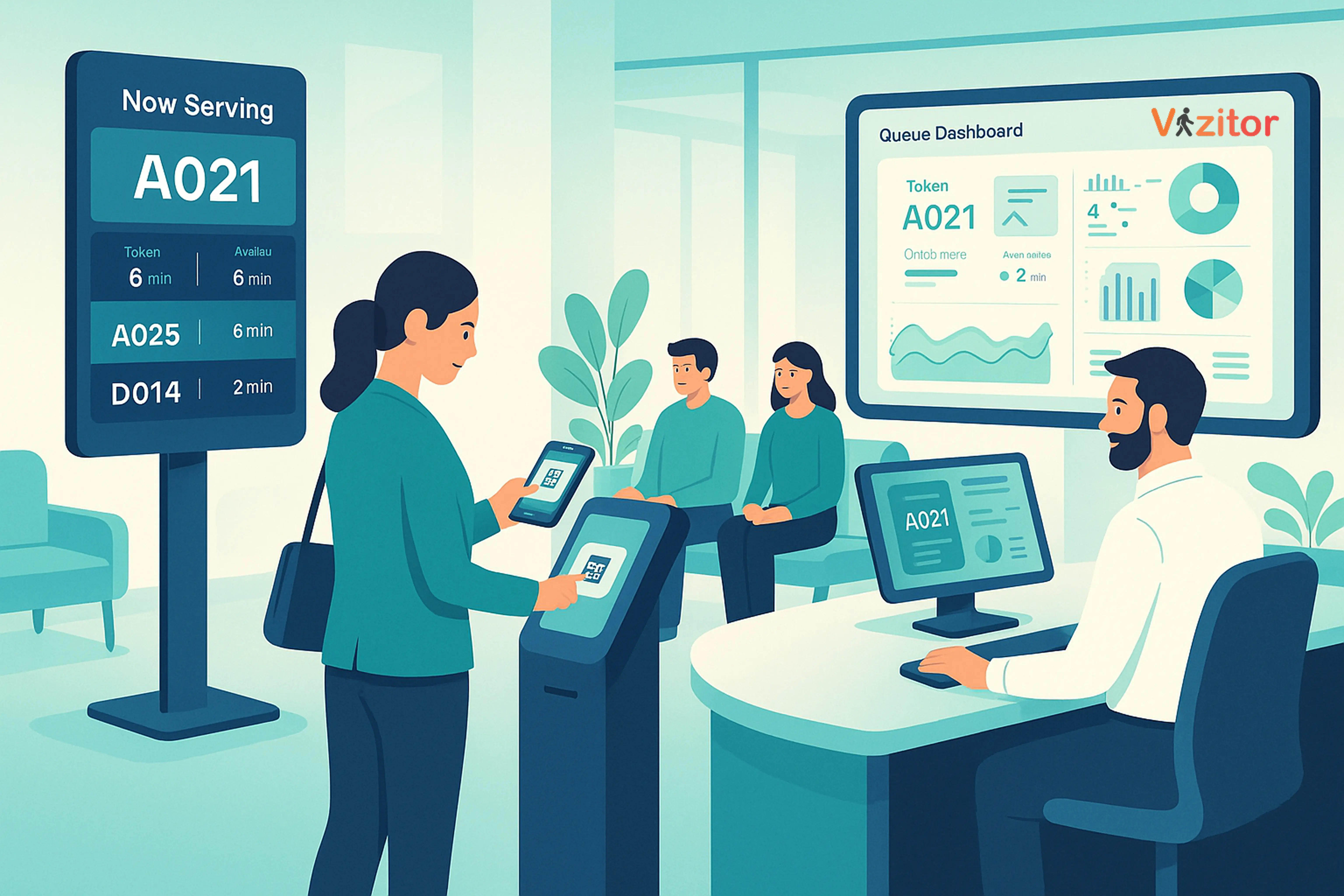
Table of Content
Try Vizitor for Free!
The Real Cost of a Broken Queue
Everyone knows the feeling: standing in a line that moves slower than expected, with no clear indication of how much longer it will take. Whether at a doctor’s office, a service center, a corporate lobby, or a government desk, poorly managed queues drain energy, frustrate visitors, and slow down operations.
But the problem goes deeper than visitor inconvenience. A slow or disorganized queue affects your entire operation:
- Staff spend time managing crowd frustration instead of serving visitors
- First impressions suffer before any real interaction happens
- Peak-hour bottlenecks become unpredictable and hard to resolve
- Data on visitor flow is absent, so improvements are guesswork
The good news is that these problems are solvable. Modern queue management tools turn chaotic waiting areas into organized, predictable visitor flows. And that is exactly what Vizitor’s Queue Management System is built to do.
From Paper Logbooks to Smart Queue Systems
Queue management has evolved significantly over the decades. Understanding that evolution helps explain why modern digital systems are now essential, not optional.
Paper Logbooks
The original queue approach was a pen, a book, and patience. Entries were slow, handwriting was often unclear, and there was no way to track flow or measure wait times. These methods worked for low-traffic environments but collapsed under volume.
Take-a-Number Tokens
Token machines added structure. Visitors received a number and waited their turn. But these systems still lacked real-time transparency. Visitors had no idea how long the wait would be, and staff had no visibility into overall queue status.
Early Digital Sign-In
Touchscreens and SMS updates improved the experience, but early systems often worked in isolation. There was no integration with visitor management, no analytics, and no ability to route visitors to the right desk automatically.
The Modern Era: Smart Queue Management
Today’s systems like Vizitor offer a fundamentally different experience:
- Self-service kiosks for instant check-in
- Digital token generation with real-time display
- Virtual queuing so visitors do not need to stand in line
- Mobile notifications with live wait time updates
- Analytics dashboards for peak-hour visibility
- Automated routing to the correct service desk
Static, paper-based queues have given way to live, intelligent, digitally managed visitor flows.
The Most Common Visitor Queue Problems (And How to Fix Each One)
Even in modern environments, organizations still face recurring queue problems. Here is a breakdown of the most common ones and the specific ways Vizitor addresses each.
1. Long Waiting Times with No Clarity
Visitors can tolerate waiting. What they cannot tolerate is waiting without knowing how long it will take. When there is no estimated time, no position indicator, and no communication from staff, frustration builds fast.
How Vizitor fixes it:
Vizitor issues digital tokens at check-in and displays real-time queue status on digital boards. Visitors can see exactly where they are in line. The system distributes load across available counters automatically, so no single desk becomes a bottleneck. Pre-registration also speeds up check-in dramatically, reducing the total time from arrival to service.
2. Confusing Queue Flow
“Where do I stand?” “Which line is for my service?” “Did I miss my turn?”
Unclear instructions create unnecessary delays and force staff to repeatedly answer the same questions. Visitors who are confused tend to hover, ask other visitors, or give up entirely.
How Vizitor fixes it:
The system guides visitors through a structured check-in process via kiosk or tablet. Digital signage displays the next token numbers, which counter to go to, and what service category is being served. Every step is clear, reducing guesswork and freeing staff from crowd management duties.
3. Overcrowded Waiting Areas
Physical crowding makes visitors uncomfortable and creates a negative perception of your organization, regardless of how good your service actually is. In healthcare settings, crowding also carries hygiene and safety implications.
How Vizitor fixes it:
Vizitor’s virtual queuing feature lets visitors join the queue without standing in a physical line. Once checked in, they can wait in a seating area, outside, or elsewhere in the building. Mobile notifications alert them when their turn is approaching, so they return at exactly the right time.
4. Staff Not Knowing Who Is Next
In manual queue setups, staff often have to walk out to the waiting area, call names, or rely on paper lists to determine service order. This is slow, error-prone, and leads to fairness complaints from visitors who believe others are being served out of order.
How Vizitor fixes it:
Every staff member has access to a real-time dashboard that shows the current queue, who is next, what service they need, and their token number. Queue priority can be assigned for urgent cases. The system eliminates coordination overhead and ensures every team member is working from the same data.
5. No Data or Insights Into Queue Performance
Without data, queue management stays reactive. Managers cannot predict peak hours, cannot identify which counters are slowest, and cannot allocate staff proactively. Every bottleneck is a surprise.
How Vizitor fixes it:
Vizitor’s analytics dashboard tracks visitor flow, wait times, service duration, and staff performance over time. Reports surface patterns like which hours see the most traffic, which service categories take longest, and where the system is losing visitors to abandonment. This data turns queue management from reactive to strategic.
6. Multiple Service Lines with No Smart Routing
Visitors often do not know which queue they belong in. They join the wrong line, wait, and then have to start over. Organizations with multiple service categories need a system that routes visitors correctly from the start.
How Vizitor fixes it:
During check-in, visitors select their service type. The system assigns the correct token category and routes them to the appropriate counter or department. Digital display boards show which token categories are being served at each counter, eliminating wrong-queue situations entirely.
See how Vizitor handles queue management
Join 2,000+ workplaces using Vizitor to reduce wait times and manage visitor flow. Free trial, no credit card required.
Book a DemoWhat Vizitor Brings to Your Workplace
Vizitor’s Queue Management System is built around one goal: making visitor flow faster, clearer, and less stressful for everyone involved. Here is a closer look at what that means in practice.
Faster Processing from Arrival to Service
Pre-registration lets visitors complete their information before arriving. QR code check-in at the kiosk takes seconds. Tokens are generated automatically and assigned to the right service category. Manual data entry by staff is eliminated. The result is a measurably faster time from arrival to being served.
For organizations that run high visitor volumes, such as banks, government offices, hospitals, or corporate headquarters, this speed improvement compounds across hundreds of daily interactions.
Transparent, Trustworthy Queue Order
One of the biggest sources of visitor frustration is not knowing whether the queue is fair. When visitors cannot see the order, they assume it is wrong. Vizitor solves this by displaying token numbers prominently on digital boards and providing mobile updates. Every visitor can verify their position, and the system enforces first-come, first-served order automatically.
For priority cases, managers can elevate a token manually and the display board updates immediately.
Security That Does Not Slow Things Down
Vizitor maintains a verified digital log of every visitor: who they are, when they arrived, what service they needed, and when they left. Digital badges can be printed at check-in. Host notifications go out automatically when a visitor is next in queue. Security is embedded in the flow, not bolted on afterward.
If you want to go deeper on this topic, see our post on cutting down customer wait times with innovative queue strategies.
A First Impression That Reflects Well on Your Organization
Visitors judge organizations within the first few minutes of arriving. A crowded, confusing waiting area sets a negative tone regardless of what happens after. A clean, guided digital check-in process, with clear displays and prompt service, sets a professional tone that carries through the entire visit.
Vizitor’s interface is designed to feel modern without being complicated. First-time visitors navigate it easily, and repeat visitors recognize it as efficient and familiar.
Operational Data That Drives Real Decisions
The analytics Vizitor provides are not just reports, they are decision-making tools. When you know that Tuesday afternoons generate 40% more traffic than Monday mornings, you can staff accordingly. When you see that one service category consistently takes twice as long as others, you can investigate and optimize. When you track abandonment rates, you can correlate them with wait times and set service-level targets.
This is the operational visibility that paper-based and manual systems simply cannot provide.
Specific Environments Where Queue Problems Are Most Acute
Queue problems exist across industries, but some environments feel them more severely than others.
Healthcare: Patient flow management directly affects care quality. Overcrowded waiting rooms create stress, raise hygiene concerns, and can affect patient outcomes. Vizitor helps hospitals and clinics route patients by department, track wait times by service type, and reduce physical crowding through virtual queuing. See our detailed breakdown of the 8 key benefits of queue management in hospitals.
Corporate offices: Visitor lobbies at enterprises deal with a mix of scheduled meetings, delivery personnel, and walk-in visitors. Without a system, reception staff become overwhelmed during busy periods and visitor tracking breaks down. Vizitor unifies the check-in experience and ensures every visitor is logged, badged, and directed correctly.
Government and service centers: These environments often have the worst queue experiences because of high volume and limited staff. Vizitor’s token-based system, digital displays, and SMS notifications can transform what is traditionally a stressful experience into a predictable, organized one.
Retail and banking: Walk-in volume spikes unpredictably during lunch hours and weekends. Vizitor gives managers real-time visibility into queue length so they can open additional counters before the wait time crosses a threshold that drives visitors away.
The Difference Between Managing Queues and Eliminating Queue Problems
There is an important distinction here. Traditional queue management tools help you react to long queues. Vizitor helps you prevent them.
The combination of pre-registration, real-time analytics, and automated routing means that most bottlenecks can be anticipated and addressed before visitors feel the impact. Staff scheduling based on historical data means you are not caught understaffed during peak hours. Smart routing means visitors arrive at the right desk the first time.
The goal is not a shorter line. The goal is a system where visitors feel confident, informed, and respected throughout their entire time at your facility.
FAQ
What causes long visitor queues in offices or service areas?
Long queues typically result from slow check-ins, unclear service routing, manual processes that require staff intervention, or insufficient counter capacity during peak hours. Adding a digital queue system addresses all of these at once.
How does Vizitor reduce actual waiting time?
Vizitor speeds up the process at every stage: pre-registration eliminates data entry on arrival, QR code check-in takes seconds, automated token generation removes manual coordination, and smart routing sends visitors to the right counter immediately. Together, these cut the time from arrival to service significantly.
Can visitors track their queue position on their phone?
Yes. Visitors receive real-time updates via SMS or the Vizitor app showing their current position in the queue and estimated wait time. They do not need to stand near the counter watching the display board.
What analytics does Vizitor provide for queue management?
Vizitor tracks peak-hour traffic patterns, average wait times by service category, counter throughput, staff performance, and visitor abandonment rates. These reports are available in the analytics dashboard and can be exported for reporting purposes.
Can Vizitor handle multiple service queues in one location?
Yes. The system supports multi-queue setups where visitors select their service type at check-in and are automatically routed to the correct counter. Each service category displays separately on digital boards so staff and visitors always know what is being served where.
Is Vizitor suitable for high-traffic environments like hospitals or government offices?
Vizitor is built specifically to handle high visitor volumes. Its virtual queuing, automated routing, and real-time analytics make it well suited for environments where managing large numbers of visitors efficiently is critical to operations.
Try Vizitor Free
No credit card required. Setup in under 5 minutes. Manage visitors, queues, meeting rooms, and more.
Start Free TrialSee Vizitor in action check-in a visitor in under 30 seconds
Trusted by 500+ businesses. QR check-in, badge printing, NDA signing. Plans from $36/mo.