
Visitor Management System for Educational Institutions
Visitor Management System for Educational Institutions
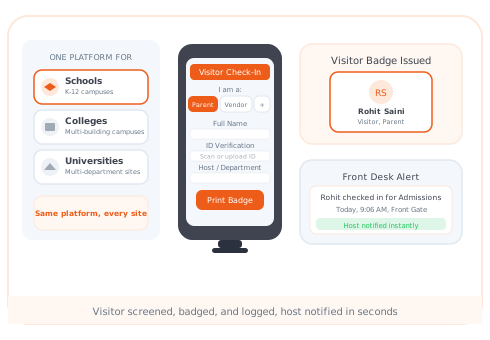
One platform for every institution type: schools, colleges, and universities. Every visitor is screened, badged, and logged before they reach a classroom, lecture hall, or campus building. Setup in under 30 minutes. No IT team required.
of educational institutions still use paper sign-in sheets with no identity verification
average Vizitor check-in time vs 5–6 minutes with a paper register
educational institutions that upgraded from paper sign-in to Vizitor
from signup to first visitor checked in, no IT team required
Find the Right Fit for Your Institution
Every educational institution manages visitors differently. A primary school managing parent drop-offs has different needs from a university managing research facility access. Select your institution type for a dedicated page built around your specific requirements.
Schools (K-12)
Manage parent check-ins, contractor access, and event pre-registration. Watchlist screening and silent alerts protect students at every entry point.
See Vizitor for SchoolsColleges
Handle high daily visitor volumes across multiple buildings. Pre-registration for open days, guest lectures, and career events. Multi-building dashboard in one view.
See Vizitor for CollegesUniversities
Multi-campus visitor tracking, research facility access, contractor management, and audit-ready records for compliance reviews.
See Vizitor for UniversitiesWhat Is a Visitor Management System for Educational Institutions?
A visitor management system for educational institutions is software that digitally records, screens, and tracks every person who enters a campus: parents, contractors, vendors, volunteers, and event guests. It replaces paper sign-in sheets with a system that captures photo ID, screens visitors against a watchlist, prints a visitor badge, notifies the relevant staff member, and stores a searchable audit trail for every visit.
Vizitor works across every institution type in the education sector from a single-building primary school to a multi-campus university using the same platform, the same dashboard, and the same check-in workflow scaled to fit the size and complexity of each institution.
The Real Risk
The Four Problems Paper Sign-In
Cannot Solve
01 / No identity verification
Visitors write any name in a paper book. No photo ID, no verification, no proof of who was actually on campus. A visitor with harmful intent faces no barrier at the front desk. Vizitor captures photo ID at every check-in and stores it with a timestamp, an irrefutable identity record for every visit.
02 / No real-time visibility during emergencies
With a paper register, there is no live view of who is on campus right now. In a fire, lockdown, or security incident, the morning sign-in book provides no useful information about who arrived after 10 AM. Vizitor's live dashboard shows every active visitor across every building, accessible from any phone, tablet, or desktop, in real time.
03 / No searchable audit trail
When an incident needs to be investigated, paper logs are often incomplete, illegible, or missing entirely. They are not defensible in institutional reviews, insurance audits, or regulatory inspections. Vizitor stores a complete visitor history, searchable by name or date, exportable as PDF or CSV, that holds up under scrutiny.
04 / No proactive threat detection
A paper register has no mechanism to identify a restricted individual. Vizitor cross-checks every visitor entry against a custom watchlist in real time. If a match is detected, a silent alert goes to the designated administrator or security contact via SMS and email. The visitor does not know they have been flagged.
CORE CAPABILITIES
Core Features of Vizitor
for Educational Institutions
Watchlist Screening with Silent Alerts
Every visitor entry is cross-referenced against your custom watchlist at the moment of check-in. Watchlists can include names, photos, and alert notes. When a match is detected, an instant silent alert is sent to the principal, security officer, or designated administrator via SMS and email. The visitor is never informed they have been flagged. Admins update and manage the watchlist directly from the Vizitor dashboard. No technical knowledge required.
Live Campus Dashboard
The admin dashboard shows a real-time view of every active visitor across every building and entry point. Filter by building, visitor type, or time. In an emergency, the dashboard provides an instant roll call, exportable as a PDF in seconds for handover to emergency services. Multi-campus institutions see all sites from one panel. Individual site admins see their own building only. Role-based access controls determine who sees what.
Pre-Registration for Events and Scheduled Visits
Send a pre-registration link to expected visitors before parent-teacher evenings, open days, guest lectures, or any scheduled event. Visitors complete their details in advance. On arrival, they scan the static QR code and are checked in in under 10 seconds. No forms, no queues. The relevant staff member is notified automatically. For large events with hundreds of expected visitors, pre-registration eliminates gate congestion and gives administrators an accurate expected headcount before the event begins.
THE HONEST COMPARISON
Paper Sign-In vs. Vizitor
See exactly what you're giving up and what you're gaining when you make the switch.
Built for Every Role on Campus
What Vizitor Does For Your Specific Role
Different people on your campus have different needs. Select your role to see how Vizitor directly helps you.
Complete campus visibility without adding to your workload
As a principal, your visitor management system should give you complete visibility, automatic risk screening, and a clear audit trail - all running in the background without needing your constant attention.
- Real-time dashboard of every visitor on campus, accessible from your phone
- Instant SMS/email alert the moment a watchlist visitor attempts check-in
- Visitor trend reports to refine your safety policies
- Setup takes under 30 minutes - no IT team required
Everything you need to run a safe school without adding to your daily workload.
Your front desk gets faster, simpler, and more professional
Vizitor removes the manual work from your front office team. Visitors self-check-in on the tablet, the system does the screening, and your staff get notified automatically - no chasing paper logs, no illegible handwriting, no interruptions.
- Self-service check-in on any iPad or Android tablet - visitors do it themselves
- Automatic badge printing on arrival - no manual writing or laminating
- Instant notification sent to the teacher or staff member being visited
- Searchable visitor history - find any past visitor in seconds by name or date
- Most front office staff are trained in under 10 minutes
A real safety layer - not just a digital sign-in sheet
Vizitor gives your safety team the tools they actually need: a live campus view, instant flagging, silent alerting, and an emergency-ready audit trail. Built specifically for the threat scenarios that school safety coordinators plan for.
- Custom watchlist with names, photos, alert notes, and access restrictions
- Silent flagging - visitor never knows they've been identified, staff act calmly
- Full log stored securely - every flagged entry documented automatically
- Emergency alert to all staff simultaneously with one tap
- Exportable PDF roll call ready for law enforcement or fire services
Built for the threat scenarios that school safety coordinators plan for.
Check in at the gate in under 10 seconds - no lines, no forms
Parents receive a pre-registration link before events. They fill in their details from home, and when they arrive, a quick QR scan is all it takes. No queues, no paper, and the class teacher is notified automatically the moment they check in.
- Email or SMS pre-registration link sent before any event
- QR code check-in at the gate in under 10 seconds
- Visitor badge printed automatically on arrival
- Teacher notified the moment a parent or guardian checks in
- Bulk invites for parent-teacher evenings, open days, and school events
No app required. Works on any smartphone with a camera.
Sign Up. Customize. Place a Tablet. Done.
No IT support, no hardware purchases, no complex training. From signup to first checked-in visitor in under 30 minutes.
Create your account
Sign up in 2 minutes. Just your school name and work email and you're in.
Customize for your school
Add your logo, staff directory, watchlist entries, visitor types, and notification rules. All in a simple dashboard.
Place a tablet at reception
Any iPad or Android tablet works. Open the Vizitor app, place it at reception or the school gate. No cables, no tech team.
Every visitor accounted for
Visitors check in digitally. Staff are notified instantly. Badges print automatically. Your campus is safer from day one.
One System. Every Educational Institution.
How Vizitor Works Differently Across Institution Types
The core platform is the same. The configuration changes to match the specific safety requirements, visitor volumes, and operational structure of each institution type.
Schools (K-12)
Primary safety concern is protecting students from unauthorised adults. Visitor volumes are moderate and visitor types are well-defined: parents, contractors, and deliveries. Watchlist screening and silent alerting are the most critical features. Setup takes under 30 minutes.
Colleges
Higher daily visitor volumes, multiple buildings, and event-driven spikes: open days, career fairs, and external speakers. Pre-registration manages event volumes. Multi-building dashboard gives administrators visibility across the entire institution.
Universities
Multi-campus complexity, research facility access, and a mix of regulated and open areas. Visitor management integrates with contractor tracking and meeting room access. Compliance records meet requirements for institutional audits and accreditation reviews.
FROM US SCHOOL LEADERS
What Principals and Front Office Managers Actually Say
"We went from paper logs to knowing exactly who's on campus in real time."
"Our front office staff thought it would be complicated. We were live in 22 minutes. They say they'd never go back to the paper book."
Is Your School Actually
Safe Right Now?
Check every safety measure your campus currently has in place. See your score update instantly.
Free 10-day trial · See pricing
Photo ID captured at every check-in - every visitor, every time, with timestamp
No visitor can write a fake name - identity is captured automatically with photo and stored securely
Custom watchlist screening on every check-in - flagged visitor silently alerted to principal
Restricted individuals identified automatically - staff notified before visitor gets past reception
Live real-time view of every active visitor on campus, accessible from any device
In any emergency, you can account for every person on campus within seconds - no searching registers
Exportable PDF roll call in one tap for fire, lockdown, or law enforcement response
Complete, accurate headcount ready for first responders - not a binder filled out hours ago
Parent pre-registration for events - QR scan check-in under 10 seconds, zero queues
Bulk invites sent before parent-teacher evenings and open days - complete attendance log built automatically
Searchable visitor history - find any visitor by name or date in seconds for any investigation
Complete audit trail for district reviews, insurance audits, or law enforcement inquiries
Automatic badge printing on arrival - visitor clearly identified at all times on campus
No manual writing - badge printed with name, photo, purpose, and permitted areas automatically
Multiple buildings or campuses managed from one dashboard with one shared watchlist
Flagged at one entrance = flagged everywhere on campus automatically - unified safety layer across all sites
Case Study · Education
Sri Sairam College of Engineering Reached 100% Visitor Screening
Sri Sairam College of Engineering, Bangalore, replaced its paper sign-in binders with Vizitor to secure a large campus that welcomes thousands of students, faculty, parents, vendors, and industry visitors every year. Three years in, the deployment has run with zero manual errors and zero unresolved security issues.
"No issues faced till now, great work by the Vizitor team!"Read the full Sri Sairam case study →
Every Educational Institution Deserves a Safer Front Door
Vizitor replaces paper sign-in sheets with a system that screens every visitor, notifies the right staff member, prints a badge, and stores a defensible audit trail, in under 10 seconds per visitor. Setup takes under 30 minutes on hardware you already own.
Frequently Asked Questions
A visitor management system for educational institutions is software that digitally records, screens, and tracks every person who enters a campus. It replaces paper sign-in sheets with a system that captures photo ID, screens visitors against a watchlist, prints a visitor badge, notifies the relevant staff member, and maintains a searchable audit trail. It applies across institution types including schools, colleges, and universities.
Vizitor manages all visitor types common to educational campuses: parents and guardians, delivery personnel, maintenance contractors, guest lecturers, volunteers, alumni, and event attendees. Each visitor type can have a customised check-in flow with different fields, ID requirements, and notification rules.
Admins add names, photos, and alert notes to a custom watchlist in the Vizitor dashboard. When a visitor enters their details at check-in, Vizitor cross-references the entry against the watchlist in real time. If a match is detected, an immediate silent alert is sent to the designated security contact or administrator via SMS and email. The visitor is never informed they have been flagged.
Yes. Admins send a pre-registration link to expected visitors via SMS or email before the event. Visitors complete their details in advance. On arrival, they scan the static QR code at the entrance and check in in under 10 seconds. No forms to fill, no queues. The relevant staff member is notified automatically.
Yes. Each entry point, building, or campus site can have its own QR code and check-in configuration. All data feeds into a single admin dashboard for cross-site visibility. Admins can see who is on-site across every building and location from one screen.
Setup takes under 30 minutes. No IT team is required. Admins configure visitor types, watchlists, notification rules, and staff directories from the Vizitor dashboard. A static QR code is placed at each entry point. Any existing Android or iOS tablet works as the check-in device.