The Hidden Cost of Tracking Attendance in Spreadsheets
This page explains why spreadsheet-based attendance tracking breaks down as businesses grow, covering the real operational and financial costs including EY research citing $250,000 in annual errors per 1,000 employees from time and attendance mistakes. It details compliance risks under FLSA and FMLA, the seven signs a business has outgrown Excel, and what to look for in a dedicated attendance tracking system. Vizitor is presented as the solution, offering real-time digital check-in, audit-ready records, and multi-location visibility as a direct replacement for manual spreadsheet processes.


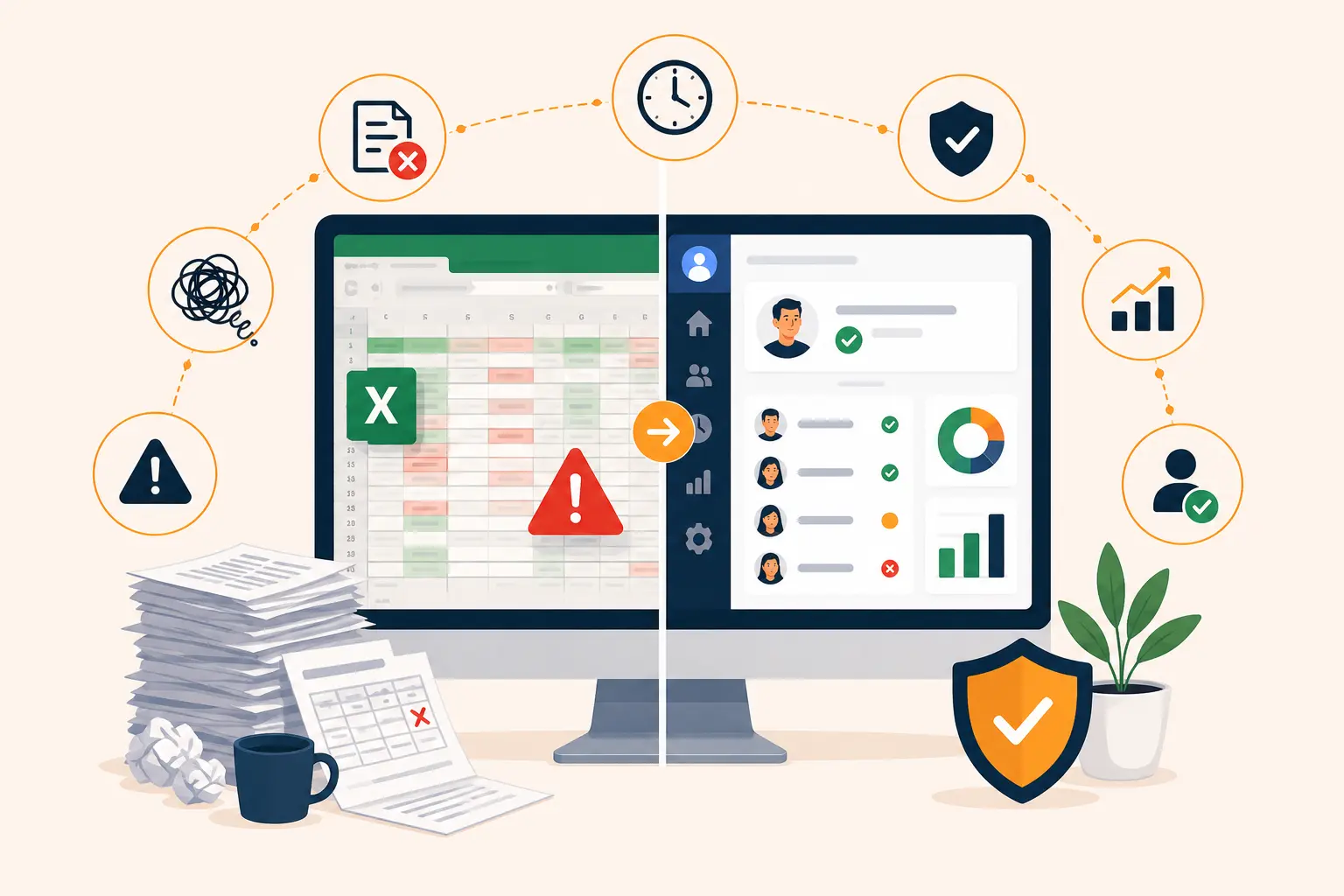
Table of Content
Try Vizitor for Free!
Why Replace Excel for Attendance Tracking? The Real Cost Most Businesses Don’t See
Let’s be honest: Excel is impressive. It can build financial models, run complex analyses, and handle data that would make most tools sweat. For a team of five or six people who all sit in the same office, an Excel attendance sheet works fine.
But somewhere between five employees and fifty or the moment someone started working from home two days a week that spreadsheet started working against you.
Tracking attendance in Excel was always a workaround, not a solution. It never had a notification when someone didn’t show up. It never flagged when overtime was creeping toward a compliance issue. It never told your payroll team that someone’s hours were recorded twice. It just sat there, waiting for a human to catch the problems and humans miss things.
This blog breaks down exactly why replacing Excel for attendance tracking isn’t just about convenience. It’s about accuracy, compliance, and the real money your business loses when those two things slip.
What’s Actually Wrong With Tracking Attendance in Excel?
Before we get into the numbers, it helps to understand what Excel actually is and isn’t.
Excel is a calculation and data management tool. It’s not an HR system. It has no concept of shifts, overtime rules, leave policies, or labor law. Every formula, every rule, and every check that makes your attendance sheet “work” is something a human built and a human has to maintain. That’s the root problem.
Here’s what that looks like in practice:
No real-time visibility.
An Excel file only reflects what was entered last. If someone called out sick this morning and the manager hasn’t updated the sheet yet, there’s no way to know who’s actually in the building right now. For facilities managers, HR teams, and anyone responsible for safety headcounts, that’s not a minor inconvenience, it’s a gap. Our guide on what a clock-in and clock-out system needs to do for workplace safety covers why that real-time gap matters more than the spreadsheet-versus-software debate suggests.
Data that breaks at scale.
As your headcount grows, Excel spreadsheets grow with it and not gracefully. Long formulas that reference hundreds of rows degrade in performance. Protected cells get accidentally unlocked. Merged cells create chaos when you try to sort or filter. What worked for 20 people is a maintenance burden at 80.
Version chaos in collaborative settings.
Most teams share their attendance file through email or a shared drive. The moment two people open and edit the file simultaneously especially through SharePoint formula conflicts, broken references, and silent data overwrites become a daily risk. There’s no reliable way to know which version of the file reflects reality.
No accountability layer.
Who changed that entry last Thursday? What did it say before? Excel doesn’t know. Unless you’ve built in version tracking manually (and almost no one does for an attendance file), there’s no audit trail which becomes a serious problem the moment you need to defend a decision.
The Numbers: What Excel Attendance Errors Actually Cost
Here’s where the “just use Excel, it’s free” argument starts to fall apart.
According to an Ernst & Young survey, time and attendance errors are the single most common payroll mistake. They occur more than once per employee per year on average. For every 1,000 employees, those errors cost around $250,000 annually not in one big incident, but in the accumulated cost of corrections, disputes, off-cycle payments, and wasted HR hours.
EY also found that 1 in 5 payrolls in the United States contains errors, with each error costing an average of $291 to fix. The most time-consuming missing or incorrect time punches take nearly 29 full 40-hour work weeks per year, per 1,000 employees, just to resolve. That’s more than half a work year spent fixing something a proper system would have caught at entry.
And then there’s the downstream effect on your people. According to Workday research, one in five employees considers leaving their job after being paid incorrectly even twice. The cost of replacing one employee runs anywhere from half to twice their annual salary. So an attendance error that causes a payroll mistake doesn’t just cost you the fix, it potentially costs you the employee.
Excel is free. The errors it enables are not.
The Compliance Risk Nobody Talks About
Most businesses know that Excel creates data entry problems. Fewer realize it creates legal exposure.
Under the Fair Labor Standards Act (FLSA), employers are required to maintain accurate records of hours worked and wages paid. There’s no specified format but there is a requirement for accuracy and completeness. An Excel file where cells have been overwritten, formulas have been broken, and there’s no log of who changed what doesn’t meet “accurate and complete” in any meaningful sense.
Under the Family and Medical Leave Act (FMLA), employers must track intermittent leave carefully; eligibility windows, leave usage, notice deadlines, and certification timelines. Managing all of this in a spreadsheet creates what compliance experts describe as a “cloudy audit trail.” If a DOL audit or an employee dispute requires you to reconstruct the history of a leave case, a spreadsheet with no change log and multiple edited versions gives you nothing to stand on.
HR compliance attorneys are clear on this: in the event of a legal challenge, “we tracked it in Excel” is not a defensible documentation practice. You need records that show what was tracked, when, by whom, and what decisions were made and those records need to be tamper-evident.
An attendance management system creates that trail automatically. Excel doesn’t.
7 Signs Your Business Has Outgrown Excel for Attendance
You don’t need to be running a 500-person company to hit these walls. Most businesses run into them well before that.
1. HR spends significant time every payroll cycle reconciling attendance data.
If someone on your team is manually cross-referencing attendance records with payroll before every pay run, that’s a sign your process is built on a patch, not a system.
2. You’ve had at least one payroll error traced back to an attendance entry mistake.
Once is a warning. Twice is a pattern. If it’s happened more than once, the process is the problem not the person who made the error.
3. You can’t answer “who was in the office today?” in real time.
This matters for emergencies, safety headcounts, and client-facing operations. If you’d have to check with a manager or wait for a sheet to be updated, you don’t have real-time attendance visibility.
4. You have remote or hybrid employees.
Hybrid work broke the sign-in sheet model entirely. When people aren’t in one place, there’s no reliable way to log attendance manually across locations. Excel becomes a collection of what people remember to enter, not what actually happened.
5. You’re managing leave across FMLA, PTO, sick time, and state-specific laws.
The overlap between federal FMLA, state paid family leave laws, ADA accommodations, and company PTO policies is genuinely complex. Tracking concurrent obligations across multiple employees in a spreadsheet is where compliance mistakes happen.
6. Managers are maintaining their own local copies.
If different departments have different versions of the attendance file even slightly different, you have conflicting records and no single source of truth. That’s a compliance and management nightmare waiting to surface.
7. You’ve had a time theft or buddy punching incident.
Excel has no way to verify who entered an attendance record. A system with biometric check-in, ID scanning, or digital sign-in captures the actual person not just a name someone typed.
Excel vs. Attendance Tracking Software: What Changes
| Feature | Excel Spreadsheet | Dedicated Attendance System |
|---|---|---|
| Real-time attendance visibility | No | Yes |
| Automatic error alerts | No | Yes |
| Audit trail / change log | No | Yes (tamper-evident) |
| Payroll system integration | Manual export | Direct sync |
| FMLA / leave compliance tracking | Manual | Automated |
| Remote / hybrid employee support | Poor | Full support |
| Multi-location management | Extremely difficult | Built-in |
| Buddy punching prevention | None | ID scan / biometric |
| Manager notifications | None | Real-time alerts |
| Compliance documentation | Not audit-ready | Audit-ready |
| Scalability | Breaks with growth | Scales automatically |
| Cost of errors | High (hidden) | Low (caught at entry) |
What Should You Look for in an Excel Replacement?
If you’ve decided it’s time to move on from spreadsheets, here’s what matters when evaluating options:
Real-time check-in and check-out logging.
The system should record the actual moment someone arrives and leaves not rely on after-the-fact data entry. This can be a digital sign-in kiosk, a mobile app check-in, ID scanning, or biometric verification depending on your security needs.
Automatic payroll data sync.
Every hour between attendance data and payroll processing is a chance for an error to slip through. Look for a system that exports directly to your payroll software or syncs automatically, eliminating the manual transfer step entirely. That includes converting hours and minutes into the decimal format payroll runs on, a calculation that’s easy to get wrong by hand and simple to automate.
Audit-ready record keeping.
Every entry should be timestamped and logged, with a clear record of what changed, when, and who made the change. This is what you need for FLSA compliance, FMLA documentation, or any DOL audit.
Leave and absence management.
PTO requests, sick day tracking, FMLA leave, and state-specific leave programs should all live in the same system as your attendance data not in a separate spreadsheet managed by someone in HR.
Multi-location support.
If you operate across more than one office or site, you need a system that gives you a unified view across all locations, not separate files that someone has to manually consolidate.
Manager alerts and notifications.
When someone doesn’t show up, the relevant manager should know immediately not when they happen to check the spreadsheet. Automated alerts for absences, late arrivals, and early departures remove the accountability gap.
Data security and access controls.
Your attendance records contain sensitive employee data. A dedicated system with role-based access controls is more secure than an Excel file floating around in a shared drive.
How Vizitor Handles Attendance Tracking
Vizitor’s visitor and employee management platform gives businesses a digital, real-time alternative to spreadsheet-based attendance tracking built for the way modern workplaces actually operate.
With Vizitor, attendance is captured at the point of entry not entered manually after the fact. Every check-in and check-out is logged automatically, with a timestamped digital record that’s always accurate and always audit-ready. Managers get real-time visibility into who’s in the building, across all their locations, without waiting for someone to update a file.
For organizations managing hybrid teams, multiple office locations, or facilities with strict compliance requirements, Vizitor removes the manual steps that create errors and the data gaps that create risk.
Key features relevant to attendance tracking:
- Digital sign-in with automatic timestamps at every entry point
- Real-time dashboard showing who’s currently on-site across locations
- Complete visitor and employee log with exportable reports
- Host and manager notifications for arrivals, check-outs, and no-shows
- Audit-ready records for compliance and safety documentation
- Integration with existing HR and facilities workflows
See how Vizitor tracks attendance →
When Does Excel Still Make Sense?
Fairness matters here. Excel is not a bad tool. It’s the wrong tool for this specific job once you pass a certain point but there are scenarios where it’s still reasonable.
If you have fewer than 10 employees, all of whom work set hours in a single location, and your payroll process is straightforward, a well-built Excel template can do the job without creating serious risk. You likely don’t have multi-location complexity, compliance audit exposure, or the kind of volume where errors compound quickly.
The moment any of these things change, hybrid work, headcount growth past 15 to 20 people, compliance obligations, or payroll complexity; Excel becomes a liability more than an asset. That’s not a criticism of Excel. It’s a recognition of what the tool was designed to do.
Conclusion
Excel’s real cost isn’t the subscription fee, it’s free after all. Its cost is the hours spent maintaining formulas that could be automated, the payroll errors that surface two weeks after the attendance sheet was updated wrong, and the compliance exposure that shows up only when an auditor asks for documentation you can’t produce.
Attendance tracking is one of those operational areas where the right tool makes the whole process invisible, it just works, accurately, in the background. The wrong tool makes it a recurring source of problems that your HR team, payroll team, and managers have to constantly manage around.
If your team has grown past the point where Excel feels manageable, it probably already has. The switch isn’t as difficult as it seems, and the risk of staying put is bigger than most businesses realize until something goes wrong.
See how Vizitor simplifies attendance tracking across your locations →
Frequently Asked Questions
See Vizitor in action check-in a visitor in under 30 seconds
Trusted by 500+ businesses. QR check-in, badge printing, NDA signing. Plans from $36/mo.