What Is an Internal Ticketing System and Why It Matters
This page is a complete guide to internal ticketing systems, software that tracks and manages employee requests submitted to IT, HR, facilities, and operations teams. It covers how tickets move from submission to resolution, the four main types of internal ticketing by department, eight must-have features, seven data-backed benefits, and a practical eight-step implementation guide. Vizitor is positioned as the internal ticketing solution built specifically for workplace operations and facilities teams.


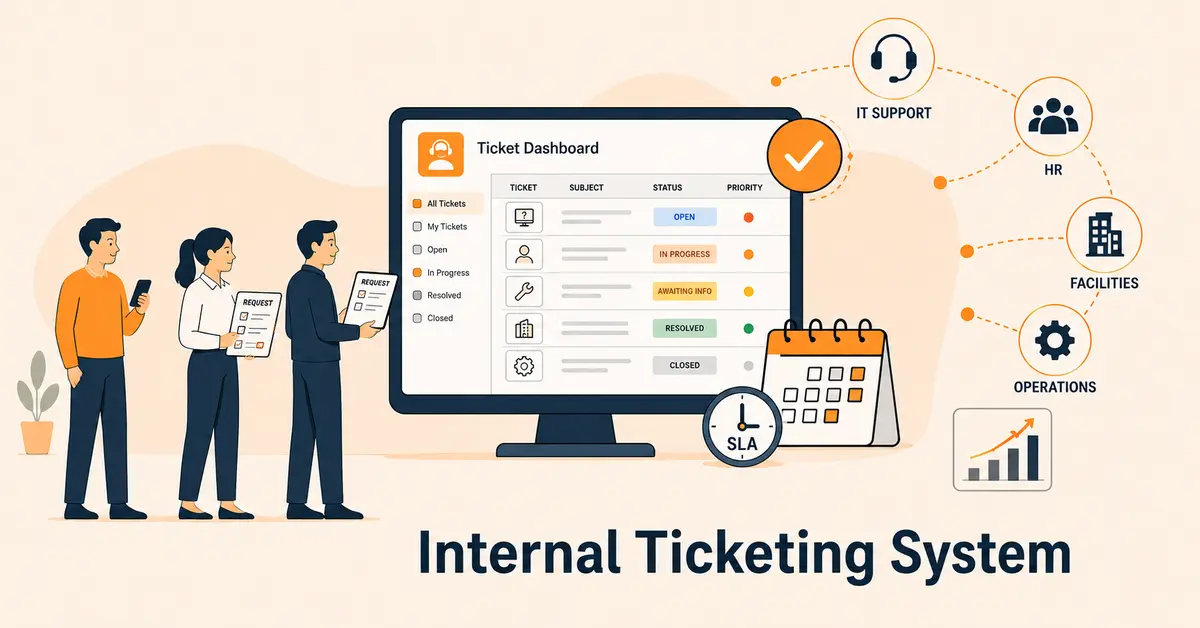
Table of Content
Try Vizitor for Free!
Here’s a scenario most office managers know all too well.
A facilities request gets sent to the wrong email. Someone Slacks IT about a broken monitor, and it gets buried under 200 other messages. An employee emails HR about a payroll issue and follows up three times before getting a response.
Sound familiar?
That’s what happens when internal requests run on informal communication instead of a real system. And the numbers back it up: the average support ticket takes 82 hours to resolve, according to Jitbit’s analysis of over 1,000 companies. Employees lose 3.22 hours of productivity per incident just waiting on a response, per HappySignals research.
An internal ticketing system is the fix. It turns every employee request whether it’s an IT issue, an HR question, or a facilities complaint into a tracked, assigned, and accountable workflow. No more dropped balls. No more “did you get my email?” follow-ups. No more guessing who’s supposed to handle what.
This guide covers everything: what an internal ticketing system is, how it works, who uses it, what features actually matter, and how to know when your team is ready for one.
What Is an Internal Ticketing System?
An internal ticketing system is software that captures, tracks, and manages requests from employees not customers. When someone on your team needs help from IT, HR, facilities, finance, or operations, they submit a request. That request becomes a ticket: a structured record with a unique ID, a description of the issue, a priority level, an assigned owner, and a status that updates in real time until the problem is solved.
Think of it as a digital paper trail that never gets lost. Every request is logged, every assignment is documented, and every resolution is recorded. Managers get visibility into workloads and response times. Employees get status updates without having to chase anyone down.
The bottom line: an internal ticketing system replaces the chaos of informal request management, scattered emails, missed Slack messages, and forgotten hallway conversations with a process that actually works.
HappySignals / Jitbit Research, 2025–2026: Employees lose an average of 3.22 hours of productivity per IT incident while waiting on a resolution, according to HappySignals. Jitbit’s benchmark study across 1,000+ companies found a mean ticket resolution time of 82 hours. The top-performing 5% of support teams close tickets in just 17 hours, a gap driven almost entirely by structured process, not bigger teams.
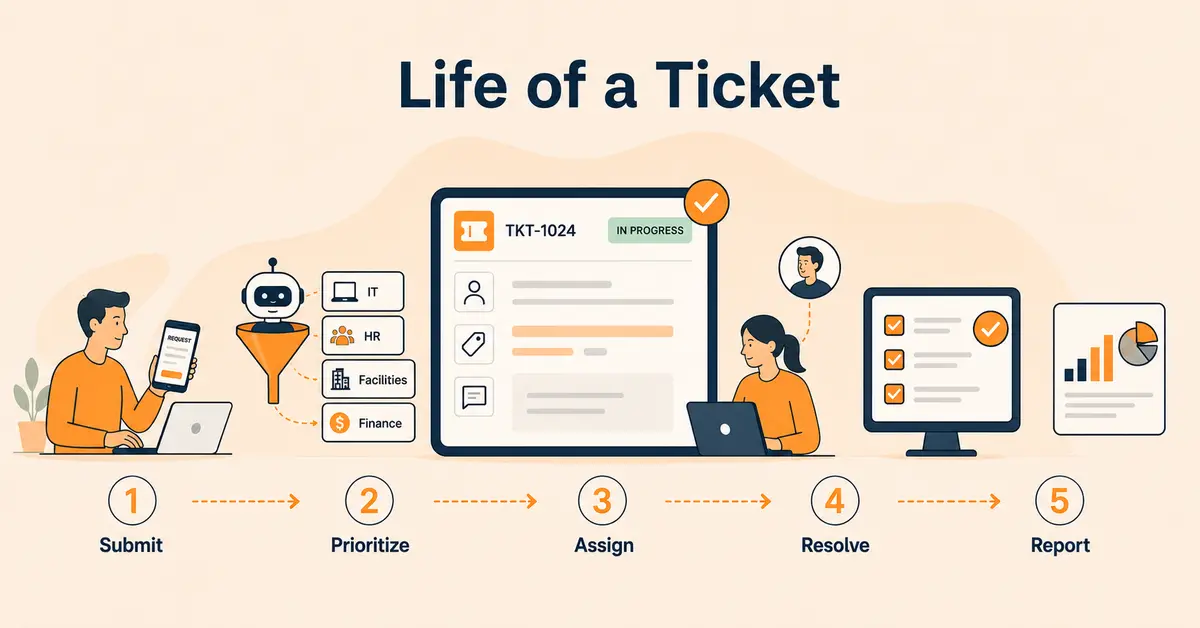
How It Works: The Life of a Ticket
Knowing how a ticket moves through the system helps you understand why these tools work and why informal alternatives consistently fall short.
Step 1: Submission
An employee has a problem or needs something done. They submit a request through a web portal, an email, a Slack integration, or a Microsoft Teams bot. The system immediately creates a ticket, generates a unique ID, and sends a confirmation. The request is officially in the system. It can’t be ignored, forgotten, or buried under other messages.
Step 2: Categorization and Priority
The system automatically categorizes the ticket: IT, HR, facilities, finance and assigns a priority. A company-wide system outage gets flagged as critical. A request for a new keyboard gets standard priority. Modern systems use AI to handle this categorization with up to 98% accuracy, eliminating the manual sorting that slows teams down and creates misroutes.
Step 3: Routing and Assignment
The ticket reaches the right person without anyone deciding manually where it should go. Routing rules built into the system send IT tickets to IT, facilities tickets to facilities, and HR tickets to HR. For teams with multiple staff members, the system distributes tickets based on workload, skill set, or whatever rules the team configures. The right person sees the right ticket.
Step 4: Resolution
The assigned team member works on the ticket, updating status as they go. The employee who submitted the request can check status anytime without reaching out. Internal notes let colleagues collaborate on complex tickets without the requester seeing every back-and-forth. When it’s resolved, the ticket closes and the employee gets notified.
Step 5: Data and Reporting
Here’s where most organizations leave real value on the table. Every closed ticket becomes data. Which request types take the longest? Which team has the biggest backlog? What issues keep coming back? This information drives smarter staffing decisions, better self-service resources, and proactive fixes for recurring problems instead of reactive scrambling every time the same issue shows up.
Internal vs. External Ticketing: What’s the Difference?
People use these terms interchangeably, but they’re built for completely different audiences and confusing them leads to the wrong tool choice.
External ticketing serves your customers. When a customer contacts your support team about a product issue, it becomes a ticket managed by your customer-facing support staff. Tools like Zendesk and Freshdesk are purpose-built for this. High volume, multiple channels, branded experience.
Internal ticketing serves your employees. The “customers” are your colleagues, submitting IT requests, HR questions, facilities complaints, and operations needs. The workflows are different, the privacy requirements are stricter, and the expectations around response time and communication are shaped by internal culture, not customer service benchmarks.
The biggest practical difference is privacy. Internal tickets often carry sensitive information, payroll discrepancies, FMLA requests, workplace complaints, security incidents. Role-based access controls and internal collaboration features matter in ways that customer-facing systems don’t always prioritize.
| External Ticketing | Internal Ticketing | |
|---|---|---|
| Who submits | Customers | Employees |
| Primary use | Customer support | IT, HR, facilities, ops |
| Privacy needs | Standard | High, HR, legal, security |
| Compliance angle | Customer data (CCPA) | Employee data (HIPAA, SOX, OSHA) |
| Common tools | Zendesk, Freshdesk | Jira Service Mgmt, Freshservice, Vizitor |
The 4 Types of Internal Ticketing Systems
Internal ticketing isn’t one-size-fits-all. Here’s how the four main types work and what makes each one different.
1. IT Ticketing
This is the category most people think of when they hear “ticketing system.” IT teams handle password resets, hardware issues, software access, network problems, device replacements, and security incidents. IT ticketing is the most mature and formalized type often built on ITSM frameworks like ITIL, which define standard processes for incident management, change management, and problem tracking.
Most common IT tickets: Password resets, software access requests, laptop issues, VPN problems, account provisioning, security incidents.
2. HR Ticketing
HR teams deal with enormous request volume, benefits enrollment questions, PTO requests, FMLA paperwork, payroll discrepancies, onboarding setup, and policy clarifications. Without a structured system, these requests end up scattered across email, Teams chats, and in-person conversations. Important deadlines get missed. Compliance documentation doesn’t get created. Employees feel like their requests disappear into a black hole.
Most common HR tickets: Benefits questions, PTO requests, FMLA leave, payroll issues, new hire onboarding, policy questions, employee relations matters.
3. Facilities Ticketing
This is the most underserved category in most workplaces and the gap where the most requests fall through the cracks.
Facilities teams manage the physical office: broken equipment, HVAC issues, maintenance requests, cleaning schedules, room setups, furniture needs, and supply restocking. In most organizations, these requests arrive through the least structured channels imaginable, a text to the facilities manager, a sticky note on a door, or a mention in a team meeting that nobody follows up on.
Most common facilities tickets: Equipment repair, HVAC or temperature complaints, office maintenance, room setup, furniture requests, supply orders.
4. Finance, Legal, and Operations Ticketing
These teams handle requests where process integrity matters as much as speed: expense reimbursements, vendor onboarding, contract reviews, purchase approvals, and compliance queries. In regulated industries like financial services, healthcare, government contracting, these requests need documented approval chains and audit trails that can withstand a regulatory review.
Ticketing in these departments is less about fast resolution and more about making sure every request goes through the right people, creates a complete paper trail, and can be retrieved quickly if it’s ever needed.
Most common tickets: Expense reimbursement, vendor setup, contract review, purchase approval, budget query, compliance documentation.
8 Features That Separate Good Internal Ticketing Systems from Great Ones
Not all ticketing platforms deliver equal value. Here are the eight features that actually move the needle.
1. Multi-channel intake.
Employees aren’t going to use a system that requires them to change how they work. The ticketing system should capture requests from email, Slack, Microsoft Teams, web portals, and any other channel your team uses converting them automatically into tracked tickets. Forcing everyone through a single portal they don’t naturally reach is why ticketing rollouts fail.
2. Automated routing.
Tickets need to reach the right person without a manual handoff. Routing rules based on category, keyword, department, or workload make this automatic. Manual routing is where tickets sit in limbo, assigned to nobody, owned by nobody, forgotten by everyone.
3. SLA tracking and escalation.
A Service Level Agreement (SLA) defines how fast your team is expected to respond and resolve each request type. The system tracks actual performance against these targets, flags tickets approaching a breach, and escalates automatically when deadlines are missed. Without SLA tracking, there’s no accountability and no honest measurement of how the team is performing.
4. Self-service portal and knowledge base.
40% of ticket submitters already tried to find answers on their own before contacting support. A searchable knowledge base lets them succeed at that, reducing ticket volume by 20-40% and freeing your support staff to focus on requests that actually need them.
5. Real-time status visibility.
Employees should never have to chase down a status update. Open, in progress, waiting on a response, resolved, visible at any time without contacting anyone. This single feature eliminates the majority of follow-up messages that waste both the employee’s time and the support team’s.
6. Internal notes and collaboration.
Complex tickets need internal discussion that the requester doesn’t need to see. Internal notes let team members collaborate directly on a ticket without cluttering the requester’s view with back-and-forth that doesn’t concern them.
7. Reporting and analytics.
How long does it take your facilities team to resolve a maintenance request? What’s your IT team’s SLA compliance rate? Which request types come up most often? If you can’t answer these questions, you’re managing by gut feeling. Reporting dashboards answer them with data.
8. Integration with your existing tools.
The ticketing system needs to fit your tech stack not fight it. Microsoft 365, Google Workspace, Slack, HRIS platforms, access control systems. The more natively it integrates, the less friction employees experience submitting requests and the less administrative work your team carries.
7 Real Benefits of an Internal Ticketing System
1. Requests stop disappearing.
Every submission gets a unique ticket ID. There’s no version of a properly configured ticketing system where a submitted request falls off the radar unnoticed. Compare that to email-based support, where requests routinely get buried, missed during someone’s vacation, or overlooked because they landed in the wrong inbox.
2. Accountability is built in not bolted on.
Tickets are assigned to named individuals with defined deadlines. The system tracks whether those deadlines get met and escalates when they don’t. That’s accountability built into the process not dependent on management enforcement.
3. Resolution times drop significantly.
The best-performing 5% of American support teams close tickets in 17 hours. The average is 82. The gap isn’t staffing, it’s process. Automated routing, prioritization, and clear ownership are what separate the 17-hour teams from the 82-hour teams.
4. Employee trust in internal teams improves.
Only 55% of US employees feel completely supported by their internal teams, according to Forrester research. A ticketing system doesn’t just solve problems faster, it signals to employees that their requests matter. Status updates without prompting, timely responses, and consistent follow-through build the kind of trust that informal processes can’t deliver.
5. Recurring problems become impossible to ignore.
When every request is logged, patterns surface. If the same conference room projector generates five maintenance tickets in a month, the data shows it and drives a real fix instead of five separate reactive repairs. Without a ticketing system, recurring issues stay invisible behind individual interactions.
6. You get the data to make smarter decisions.
Deloitte found that fragmented internal workflows, employees bouncing between disconnected tools trying to get answers cost organizations 32 days of productivity per employee per year. That’s not a small number. Ticketing systems reduce this by centralizing requests and eliminating the guesswork of informal communication.
7. Compliance documentation happens automatically.
For HR tickets involving FMLA, ADA accommodations, or workplace investigations, and for IT tickets involving HIPAA-covered data or SOX-relevant system access, the audit trail a ticketing system creates is the documentation compliance requires. It’s a byproduct of using the system properly, not a separate documentation effort.
6 Signs Your Team Actually Needs a Ticketing System
You don’t need a formal evaluation to know when informal processes have stopped working. These signs make it obvious. For a deeper look at exactly what email is structurally missing, no unique ID, no ownership field, no shared status, see why email specifically fails as a ticketing system.
Requests are going unanswered.
Employees report submitting requests that nobody followed up on. That’s not a people problem. It’s a process problem. Email was never designed to track work.
You can’t answer basic performance questions.
If your VP asks how long it typically takes to resolve a facilities issue and you don’t have an answer, you don’t have a reporting function. A ticketing system answers this question automatically.
One person is manually routing everything.
When all requests funnel through a single coordinator who decides who handles what, that person is the ticketing system. And they’re one vacation away from complete breakdown.
Employees follow up repeatedly before getting a response.
Follow-up messages exist because people have no visibility into whether their request was received or assigned. Real-time status tracking eliminates this.
The same issues keep coming back.
Without logged data, recurring problems stay hidden. They look like individual incidents rather than systemic issues and they never get permanently fixed.
Multiple teams are running disconnected inboxes.
IT has one shared inbox. Facilities has another. HR has a third. No unified view exists. Coordination between teams requires manual phone calls or Slack messages. This is the most common configuration for growing US companies that haven’t yet formalized ticketing and it’s also the configuration that creates the most daily friction.
How to Implement an Internal Ticketing System: Step by Step
Step 1: Map how requests currently flow.
Before picking a tool, document your current state. Which channels do employees use to submit requests? Which teams receive them? Where do things fall through the cracks? This mapping defines your actual requirements not theoretical ones.
Step 2: Define your intake channels.
Start with one or two channels employees already use typically email-to-ticket and a web portal. Don’t try to configure every possible channel at launch. Starting simple means faster deployment and higher adoption.
Step 3: Define your ticket categories.
Three to five categories per department is a workable starting point. For facilities: maintenance, equipment, room setup, supplies. For IT: access requests, hardware, software, network. Keep them simple enough that any employee can categorize their own request accurately.
Step 4: Set up routing rules.
Define who receives which categories. For small teams, a single queue works fine. For larger teams, distributing by category and workload prevents bottlenecks. Build in escalation rules so unassigned tickets don’t age past your SLA.
Step 5: Configure your SLAs.
Set expected response and resolution times per category. They don’t need to be aggressive, they need to exist and be enforced. A 4-business-hour first response SLA and a 2-business-day resolution SLA gives you a measurable baseline from day one.
Step 6: Build out your knowledge base, starting with your top 10 request types.
Self-service works best when it’s built on your most frequent real-world requests. Identify the 10 questions and issues your teams handle repeatedly. Write clear, searchable answers for each. This pre-launch investment reduces day-one ticket volume immediately.
Step 7: Train your team and tell employees how to submit.
Support staff need hands-on training before launch. Employees need a simple, clear announcement: here’s where to submit requests, here’s what to expect. A direct link to the portal removes any friction between knowing the system exists and using it.
Step 8: Review performance at 30 days.
Pull your data: average resolution time, ticket volume by category, SLA compliance rate, most frequent request types. Adjust routing rules, SLAs, and knowledge base content based on what actually happened not what you assumed would happen. The first 30 days always surface gaps that planning can’t predict.
AI and Internal Ticketing: What’s Real, What’s Hype
AI is everywhere in ticketing system marketing right now. Here’s the honest breakdown of what’s delivering real value in 2026 and where the hype still outpaces the reality.
What’s actually working:
Automated classification. AI achieves up to 98% accuracy categorizing common ticket types like password resets compared to 60-70% for manual categorization. Fewer misroutes means faster resolution, period.
Response suggestions. When AI suggests responses based on similar resolved tickets, agents handle requests faster. Studies across 5,000 agents showed 13.8% higher inquiry handling rates when AI-assisted suggestions were available. That’s a real productivity lift, not a marketing stat.
Self-service deflection. AI-powered knowledge matching, surfacing the right article as an employee types their request stops tickets from being submitted in the first place. When it works well, this reduces incoming volume by 20-40%.
Where it still falls short:
AI support agents hit 78% average customer satisfaction and 98.2% accuracy on simple tasks like password resets. But accuracy drops to 61.2% on emotionally complex requests. An employee dealing with an FMLA situation, a payroll dispute, or a workplace complaint needs a human not an AI chatbot reading from a knowledge base.
The practical guidance: deploy AI for classification, routing, and self-service deflection. Keep humans in the loop for anything sensitive, complex, or context-heavy. Most American organizations are best served by AI handling the routine volume while staff handles the requests that actually need judgment.
How to Choose the Right Internal Ticketing System
The right system is the one your team will actually use, consistently. Here’s how to find it:
Match the tool to your primary use case.
IT teams with formal ITSM needs ITIL workflows, change management, asset tracking, CMDB should be looking at Freshservice, Jira Service Management, or ManageEngine ServiceDesk Plus. Facilities and workplace operations teams, whose primary need is structured request tracking without ITIL complexity, need something lighter and purpose-built. Don’t buy a ServiceNow-tier platform if you’re managing maintenance requests and supply orders.
Verify integration with your existing stack.
If your company runs on Microsoft Teams, a ticketing system with native Teams integration eliminates friction. Same for Slack, Google Workspace, and your HRIS. Disconnected tools recreate the exact fragmentation the system is meant to solve.
Read the fine print on pricing.
Per-agent pricing is common, but true monthly costs include SMS fees, analytics add-ons, AI feature tiers, and implementation costs. A 2025 Software Advice survey found that 62% of small businesses were surprised by additional costs after subscribing to a SaaS tool. Get the complete cost breakdown including your expected ticket volume and any per-message charges before you sign anything.
Run a real trial.
Most platforms offer 14-21 day trials. Don’t use the trial to explore features in a demo scenario. Use it to process your actual top five ticket types and see what breaks. How long does setup really take? How intuitive is the submission flow for employees? Does routing work without manual correction?
Be honest about whether you need IT ticketing, facilities ticketing, or both.
These are different problems that often require different tools. IT ticketing handles software and hardware issues under ITSM frameworks. Facilities ticketing handles physical workplace requests, maintenance, equipment, room setup. Some platforms cover both well. Most cover only one.
How Vizitor Handles Internal Ticketing for Workplace Operations
Vizitor’s ticketing system is purpose-built for workplace operations and facilities teams, the internal teams whose request management needs are most consistently left unaddressed by IT-focused platforms.
When an employee reports a broken piece of equipment, requests a room configuration, flags a maintenance issue, or needs a facilities-related service, they submit a request through Vizitor. The request becomes a ticket: logged, assigned, tracked, and visible to the requester in real time through to resolution.
For organizations already using Vizitor for visitor management, attendance tracking, and meeting room booking, the ticketing module connects workplace requests to the same operational platform. Facilities and operations teams get a single view of everything happening across their spaces not a separate disconnected tool they have to check independently.
What Vizitor delivers:
- Structured submission for workplace and facilities requests
- Clear ownership, every ticket is assigned to a specific team member
- Real-time status visible to the employee who submitted the request
- Resolution documentation for audit and compliance purposes
- Connected to visitor management, attendance, and room booking in one platform
Vizitor isn’t an enterprise ITSM platform for complex IT operations and it doesn’t try to be. It’s the right tool for the facilities and workplace operations gap that most IT-focused ticketing platforms leave wide open.
The Bottom Line
An internal ticketing system isn’t a luxury feature for enterprise companies. It’s the operational infrastructure that makes it possible for any internal team: IT, HR, facilities, operations to consistently handle employee requests without dropping the ball.
The data is clear. Mean resolution takes 82 hours without structure. Employees lose 3.22 hours of productivity per incident waiting on responses. Only 55% of American workers feel fully supported by their internal teams. These aren’t technology problems. They’re process problems and they’re solvable.
The right tool depends on your use case. IT teams with complex ITSM needs require different platforms than a facilities team managing maintenance requests and office supply orders. Both need accountability. Both need visibility. Both need a system that makes the invisible visible.
The organizations that get this right don’t just resolve issues faster. They build the kind of internal trust where employees stop wondering whether anyone’s actually going to follow up because they already know the answer is yes.
Frequently Asked Questions
See Vizitor in action check-in a visitor in under 30 seconds
Trusted by 500+ businesses. QR check-in, badge printing, NDA signing. Plans from $36/mo.