Catching Denied-Party Matches Before a Badge Gets Printed
Visitor watchlist screening is the process of automatically checking every guest, contractor, and delivery person against denied-party lists at front-desk check-in. A modern visitor management system runs the check silently in under two seconds; if a match surfaces, security is alerted before the visitor receives a badge without informing the visitor (the "tipping-off" rule). It's required under ITAR, CMMC, DFARS, and Joint Commission, and a baseline duty-of-care for any organization with a credible security risk.


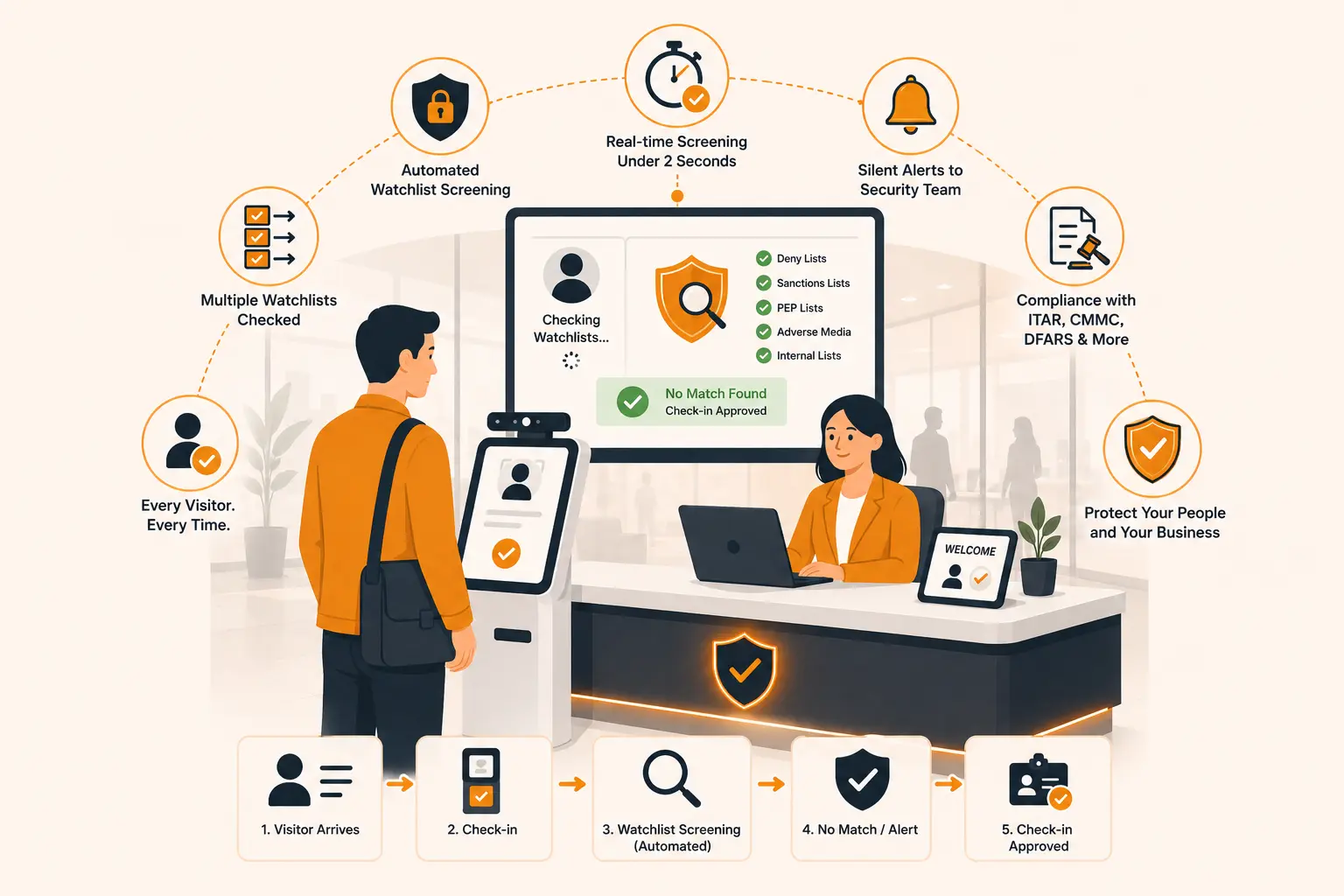
Table of Content
Try Vizitor for Free!
A contractor walks into your facility, signs the paper log, and gets waved through by your receptionist who’s simultaneously answering the phone and printing a badge for the previous visitor. Nobody runs a name check. The contractor has full access for the next six hours.
Three months later, your compliance team discovers that person was flagged on an internal deny list after an incident at a partner facility, two months before this visit.
This isn’t a hypothetical. It’s the exact scenario that plays out regularly at manufacturing plants, defense facilities, corporate offices, and research campuses. And the cost isn’t just a security incident; it’s delayed contracts, mandatory security reviews, and potential six-figure fines for regulatory violations.
Visitor watchlist screening is what prevents this. In this guide, we’ll walk through exactly what it is, which watchlists matter, and how to build a denied-party check at your front desk whether you’re starting from scratch or plugging gaps in an existing process.
What Is Visitor Watchlist Screening?
Visitor watchlist screening is the process of checking every person who enters your facility against your internal block lists, to verify they’re not a restricted, denied, or sanctioned party before granting them access.
Think of it as the front-desk equivalent of a background check, but one that happens in real time, every single visit, not just at onboarding. The goal is simple: make sure no flagged individual walks through your door before you know about it.
This applies to everyone not just vendors or contractors. Visitors, interview candidates, delivery personnel, and even returning clients should go through the same screening process. The risk doesn’t carry a badge.
Why the Sign-In Sheet Isn’t Enough
Most facilities log visitors. Very few actually screen them.
There’s a critical difference between recording that someone came in and verifying that they should have been allowed in. A paper logbook, or even a basic digital sign-in kiosk, only captures attendance. It does nothing to check the person’s name against any list.
Even front desk staff who are diligent about manual checks face real operational limits. Your receptionist cannot realistically query multiple government watchlist databases in real time for every visitor while also managing phone calls, issuing badges, and directing foot traffic. The math simply doesn’t work.
Add to that the problem of name variations. A person flagged under one spelling won’t necessarily get caught if their ID shows a slightly different form of the same name. Manual checks miss these all the time.
For facilities operating under ITAR, CMMC, C-TPAT, or OFAC compliance requirements, this isn’t just a security gap, it’s a documentation gap. When auditors come in, they want to see screening records for every visitor, not a clipboard with names.
What Watchlist Screening Actually Is (And Isn’t)
There are two categories of watchlist screening. Most security teams need both. Most front desks have neither.
Internal watchlists
Your own list of people who shouldn’t be on your premises. This includes:
- Banned visitors (former incidents, asked to leave, security threats)
- Terminated employees, particularly those who left under contention
- Restraining order subjects (where the order names a specific person)
- Individuals previously involved in workplace incidents at any of your sites
- VIPs flagged for special handling (not negative but requires custom workflow)
An internal watchlist is simple to maintain. It’s a CSV or a database table. You add entries when HR notifies security of a problematic termination, or when an incident gets logged, or when legal hands you a restraining order. The list lives inside your visitor management system and runs silently against every check-in.
External watchlists
Government-maintained lists of people your organization is legally prohibited from doing business with or in some cases, allowing on the premises. The major ones:
- OFAC SDN List (Specially Designated Nationals and Blocked Persons): Over 12,000 individuals and entities under U.S. Treasury sanctions. Required for any U.S. organization with international exposure.
- OFAC Consolidated Sanctions List: Includes the Foreign Sanctions Evaders List, Sectoral Sanctions Identifications List, and others.
- BIS Denied Persons List: U.S. Commerce Department list of parties denied export privileges. Critical for ITAR and EAR-controlled facilities.
- National Sex Offender Public Website (NSOPW): Aggregates data from all 50 U.S. states, DC, and territories. Required by law in many K-12 schools and healthcare settings.
- International sanctions lists: UN Consolidated List, EU Consolidated Sanctions List, UK Sanctions List, plus jurisdiction-specific lists (Canada, Australia, Singapore, Japan).
- State-level criminal databases: Some jurisdictions allow visitor screening against state criminal records.
The distinction matters operationally. Internal lists you maintain yourself. External lists update multiple times per week (OFAC sometimes daily) and require automated feeds to stay current. Trying to maintain an external watchlist manually is impossible, the SDN List alone gets updated 50+ times a year.
Who Needs Visitor Watchlist Screening?
The short answer: more organizations than currently do it. Here are the industries where it’s either legally required or strongly recommended:
Defense contractors and aerospace manufacturers face the strictest requirements. ITAR and CMMC both mandate documented identity verification and screening records for all visitors to controlled areas.
Pharmaceutical and life sciences companies handling controlled substances, export-controlled research, or government-funded projects are subject to OFAC and EAR requirements that extend to physical facility access.
Financial services firms regulated under OFAC need to ensure that sanctioned individuals don’t gain access to systems, client records, or facilities.
Universities and research institutions hosting international collaborators, visiting scholars, or joint researchers need to screen against OFAC SDN and BIS Entity lists, particularly for any lab work touching controlled technology.
Manufacturing companies involved in international supply chains even domestic ones that work with foreign nationals or contractors should be screening against denied party lists.
Corporate offices handling sensitive client data even outside regulated industries, benefit from internal blocklisting for former employees and known security threats.
You’re under C-TPAT (Customs-Trade Partnership Against Terrorism) for supply chain security
You probably should have it (but may not realize) if:
- You’ve ever had a contentious termination in the last 24 months
- You have multi-site operations, a person banned at one site can walk into another without screening
- You’re a coworking space with member churn
- You’re a corporate office in a sector with public visibility (media, finance, public-facing executives)
If any of those describe you, the question isn’t whether to implement watchlist screening. It’s how.
How to Build a Watchlist Screening at Your Front Desk
Here’s a practical framework for building visitor watchlist screening into your front-desk process, whether you’re starting from zero or formalizing what you already have.
Step 1: Identify Which Lists Apply to Your Organization
Start by mapping your compliance obligations. What regulations govern your industry? What countries or entities do you interact with? A defense manufacturer will need to screen against ITAR deny lists and OFAC. A domestic corporate office with no export activity may only need OFAC and an internal blocklist.
If you’re unsure, consult your legal or compliance team.
Step 2: Build Your Internal Blocklist
Before you integrate any government list, create your own. Gather records from HR on terminated employees with flags, any individuals served with restraining orders, and people reported as security threats by your facilities or security teams. This list should be stored securely, updated regularly, and accessible to whoever manages your sign-in system.
Don’t underestimate this step. Government lists catch external threats. Your internal blocklist catches risks that no government database will ever track.
Step 3: Decide When Screening Happens
Best practice, according to compliance experts, is to screen before the person arrives not when they show up at the front desk. Pre-registration workflows allow visitors to submit their name and information ahead of time, which gives you the window to run a check and flag issues before the visit day.
For walk-in visitors, the check should happen at sign-in. Real-time screening integrated into your visitor management system (VMS) is the most reliable way to do this at scale.
The key rule: screen every visit, not just the first. A contractor’s status on a watchlist can change between their last visit and today. One-time onboarding checks are not sufficient for ongoing compliance.
Step 4: Integrate Screening into Your Visitor Management System
Manual watchlist checks are operationally unreliable. A front-desk staff member checking three other things cannot realistically pull up data and cross-reference a name against multiple lists in real time for every visitor.
A visitor management system with built-in watchlist integration automates this. When a visitor submits their name either during pre-registration or at the sign-in kiosk, the system automatically queries the relevant lists and flags any matches before access is granted.
Look for a VMS that:
- Supports custom internal blocklists
- Sends real-time alerts to security or the designated host when a match is detected
- Keeps an auditable log of every screening check not just every sign-in
- Supports pre-registration so screening happens before arrival, not at the door
Step 5: Define What Happens When There’s a Match
This is the step most organizations skip when they set up screening. You need a documented response protocol before the first match occurs not after.
At minimum, your protocol should define:
- Who gets notified immediately (security, compliance officer, the scheduled host)
- Whether the visitor is denied entry, held pending review, or escorted
- How the decision gets documented
- Who has authority to override a flag and under what circumstances
False positives do happen, common names can generate matches that aren’t actually the person in question. Your protocol should include a clear process for resolving possible false positives through supporting documentation (passport, driver’s license, company affiliation) before entry is either granted or denied.
Step 6: Document Every Screening for Audit Readiness
This is what separates a real compliance process from theater. Every screening whether it resulted in a flag or not should be logged with a timestamp, the lists checked, and the outcome. When ITAR auditors, CMMC assessors, or OFAC examiners ask for visitor screening records, you should be able to produce them in minutes, not hours.
Paper logs don’t satisfy this. A VMS with automated screening and digital record-keeping does.
Step 7: Review and Update Your Lists Regularly
Government watchlists are updated frequently, sometimes daily. An individual who passed a screening last quarter may appear on a new list today. A manual process where someone reviews list updates and patches them into a spreadsheet will always lag behind.
Automated screening solutions pull updated list data continuously, which means your screening is always running against current information. This is especially important for organizations with high visitor volume or those operating in regulated industries where the cost of a missed flag is significant.
Common Mistakes Organizations Make With Visitor Screening
Screening only at onboarding. A contractor’s compliance status can change after your initial check. One-time screening is not a program, it’s a single data point.
Maintaining watchlists manually. A spreadsheet updated quarterly is not a compliance tool. Government lists change daily. Any manual process will have gaps.
No documented response protocol. Screening without a defined response plan leaves your team to improvise when a flag fires. Improvised decisions in a compliance context are rarely the right ones.
Treating all matches the same. An OFAC SDN match and an Unverified List match have very different implications. Your protocol should distinguish between them.
Skipping internal blocklists. No government list tracks the former employee who was terminated for threatening behavior last year. That’s your responsibility, not OFAC’s.
Not keeping screening records. If you can’t prove a check was run, for compliance purposes, it wasn’t.
The Cost of Skipping This
A contractor walks into your manufacturing facility at 9:14 AM on a Tuesday. He scans a QR code, types his name, gets a badge, and is escorted to the machine shop. He works on a CNC station for six hours. He leaves at 3:30 PM.
Twelve weeks later, during a routine CMMC audit, your compliance team discovers his name was flagged on an internal deny list following an incident at a partner facility, two months before this visit. The breach went undetected because no deny list screening happened at check-in.
Nobody noticed. The auditor noticed.
That’s the version of this story you read in the trade press. The version you don’t read is worse. A terminated employee returns to clean out their desk and the locks haven’t been re-keyed. A restraining order subject walks past your reception because nobody at the front desk knew to look. A foreign national on the BIS Denied Persons List tours your aerospace facility because export control compliance was somebody else’s job that day.
Watchlist screening isn’t a nice-to-have. For regulated industries, it’s a legal requirement. For everyone else, it’s the cheapest insurance policy your security team can deploy.
Watchlist Screening vs. Basic Visitor Logging: A Clear Comparison
| Feature | Paper / Basic Sign-In | Visitor Management + Watchlist Screening |
|---|---|---|
| Records who visited | Yes | Yes |
| Screens against OFAC/BIS lists | No | Yes (automated) |
| Internal blocklist check | No | Yes |
| Real-time alerts on matches | No | Yes |
| Audit-ready records | No | Yes |
| Handles name variations / aliases | No | Yes (fuzzy matching) |
| Works at scale across multiple locations | No | Yes |
| Compliance documentation | Manual, incomplete in case of paper check-ins, timestamped in case of VMS | Automated, timestamped |
Conclusion
Visitor watchlist screening isn’t complicated but it does require intention. Most organizations log their visitors. Far fewer actually screen them. And that gap is exactly where compliance violations, security breaches, and undocumented risks live.
Building a denied-party check at your front desk comes down to six things: knowing which lists apply to your organization, maintaining your own internal blocklist, screening every visit (not just the first), automating the check through your visitor management system, having a documented response protocol, and keeping complete records for every screening you run.
If your front desk is still running on clipboards and instinct, it’s worth taking a hard look at what you’re actually exposing your organization to. The fix isn’t complex but the cost of not fixing it can be.
Book a demo and tell us about your requirements.
Try Vizitor Free
Setup in under 5 minutes. Manage visitors, queues, meeting rooms, and more.
Start Free TrialFrequently Asked Questions
See Vizitor in action check-in a visitor in under 30 seconds
Trusted by 500+ businesses. QR check-in, badge printing, NDA signing. Plans from $36/mo.