Ditch the Paper Logbook for a Digital Visitor Sign-In App
Replace your insecure paper logbook with Vizitor, a modern visitor sign-in app that automates front desk check-ins in under 60 seconds. Learn how mobile QR codes and tablet kiosks streamline registration, send instant host notifications, and ensure total GDPR compliance. Upgrade to a digital visitor management system to secure your workplace and simplify audit trails in less than 30 minutes.


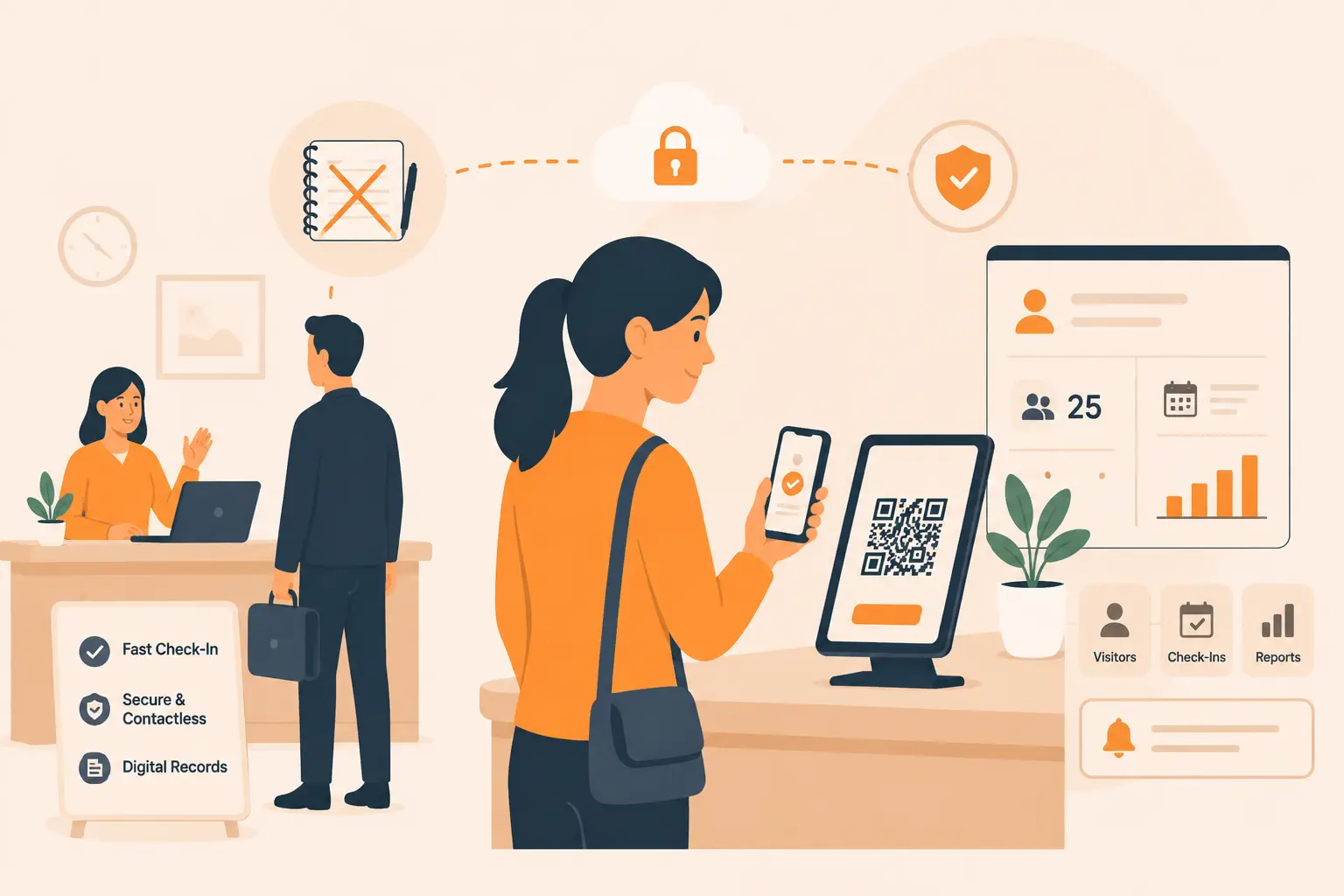
Table of Content
Try Vizitor for Free!
Visitor Sign-In App: How a Mobile-First Check-In Replaces the Paper Logbook
The paper logbook sitting at your front desk looks harmless. But the moment a visitor picks up the pen and glances at the entries above theirs, they have already seen the name, company, and arrival time of whoever came before them. That is a privacy exposure before anyone has even said hello.
A visitor sign-in app fixes this completely. Vizitor is a mobile-first check-in system that lets visitors register, complete forms, receive a printed badge, and notify the host through a QR code scan on their own phone or a shared tablet. No pen. No clipboard. No receptionist hunting down a phone number.
This guide walks through exactly how that replacement works, what changes at your front desk on day one, and why Vizitor is the sign-in app designed for workplaces that need both a great first impression and a real audit trail.
Key Takeaways
- Paper logbooks expose every visitor’s name and company to the next person through the door, which is a direct breach of GDPR data minimisation requirements.
- Vizitor’s mobile QR check-in reduces average sign-in time to under 60 seconds, compared to 2 to 4 minutes for manual paper entry.
- Every check-in creates a searchable, exportable digital record with timestamps, photos, signed documents, and host approvals.
- Vizitor runs on any Android 8.0+ tablet or iPad with no proprietary hardware purchase and no IT project to raise.
- Setup takes under 30 minutes and your paper logbook can go in the drawer on day one.
Why Paper Logbooks Fail Your Front Desk and Your Compliance Team
Most articles call paper logbooks inefficient. That framing misses the bigger problem.
Here is what actually happens when a visitor uses your paper sign-in book. They pick up the pen, find the next blank line, and in two seconds they have read the name, employer, host, and arrival time of every person who came before them that day. If your organisation works with confidential clients, handles sensitive contracts, or operates in a regulated industry, that glance is a data exposure event. You cannot un-see a name.
This is not a theoretical concern. Under GDPR, organisations must minimise who can access personal data and store it securely. A paper logbook with previous visitor details visible to anyone who picks it up fails both requirements from the moment the book is opened. The same principle applies under PDPA, PIPEDA, and most regional privacy frameworks.
The operational failures compound the compliance risk. Reception staff have no real-time visibility. A visitor whose appointment was cancelled can sign in on paper and wander inside before anyone realises. There is no way to check an incoming visitor against a denied-entry list, no automatic alert to the host, and no digital trail if something goes wrong later.
The evacuation scenario makes this concrete. When a fire alarm activates, the paper logbook stays on the reception desk inside the building you just evacuated. You are doing a headcount from memory. For contractors and third-party staff who signed in that morning, you may not even know their names.
Reception staff bear the operational cost daily: reading illegible handwriting, manually transcribing details into a spreadsheet, printing NDAs, collecting signatures, storing paper copies, writing badge labels by hand. Every one of those steps is something Vizitor handles automatically before the visitor reaches the door.
What Vizitor’s Visitor Sign-In App Does, Step by Step
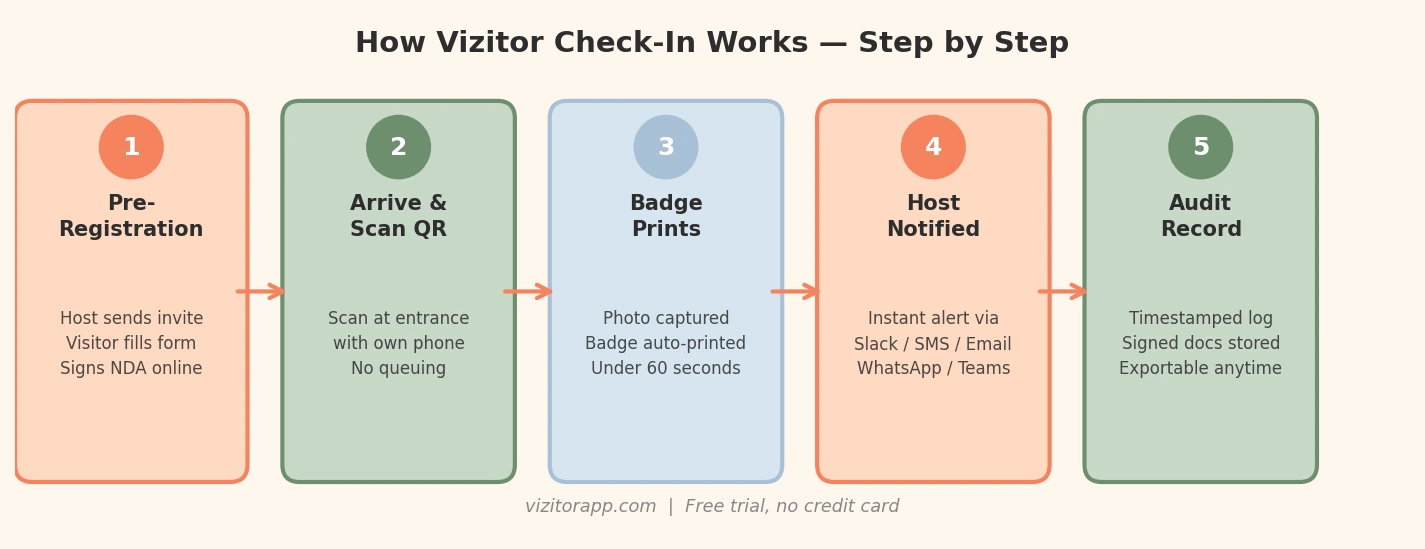
Vizitor is not a digital form sitting on a tablet. It is a complete front-desk workflow that replaces every manual step with an automated sequence. Here is what the full process looks like.
If you’re still deciding exactly which fields belong on that form, our guide to designing an office visitor log walks through what to capture and what to leave out.
Before the Visitor Arrives
The host sends a pre-registration invite from within the Vizitor dashboard. The visitor receives an email with a link to fill in their details, review and sign any required NDA or health declaration, and confirm the visit. When they arrive, their information is already in the system and their QR code is waiting. Visitors who have pre-registered take under 30 seconds to check in.
At the Entrance
Visitors who have not pre-registered scan a QR code displayed at the entrance using their own phone camera. No app download is required. The check-in form opens in their browser, they fill in their name and host, and submit. A photo is captured automatically. The badge prints. For visitors without a smartphone, Vizitor’s tablet kiosk handles the same flow on the shared device.
The Host Notification
The moment a visitor checks in, their host receives an alert through whichever channel your team uses: SMS, email, Slack, Microsoft Teams, or WhatsApp. They know their visitor has arrived before reception ever picks up the phone. The notification includes the visitor’s name and photo so the host knows exactly who to look for.
The Background Record
Simultaneously, Vizitor logs the visit with a precise timestamp, stores any signed documents against the visitor record, updates the live on-site dashboard, and checks the visitor against any watchlist your security team has configured. If there is a match, a private alert goes to your designated security contact. The visitor sees nothing unusual at the desk.
Mobile QR Check-In vs Tablet Kiosk: Which Setup Is Right for Your Office
Both mobile QR check-in and tablet kiosk check-in are available within Vizitor. Understanding the difference helps you pick the right configuration for your reception environment.
| Mobile QR Check-In | Tablet Kiosk | |
|---|---|---|
| Device used | Visitor’s own smartphone | Shared tablet at reception |
| App download needed | No, opens in browser | No, built into kiosk |
| Check-in speed | Under 45 seconds | Under 90 seconds |
| Queue risk | None, multiple visitors at once | Can form a line at busy times |
| Best for | High-traffic lobbies, tech-savvy visitors | Branded experience, older visitors |
| Visitor touches your hardware | No | Yes |
| Pre-registration support | Yes | Yes |
| Badge printing | Yes, auto-triggers | Yes, auto-triggers |
| Host notification | Yes, instant | Yes, instant |
| Setup required | QR code poster at entrance | Tablet mount at reception desk |
| Hardware cost | None | One standard Android or iPad tablet |
The Security and Compliance Case: Specifics, Not Slogans
More secure than paper is the claim every visitor management vendor makes. Here is what it actually means in Vizitor’s case.
Visitor Data Visibility
Every entry in a paper logbook is visible to every subsequent visitor. Vizitor stores each record in a private cloud database. The visitor confirms only their own details on screen and sees nothing else. Previous visitor information is completely inaccessible.
Watchlist Screening
Paper has no screening capability at all. Vizitor checks each incoming visitor against your watchlist before issuing a badge. If there is a match, a silent alert goes to your designated security contact. The check happens automatically with no visible disruption at the front desk.
NDA and Document Management
Paper NDAs require printing, manual signing, physical filing, and manual retrieval during disputes. Vizitor captures legally valid e-signatures at check-in, attaches them to the visitor record with a precise timestamp, and stores them in a searchable cloud archive. Retrieving a specific signed NDA from fourteen months ago takes about ten seconds.
GDPR and Data Retention
Under GDPR, organisations must inform visitors how their data is used, store it securely, and delete it after the defined retention period. Paper logbooks cannot satisfy these requirements consistently. Vizitor displays your privacy notice at check-in, captures digital consent, restricts access to authorised users, and automatically deletes records after your configured retention window.
The UK Information Commissioner’s Office is explicit that personal data collected during visitor sign-in must be stored securely with access limited to authorised personnel and deleted when no longer needed. Handing a pen and a shared logbook to every arriving visitor does not meet that standard.
What Changes for Your Reception Team
This is the section most vendor pages skip. Switching to a visitor sign-in app changes daily reception work in specific ways, and not all of them are obvious.
What Becomes Noticeably Easier
Your front desk team stops being the notification system. They no longer need to call the host, track down an extension, or send a Slack message manually. Vizitor handles the notification the moment the visitor checks in. Your receptionist is free to do something more useful.
Badge production is automatic. No handwriting. No label printers jamming. No waiting for a sticker to print while the visitor stands at the desk.
End-of-day reporting is instant. The complete visitor log for any day is already in the Vizitor dashboard, searchable by name, company, host, or time. No manual compilation, no spreadsheet.
What Needs a Brief Adjustment
Your team needs to know how to help a visitor who is unfamiliar with QR codes or hesitant about the tablet. A thirty-second explanation and a laminated how to sign in card at the kiosk handles the vast majority of cases.
You also need to make two decisions before you go live: what your privacy notice says and how long you retain visitor records. Vizitor’s setup guide walks through both.
How Long Vizitor Actually Takes to Configure
Vizitor runs on any Android 8.0 or later device or iPad. You download the app, create your account, build your check-in flow, and add your host directory. Most organisations finish this in under 30 minutes. No proprietary hardware purchase. No IT project. No vendor implementation timeline.
The Audit and Evacuation Scenarios: When Digital Records Are Not Optional
Nobody thinks about visitor records until they urgently need them. That is exactly when the gap between paper and Vizitor becomes impossible to ignore.
During a Fire Evacuation
You need a real-time list of every person on-site, not from this morning, not from a book inside the building you just evacuated. Vizitor gives you a live on-site count accessible from any phone or laptop, anywhere. The facilities manager in the car park pulls up the roster in seconds, including contractors and delivery personnel who signed in that day.
During a Compliance Audit
A regulator or internal auditor asks for visitor records covering a specific date range. With a paper logbook, you are locating the right book, scanning pages, and hoping the handwriting is legible. With Vizitor, you filter by date range and export a PDF or CSV in under thirty seconds. The export includes visit timestamps, host approvals, signed documents, and visitor photos.
After a Security Incident
The question is always who was on-site between specific times. Paper produces a slow, unreliable answer. Vizitor produces a timestamped, tamper-evident log you can filter and export immediately.
In Contractor Disputes
The ability to prove precisely when someone arrived, who authorised their entry, and what they signed is worth considerably more than the cost of the software. One avoided dispute typically covers multiple years of subscription.
Key Features in Vizitor’s Visitor Sign-In App
Vizitor replaces the entire paper check-in process with a single platform. Here is what is included.
QR code check-in: Visitors scan at the entrance with their own phone. No download required. The check-in form opens in their browser and the record is logged the moment they submit.
Pre-registration: Hosts invite visitors in advance. Visitors fill in their details, sign documents, and receive their QR code before they arrive. Check-in on arrival takes under 30 seconds.
Automatic badge printing: Triggers the moment a visitor checks in. Name, company, host, visit date, and photo all print without any manual step from reception.
Host notifications: Instant alert via Slack, Microsoft Teams, WhatsApp, SMS, or email. The notification includes the visitor’s name and photo.
Watchlist screening: Checks every incoming visitor against your configured list before the badge is issued. Security receives a private alert on any match.
Digital document signing: Captures legally valid e-signatures for NDAs, health declarations, safety inductions, or any custom form. All signatures are stored with a timestamp.
Audit export: Pull a complete visitor log for any date range as a CSV or PDF in seconds. Signed documents, photos, and host approvals all included.
Live on-site roster: Shows every person currently on-site in real time, accessible from any device. This is the list you need during an evacuation.
No proprietary hardware: Vizitor runs on any standard Android 8.0+ tablet or iPad. You buy the hardware you want, not hardware Vizitor sells.
When a Visitor Sign-In App Might Not Be What You Need
Most vendor pages skip this section. It is worth including because honest advice builds more trust than a universal sales pitch.
If your organisation receives fewer than five visitors per month, a paper logbook may be genuinely adequate. Compliance risk is lower at low volumes and the subscription cost represents a poor return.
If your visitors are primarily older and uncomfortable with smartphones, you will rely on the tablet kiosk for most check-ins. Vizitor still handles that workflow better than paper, but the mobile-first speed advantage is reduced.
If your industry has specific regulatory requirements beyond GDPR, such as healthcare under HIPAA or finance under specific national frameworks, verify that Vizitor meets your exact requirement before switching. The platform supports GDPR, ISO 27001, and SOC 2 standards, but regulated industries should confirm compliance with their specific framework directly.
For the majority of offices, corporate campuses, manufacturing sites, and multi-tenant buildings, the sensible threshold is around 10 visitors per week. Above that volume, the time savings, compliance benefits, and security improvements easily justify the cost.
How to Replace Your Paper Logbook on Day One
Switching to Vizitor is not a project. Here is a realistic day-one timeline.
Morning, about 30 minutes: Download Vizitor on your reception tablet. Create your account. Build your check-in flow, which includes the questions you want visitors to answer, any NDA or form to sign, and your badge design. Add your host directory so Vizitor knows who to notify.
Lunchtime, about 10 minutes: Brief your reception team. Show them how to help a visitor who is unfamiliar with the QR code. Put up the QR code sign at the entrance and place the how to sign in card at the kiosk.
Afternoon: Your first visitor goes through the new process. The host gets a Slack notification instead of a phone call. The badge prints. The visit record appears in the dashboard with a timestamp.
End of day: No paper to file. No handwriting to transcribe. The complete day’s visitor log is in your Vizitor dashboard, searchable, exportable, and audit-ready.
The paper logbook goes in a drawer on day one. You may want to keep it for a week as a safety net. After that, you will not miss it.
Conclusion
The paper logbook at your front desk is doing three things you do not want: exposing visitor data, creating manual work your reception team should not have to do, and leaving you with no useful records when an audit, evacuation, or security incident makes you need them urgently.
Vizitor addresses all three. Visitors check in on their own phone or a shared tablet, the host receives an instant notification, and a complete digital record exists from the moment they walk through the door.
The switch takes less time than you expect. No IT project. No hardware purchase. No lengthy vendor process. Most organisations are fully live by end of their first day.
Try Vizitor for free on any Android or iPad tablet. No proprietary hardware. Live in under 30 minutes.
Visit vizitorapp.com to start your free trial or Book a Demo
Frequently Asked Questions
See Vizitor in action check-in a visitor in under 30 seconds
Trusted by 500+ businesses. QR check-in, badge printing, NDA signing. Plans from $36/mo.