The Counter-Side Benefits of Virtual Queuing Staff Overlook
Virtual queuing is usually pitched as a customer-experience upgrade. This article covers the other side of the counter: fewer staff interruptions, no duplicate call-ins, and less manual queue work.


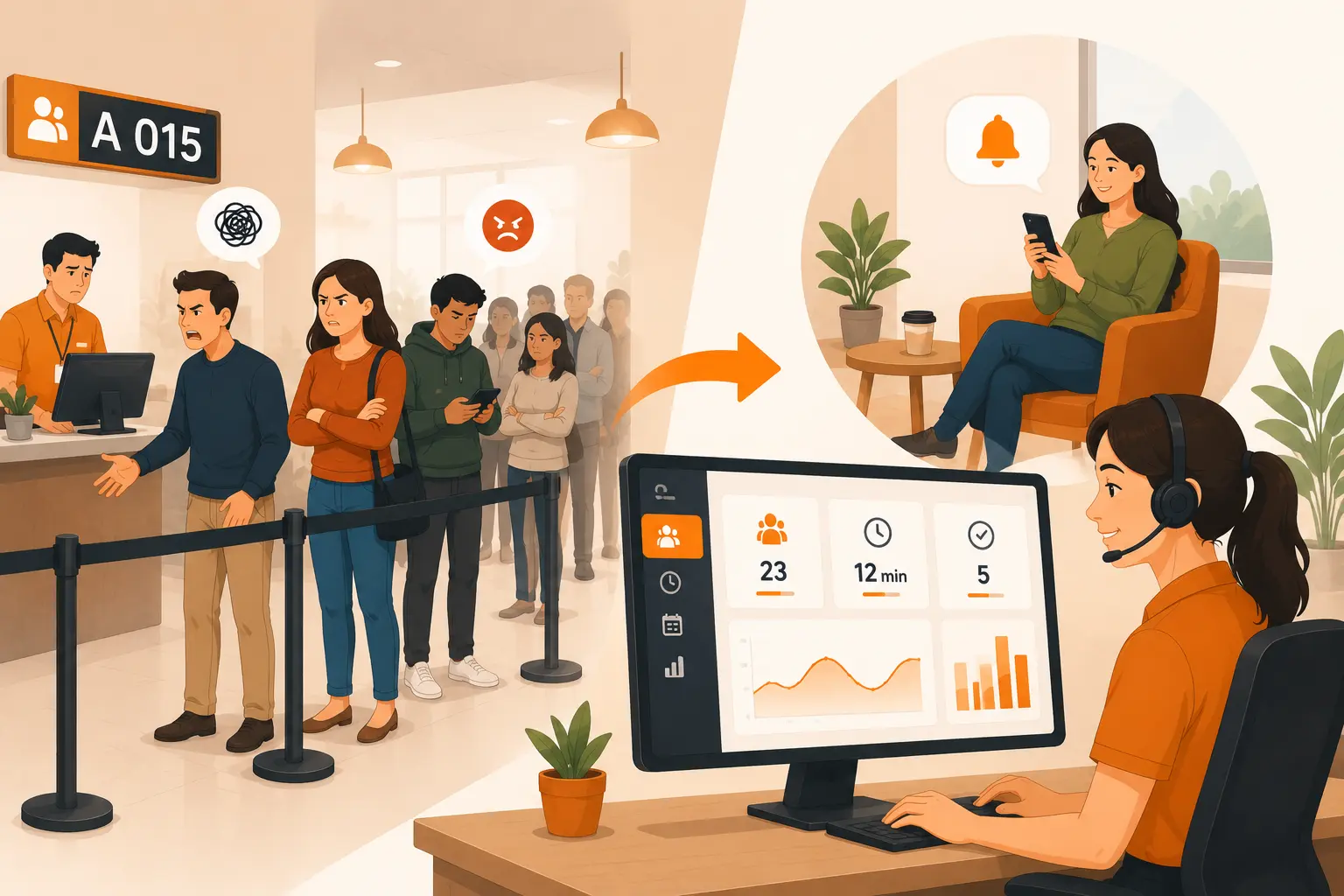
Table of Content
Try Vizitor for Free!
Most articles about virtual queuing talk about the person waiting. Shorter lines, real-time updates, less standing around. That’s the pitch, and it’s true. But it skips the person standing behind the counter, calling the next number, and absorbing every “how much longer?” for the whole shift.
Virtual queuing changes that job too. Not by adding another dashboard for staff to babysit, but by removing the small, constant friction that paper tokens and physical lines create for the people running them.
Vizitor’s queue management system was built around the front-desk and counter workflow, not just the visitor-facing screen. That makes the staff side of virtual queuing worth its own look, separate from the usual “customers wait less” framing covered in what virtual queuing is and how it works.
The customer story gets told. The staff story usually doesn’t
Search for virtual queuing and you’ll find the same three benefits repeated: shorter perceived wait times, fewer people crowding a lobby, better customer satisfaction scores. All real. All aimed at the person in line.
Those satisfaction gains often start earlier than people assume: with what listening to customers while they wait actually captures, not a survey sent after the fact.
What’s missing is the other half of the counter. Staff are the ones who used to manage a physical token machine, reset it at close, chase down whichever colleague was supposed to take the next visitor, and answer the same status question a dozen times an hour. A queue system that only improves the customer’s wait and leaves that workload untouched has only solved half the problem.
What actually changes for the people working the counter
Fewer interruptions, less repeated small talk
A visible token board or a receptionist saying “you’re next” out loud invites questions. Every person waiting wants a status update, and every update pulls staff attention away from the person they’re actually serving. Digital queue status and instant notifications hand that update to the visitor directly, so staff aren’t fielding “am I close?” all day.
No more manual token boards or end-of-day resets
Physical queue systems come with housekeeping: printing token rolls, resetting the counter display, fixing a jammed dispenser. Vizitor’s queue system resets serial numbers automatically every night, which removes a small but real end-of-shift task that used to fall on whoever closed up.
One person accepts, everyone else’s notification clears
This is a quieter problem than long lines, but it eats real time: two staff members both think they’re calling the same visitor, or a token gets accepted twice and nobody notices until the visitor is standing at the wrong desk. Vizitor’s queue system clears the notification for every other team member the moment one person accepts a token, so there’s no duplicate handling and no confusion about who owns the next visitor.
Department routing means less chasing colleagues
When a visitor needs a different department, staff used to walk them over, page someone, or send a visitor wandering off with vague directions. Department-wise digital token generation and instant transfer notifications route the visitor and alert the right team automatically, so front-desk staff aren’t acting as a manual relay between departments.
Staff can see the queue without watching it
A physical line requires someone to keep half an eye on it constantly. A digital queue is visible on a screen or app in real time, which means staff can step away to actually help someone, handle a phone call, or deal with an exception, and still know what’s waiting when they look back.
The workload most people don’t count
Wait-time metrics measure the visitor’s experience. They don’t measure how many times a receptionist got asked the same question, how many minutes were lost to a jammed token printer, or how much mental overhead comes from tracking three visitor types in one line with no system behind it.
That workload is real, even without a number attached to it. It shows up as frustration, short tempers at the counter, and burnout on high-traffic days. A queue system that also handles appointment and walk-in routing removes the guesswork staff otherwise carry alone, and that’s worth counting even when it doesn’t show up in a satisfaction survey.
There’s a fairness angle too. When the queue order is visible to everyone, staff spend less energy defending decisions. Nobody accuses the receptionist of playing favorites when the system, not the person, decided who’s next.
Where virtual queuing doesn’t fully solve staff workload
It’s worth being honest about the limits. Virtual queuing removes the manual, repetitive parts of managing a line. It doesn’t replace a receptionist’s judgment on an angry visitor, a security exception, or someone who genuinely doesn’t fit any category in the system. Staff still make the calls that need a person.
It also won’t fix a broken process on its own. If departments don’t respond to transfer notifications, or nobody has agreed who owns a walk-in with no clear purpose, digital tools make that gap visible faster, but someone still has to close it with a policy decision.
Rolling this out without disrupting the team that runs it
The staff experience improves fastest when the rollout treats staff as the primary user, not an afterthought to the visitor-facing screen.
A few things matter in practice:
- Set up departments and assign staff before go-live, so the first live token has somewhere real to route.
- Walk the front-desk team through what a notification looks like and what accepting a token actually does, especially the fact that accepting clears it for everyone else.
- Agree on what happens when nobody responds to a transfer, before it happens live in front of a visitor.
- Watch the first week for the exceptions your policy didn’t cover, and add a clear rule for them instead of leaving it to whoever’s on shift.
None of this requires new hardware. Vizitor’s queue system runs on the same tablet or device already used for check-in, which keeps the rollout closer to a workflow change than an IT project.
The version of this story worth telling
Virtual queuing gets sold as a customer-experience upgrade, and it is one. But the staff running the counter deal with the queue all day, every day, in a way the average visitor never does. If a system only fixes the visitor’s wait and leaves the staff workload exactly where it was, it’s only done half the job.
Want to see what department routing and staff notifications look like in practice? Book a demo and watch how Vizitor’s queue management system handles both sides of the counter.
Frequently Asked Questions
See Vizitor in action check-in a visitor in under 30 seconds
Trusted by 500+ businesses. QR check-in, badge printing, NDA signing. Plans from $36/mo.