Calculating the ROI of a Queue Management System
This article provides a step by step framework for calculating the ROI of a queue management system, covering revenue recovered from fewer walkaways, staff time saved, and improved retention. It includes worked examples, industry-specific abandonment rates for healthcare, retail, banking, and government, and guidance on building a business case for stakeholder approval.


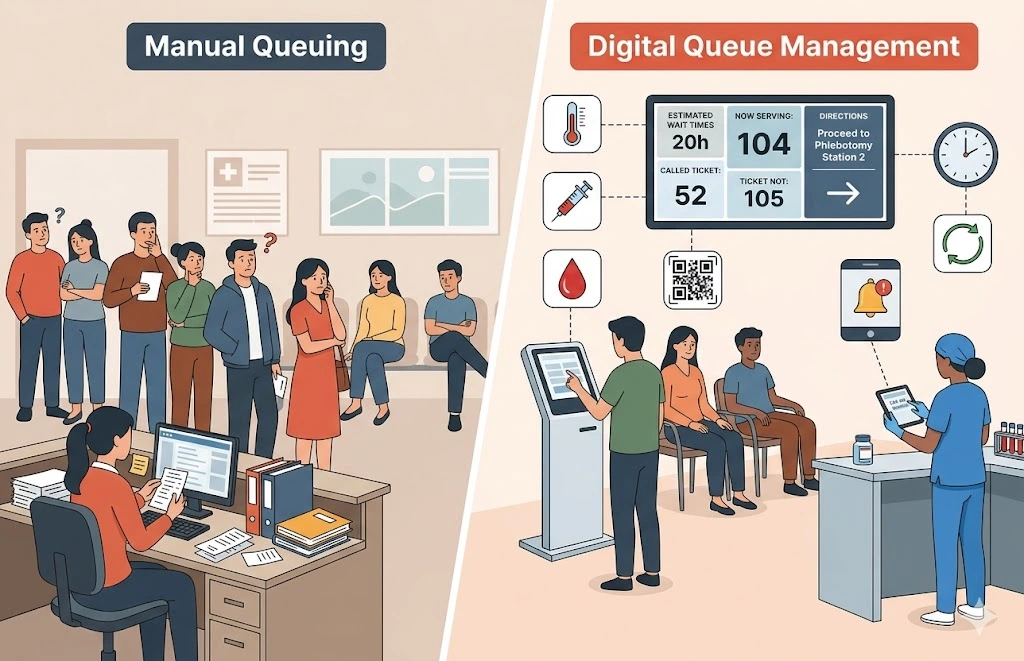
Table of Content
Try Vizitor for Free!
Long queues cost more than most businesses realise.
Not just in lost patience. In actual revenue walking out the door.
A 2026 industry study found that the average customer gives up and leaves a queue after just eight minutes. Think about what that means for a busy clinic, a government office, or a retail store during peak hours.
Every person who walks away is a transaction you will never close.
This guide gives you a practical way to calculate the return on investment for a queue management system. You will find formulas, worked examples, industry numbers, and a method for building a business case that actually gets approved.
If your business case needs to cover more than queue software, this overview of the wider set of flow technologies that pair with queue systems walks through appointment scheduling, visitor management, and meeting room tools too.
What Is Queue Management System ROI?
Queue management system ROI measures the money you get back after switching from manual queuing to a digital system.
Manual queuing means paper tokens, shouted names, and guesswork. A digital queue management system replaces all of that with organised token flow, automated notifications, and real-time data.
The ROI formula is simple:
QMS ROI (%) = [(Total Gains - Total Cost) / Total Cost] x 100
The hard part is not the formula. The hard part is that the gains show up in different places.
Revenue recovery sits with operations. Labour savings sit with HR. Customer retention sits with marketing.
Nobody owns the full picture unless you map it all together. That is what this guide helps you do.
Why Queue Management ROI Matters More in 2026
The queue management system market hit roughly $2.85 billion in 2025. It is growing at about 9 percent per year.
Why is it growing so fast? Three things are happening at once.
Customers have less patience than ever. A 2024 consumer survey showed that frustration with waiting jumped 126 percent in a single year. People who were happy to wait 13 minutes back in 2015 now expect service in five to seven minutes.
Staff costs keep climbing. Every minute your team spends calling out names, sorting paper tokens, or settling “who was next” arguments is a minute they are not serving customers. That wasted time gets more expensive every year as wages rise.
Compliance pressure is growing. Healthcare, banking, and government organisations need proper records of every customer interaction. Paper tokens do not create records. They create risk.
If you are thinking about investing in a queue management system, the real question is not whether it adds value.
The real question is how much it is costing you to wait.
The True Cost of Poor Queue Management
Before you can calculate ROI, you need to know what bad queuing is costing you right now.
The money goes to five places. Most businesses only notice the first one.
1. Customers Walking Away
This is the biggest and most direct cost.
A 2024 consumer study found that three out of five customers leave a queue before reaching the front.
Out of those who leave, about 40 percent either go to a competitor or skip the purchase entirely.
If your business sees 200 walk-ins per day and 10 percent of them leave, that is 20 lost transactions every single day.
Multiply that by your average transaction value. The annual number is usually eye-opening.
2. Staff Time Wasted on Crowd Control
Without a digital system, your frontline team spends a big chunk of their time on things that have nothing to do with actual service.
Calling out names. Redirecting people to the right counter.
Answering “how much longer?” over and over again. Settling arguments about who was next.
Every one of those minutes is a minute they could have spent helping a paying customer.
3. Losing Repeat Customers
A 2026 study on queue management found something alarming. Customers who experience long waits three or more times at the same business are 71 percent less likely to come back.
That is not just one lost sale. That is months or years of future purchases gone.
4. Damage to Your Reputation
A 2026 customer experience survey found that 67 percent of consumers say waiting changes how they see a brand. Not in a good way.
In a world where one bad review can influence hundreds of potential customers, a poor queue experience costs you far more than just the one person who left.
5. Making Decisions Without Data
Paper tokens tell you nothing.
No timestamps. No transfer records. No department-level wait times.
Without that data, you cannot find bottlenecks. You cannot justify staffing changes. You cannot prove anything during an audit.
You are running blind.
The ROI Framework: Five Ways a QMS Pays You Back
A queue management system does not make money for you directly. What it does is stop the bleeding.
It recovers revenue you were losing. It cuts wasted time. It gives you data to make better decisions.
These are the five areas where the return shows up.
1. Revenue Recovered From Fewer Walkaways
This is usually the biggest win.
How to estimate it:
Start with your average daily walk-in count.
Then estimate how many of those people leave without being served. If you do not have your own data, use these industry averages:
- Retail: about 14 percent
- Healthcare clinics: about 27 percent
- Restaurants: 10 to 15 percent
- Government services: about 32 percent
Multiply your daily walkaways by your average transaction value.
Now assume a digital queue management system cuts your walkaway rate by 40 to 60 percent. That is a conservative number based on industry research.
Effective implementations typically reduce average wait time by 38 percent. Over half of all customers say they are willing to wait longer when they can join a virtual queue.
Worked example for a mid-sized clinic with 150 walk-ins per day:
Metric | Value
Daily walk-ins | 150
Current walkaway rate | 20%
Daily walkaways | 30
Average revenue per visit | $65
Daily lost revenue | $1,950
Annual lost revenue (260 working days) | $507,000
Expected walkaway reduction with QMS | 50%
Recovered annual revenue | $253,500
Even if you cut that number in half to be safe, it still dwarfs the cost of a cloud-based QMS subscription.
2. Staff Time Saved
When your team stops managing the crowd, they start serving customers faster.
How to estimate it:
Figure out how many minutes per hour your staff spend on manual queue tasks. Calling names, handing out paper tokens, answering wait time questions, sorting out disputes.
Then multiply those minutes by your hourly labour cost.
A digital QMS with automated token generation, real-time notifications, and one-tap acceptance handles all of that automatically.
Vizitor’s queue management system reports a 30 percent improvement in staff efficiency when paper tokens and manual call-outs are replaced.
Worked example for a 4-counter service environment:
Metric | Value
Staff members on queue duty | 4
Minutes per hour on manual queue tasks | 15
Hours saved per person per day (8-hour shift) | 2 hours
Hourly labour cost | $18
Daily labour savings (4 x 2 x $18) | $144
Annual labour savings (260 days) | $37,440
Those hours go straight back into serving customers. You get more capacity without hiring more people.
3. Keeping More Customers Long-Term
Keeping an existing customer costs far less than finding a new one.
When a QMS cuts wait times and shows people where they stand in the queue, you remove one of the top reasons they stop coming back.
Industry data puts the lifetime value loss of each queue-related walkaway at roughly $1,247. That is not just the sale they skipped today. It is every future visit they will never make.
Even a rough estimate of how many customers you lose to queue frustration each year usually produces a six-figure number.
4. Better Decisions From Better Data
A digital QMS logs every token, every timestamp, every transfer between departments, and every completed service.
That data lets you do things that paper tokens never could.
Find your peak hours. Move staff to the busiest counter before the backlog builds. One smart reallocation during the lunch rush can serve 15 to 20 extra customers per day without adding headcount.
Spot bottlenecks. See which departments consistently run over acceptable wait times. Then fix the root cause with real evidence instead of guesswork.
Set performance baselines. Track service time per department and per staff member. Measure whether process changes actually work.
Pass audits faster. In healthcare, financial services, and government, you need timestamped records of every interaction. Vizitor’s queue module logs everything automatically and resets serial numbers each night. That is a complete audit trail with zero manual effort.
5. Less Admin Work
Paper-based queues mean manual setup every morning. Manual counting every evening. Manual reports for management.
A cloud-based QMS does all of that automatically.
Serial numbers reset overnight. Reports are one click away.
Department setup and staff assignments update in real time. No hardware to maintain and no paper stock to buy.
For businesses with multiple locations, this matters even more. Instead of needing an administrator at every site, one operations manager can run everything from a single dashboard.
Real-World ROI: What the Numbers Actually Look Like
Theory is useful, but real examples make the case clearer.
Consider a multi-department government service centre handling 400 visitors per day across six counters. Before implementing a QMS, they measured a 28 percent walkaway rate and staff spent roughly 20 minutes per hour on manual crowd control.
After switching to a digital queue management system, their walkaway rate dropped to 11 percent within the first month. Staff time on crowd management fell to under 5 minutes per hour.
The annual savings in recovered citizen services and reallocated staff time exceeded the system cost by more than fifteen times.
Or take a mid-sized dental clinic chain with three locations. Each location used its own paper-based queue. There was no way to compare performance across sites or standardise the patient experience.
After deploying a cloud-based QMS with a central dashboard, the chain reduced average patient wait time by 40 percent within six weeks. Patient satisfaction scores improved by 22 percent in the same period.
The most valuable outcome was not the numbers themselves. It was the ability to see what was happening across all three locations in real time and make staffing decisions based on actual data rather than guesswork.
These are not unusual results. They are typical of what happens when a business moves from paper-based queuing to a digital system that tracks, notifies, and logs automatically. The pattern is consistent across industries and business sizes. The system pays for itself fast, and the data it produces keeps driving improvements long after the initial ROI has been proven.
How to Calculate Your QMS ROI Step by Step
Follow this straightforward process to build a credible ROI estimate.
Step 1: Spend two to four weeks measuring your current situation. Count how many customers leave without being served. Track how much staff time goes to queue management tasks. A queue wait time calculator can help you model this before you commit to a system.
Step 2: Multiply your daily walkaways by your average transaction value, then by working days per year. That is your annual revenue at risk.
Step 3: Calculate the hourly cost of staff time spent on queue management. Project how much a digital system would free up.
Step 4: If you track churn or satisfaction scores, figure out what share comes from wait-time complaints. Apply a conservative recovery rate.
Step 5: Add up the annual gains from Steps 2, 3, and 4.
Step 6: Add up the costs. Subscription fees, onboarding time, and hardware if needed. Cloud-based systems like Vizitor need no hardware and run on devices your staff already own.
Step 7: Plug it into the formula.
ROI (%) = [(Annual Gains - Annual Cost) / Annual Cost] x 100
For most service businesses, the system pays for itself in two to four months.
ROI by Industry
Different industries see different returns because walkaway rates, transaction values, and service models vary.
Healthcare
Queue abandonment in healthcare runs at about 27 percent.
Patients leave when the wait goes more than 20 minutes past their appointment time. Every missed appointment wastes clinical capacity on top of lost revenue.
For a clinic serving 100 patients daily at $120 per visit, a 10 percent improvement in abandonment recovers over $300,000 per year. That is a significant return for a system that costs a fraction of that amount.
The compliance benefit matters too. Healthcare regulators expect proper documentation of patient flow. A digital QMS creates that documentation automatically, and the same logic applies to the benefits of queue management systems in hospitals.
Retail
Retail is the most vulnerable sector when it comes to queue abandonment.
Average checkout wait is 8 to 12 minutes. The point where customers start leaving is around 10 minutes.
There is almost no margin for error. A small improvement goes a long way.
Research shows that customers in virtual queues spend 18 percent more at nearby areas while they wait. That is extra revenue you would never see with a physical line, a pattern covered further in enhanced retail journeys through queue management.
Banking and Financial Services
Bank branches deal with long waits (9 to 17 minutes) and high expectations for professionalism.
Queue management in banking is also a compliance issue. Regulators want records of service times and customer handling.
A QMS that logs every interaction makes audit prep faster and cheaper. It also makes the branch experience smoother, which helps with customer retention.
Government and Public Services
Government offices have the longest average waits (30 to 45 minutes) and the highest abandonment rate at 32 percent.
The ROI argument here is less about revenue and more about efficiency.
A registrar’s office serving 300 citizens daily with four counters might have one staff member doing nothing but managing the crowd during busy hours.
A digital QMS frees that person up for actual service. That is a 25 percent boost in counter capacity without hiring anyone.
Citizen satisfaction scores also tend to improve when people can see their position in the queue instead of staring at a crowded waiting room. For a closer look at how public offices are tackling this, see our guide to cutting wait times in government offices.
Education and Training Centres
Universities, coaching centres, and training institutions deal with registration queues, exam centre lines, and administrative service counters that get overwhelmed during enrollment periods.
The walkaway cost is different here. A student who gives up on a registration queue does not just represent lost revenue. It can mean lost enrollment entirely.
A digital QMS that routes students to the right department, sends position updates, and logs every interaction reduces queue chaos during peak enrollment periods. It also provides administrators with data to plan staffing for the next cycle, as covered in our guide to queue management systems for educational institutions.
What to Look for in a QMS That Delivers Real ROI
Not every queue management system delivers the same return. The ROI you see depends heavily on the features the system includes and how well it fits your operation.
Digital token generation. The system should replace paper tokens with digital tokens that are assigned to specific departments automatically. No paper stubs, no manual registration.
Real-time staff notifications. When a token is created, staff should be notified instantly. No phone calls. No walking to the front desk to check who is next.
One-tap acceptance. A staff member should be able to accept a visitor with a single tap. Once accepted, the notification should clear for everyone else so two people are never handling the same customer.
Department transfers. Customers sometimes end up at the wrong counter. The system should let staff transfer a token to the correct department in seconds, with the receiving team notified immediately.
Automatic logging. Every token, every wait time, every transfer, and every service completion should be recorded without anyone doing anything manually. This is what makes audits painless and gives you the data to improve operations.
No hardware requirement. Systems that require proprietary kiosks, barcode scanners, or specialised tablets add cost, complexity, and delay. The best platforms run on devices your team already owns.
Multi-location support. If you operate across more than one site, you need a system where each location runs independently but reports into one central dashboard. Otherwise you end up managing separate systems at every site.
Vizitor’s queue management system includes all of these features. It runs on any Android or iOS device, goes live in under 30 minutes, and starts logging data from the first token.
Common ROI Calculation Mistakes
Watch out for these errors before you present your numbers.
Only counting walkaway revenue. Most people stop there and ignore labour savings, retention value, and data benefits. That gives you a weaker business case than you actually have.
Using industry averages instead of your own numbers. Benchmarks are fine for a first estimate. But decision-makers want to see data from your operation. Spend a couple of weeks measuring before you finalise.
Treating each prevented walkaway as a one-time save. It is not. That customer comes back again and again. The compounding effect of retention is where the real value lives.
Overestimating setup costs. If your estimate includes hardware purchases, installation crews, and a multi-week IT project, you may be looking at the wrong type of system. Vizitor’s queue management system runs on any phone or tablet and goes live in under 30 minutes. The setup cost is practically zero.
Skipping the baseline. If you do not measure where you are now, you cannot prove where you got to. Document your walkaway rate, wait times, staff time on queue tasks, and satisfaction scores before you launch.
Building the Business Case for Stakeholder Approval
Having the ROI numbers is only half the job. You also need to present them in a way that gets a yes.
Start with what you are losing, not what you will gain. People react more strongly to losses. Show stakeholders exactly how much unmanaged queues are costing the organisation right now.
Talk in payback periods, not percentages. “The system pays for itself in 11 weeks” lands better than “300 percent ROI.”
Deal with the disruption concern up front. The biggest pushback is usually not the price. It is the fear of a complicated rollout. If the system you are proposing needs no hardware and goes live in 30 minutes, say that early.
Show three scenarios. Conservative, expected, and optimistic. Even your conservative case should be positive within the first year. That tells stakeholders you have tested the numbers from every angle.
Connect it to something leadership already cares about. Customer experience. Operational efficiency. Digital transformation. Compliance readiness. Frame the QMS as something that accelerates a priority they have already committed to.
What Metrics to Track After Implementation
Once your QMS is running, these are the numbers that prove ongoing ROI.
Average wait time by department. This is your primary metric. Track it weekly and compare to your baseline from before the system went live.
Walkaway rate. What percentage of tokens end without service? A dropping number means the system is working.
Service time per interaction. How long does each service take from start to finish? This shows you where training or process improvements are needed.
Staff utilisation rate. How much of your team’s time goes to direct service versus idle time or crowd management?
Peak-hour queue depth. When does demand outstrip capacity? This tells you when to add staff before the backlog starts.
Customer satisfaction scores. If you survey customers after visits, break the scores down by wait time. The connection between shorter waits and higher satisfaction is usually clear.
Transfer rate between departments. If a lot of people get sent to the wrong department first, you have a routing problem you can fix at the token stage.
Review these monthly for the first quarter. After that, quarterly is enough. Always present them alongside the financial impact so leadership can see the return.
Multi-Location ROI
For businesses with multiple sites, the ROI picture changes significantly.
Without a central system, every location manages its own queue differently. Different methods, different data, different reporting schedules.
Comparing performance across sites becomes nearly impossible.
A cloud-based QMS with a central dashboard fixes this. One view across all locations.
Your operations manager can compare wait times at different sites. They can spot which departments are consistently slow. They can move resources based on real numbers.
The multi-location ROI comes from three places.
Admin consolidation. One team manages queue setup across all sites instead of having a local administrator at each location.
Cross-site benchmarking. What works at your best location becomes the template for the rest. That creates a cycle of continuous improvement.
Consistent experience. Customers who visit multiple locations get the same quality of service everywhere. That builds trust and reduces complaints.
Vizitor’s queue management system supports unlimited departments across multiple locations from one dashboard. Each site runs independently while everything reports into a single central view.
Conclusion
Queue management system ROI is not complicated. It is basic math applied to real losses.
You are losing revenue to walkaways. You are losing staff time to crowd control.
You are losing customers to frustration. And you are making decisions without data because paper tokens tell you nothing.
A queue management system stops those losses.
Spend two weeks measuring your current queue performance. Count the walkaways. Track the staff time.
Then apply the framework from this guide. Run the numbers against your own operation.
For most service businesses, the system pays for itself in weeks. The ongoing returns compound as your team uses the data to make better decisions every quarter.
The organisations that act first get something even more valuable than efficiency. They get evidence. Timestamped, department-level, auditable data that manual systems simply cannot produce.
When compliance requirements get tighter and customer patience gets thinner, that evidence is not a nice-to-have. It is a necessity.
Vizitor’s queue management system runs on your team’s existing devices, needs no hardware, and goes live in under 30 minutes.
Still comparing vendors before you run these numbers? This comparison of the top queue management tools and solutions breaks down pricing and features across 12 platforms.
Start a free trial or book a demo to test it with your own queue data.
Frequently Asked Questions
See Vizitor in action check-in a visitor in under 30 seconds
Trusted by 500+ businesses. QR check-in, badge printing, NDA signing. Plans from $36/mo.