How Package Alerts Reach Staff via Slack, Teams and SMS
A package notification system logs incoming mail and instantly alerts the recipient through Slack, Teams, or SMS the moment it arrives. Chat alerts suit desk staff, SMS reaches frontline workers and visitors. Vizitor combines logging, multi channel alerts, and pickup tracking in one platform, so parcels get collected the same day.


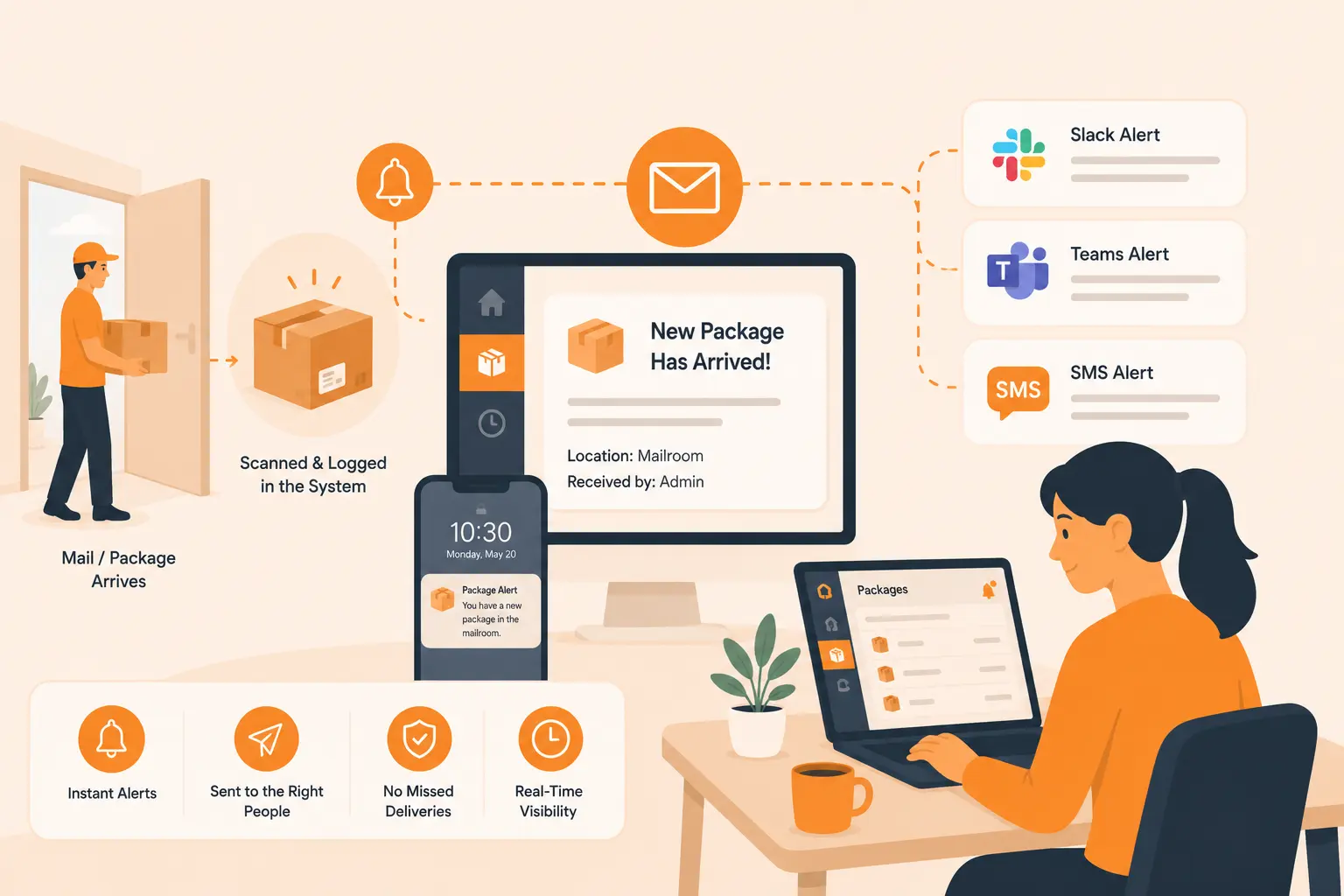
Table of Content
Try Vizitor for Free!
Package Notification System: Slack, Teams, and SMS Alerts When Mail Arrives
A package lands at your front desk. The courier hands it over, your receptionist signs for it, and then it sits. Maybe on a shelf, an arrangement worth comparing against smart lockers. Maybe on the floor behind reception. Maybe in a pile with thirty other parcels that all arrived that morning. The person it belongs to has no idea it is there. Hours pass. Sometimes days. By the time they finally walk past the desk and spot their own name on a box, the cold chain on those lab samples is broken, or the signed contract that needed a same day countersignature is still waiting.
This is the quiet problem with mail in most offices. The delivery part is solved. Couriers are fast and reliable. The handoff inside the building is where everything falls apart. A package notification system fixes exactly that gap by sending an instant alert to the recipient the moment their item is logged, through the channels they already check all day: Slack, Microsoft Teams, and SMS.
This guide walks through how those alerts work, when to use each channel, and how to set the whole thing up so no parcel ever goes unclaimed again.
Why package notifications matter more than ever
Office deliveries have exploded, and the load only gets heavier around the holiday season. Hybrid work means staff order more to the office because they are not always home to receive things. Equipment, samples, legal documents, client gifts, and personal parcels all flow through a single reception point that was never designed to handle the volume. The front desk has become an unofficial warehouse.
The cost of a slow handoff is bigger than it looks. Reception staff lose hours every week chasing recipients, answering “did my package arrive” questions, and re-sorting piles that keep growing. Recipients waste time walking to the desk on the off chance something showed up. Sensitive deliveries sit exposed in a shared area, which is a real security and compliance issue in regulated industries. And perishable or time sensitive items degrade while they wait.
An automated alert removes the guesswork. The recipient knows within seconds, the package gets collected fast, and the front desk clears out. That is the entire value of a package notification system: it turns a passive pile into an active, tracked flow where every item has a clear owner and a clear status.
What a package notification system actually does
At its core, the system does three things. It logs the package, it identifies the recipient, and it notifies them. Everything else is detail layered on top of those three steps.
When a parcel arrives, whoever receives it captures the basics: who it is for, who delivered it, and ideally a photo of the label or the item itself. Many setups let you scan a barcode or snap a picture so the entry takes seconds rather than minutes of typing. Once the recipient is matched to a staff record, the system fires off a notification automatically.
The smart part is the follow through. A good system tracks the package status from arrival to pickup. It can send reminders if an item sits uncollected for too long. It keeps a clean log of who received what and when, which matters enormously for audits, chargebacks, and lost item disputes. The notification is the trigger, but the record keeping is what makes the whole thing defensible later. Vizitor’s mailroom management system is built around this exact loop, pairing instant alerts with a full digital trail.
Slack alerts when mail arrives
For teams that live inside Slack, this is the most natural channel by far. When a package is logged for someone, they get a direct message in Slack telling them an item is waiting and where to collect it. No email to dig out of a crowded inbox, no walk to the desk to check. The alert appears right in the tool they already have open.
The reason Slack works so well for this is behavioral. People glance at Slack constantly throughout the day. A direct message stands out, it is timestamped, and it sits in a thread the recipient can return to. If your office runs on Slack for everything else, routing package alerts there means staff respond in minutes instead of hours. Collection times drop sharply once the alert lands somewhere people actually look.
Vizitor connects directly with Slack so package notifications flow into the same workspace your team uses for daily work. The recipient gets pinged the instant their parcel is recorded, and the front desk sees when the message has been acted on. If you want to understand the broader picture of how chat based alerts fit into office operations, the Vizitor Slack integration page covers the setup in detail.
Microsoft Teams alerts for package arrivals
Plenty of organizations standardize on Microsoft Teams rather than Slack, especially larger enterprises already inside the Microsoft ecosystem. The logic is identical. A package gets logged, the recipient receives a Teams notification, and they head down to collect it knowing exactly what is waiting.
Teams alerts carry the same advantages. They are instant, they are personal to the recipient, and they live inside a platform staff keep open all day. For companies that run their entire internal communication through Teams, adding package alerts to that stream means there is no new app to learn and no extra login to remember. The notification simply becomes part of the existing rhythm of work.
This matters most in large or multi floor buildings where the distance between reception and a recipient’s desk is significant. A Teams ping tells someone on the fourth floor that their delivery is at the ground floor desk before they waste a trip down to check for nothing. The alert respects people’s time, and over a whole organization that adds up to real productivity recovered.
SMS alerts for staff without chat access
Not everyone sits at a desk with Slack or Teams open. Warehouse staff, field technicians, drivers, security teams, and frontline workers often have a phone but no company chat app running during their shift. For these people, SMS is the channel that actually reaches them.
An SMS package alert lands on any phone, smart or basic, with no app required. The moment a parcel is logged for a recipient, a text goes out: a parcel has arrived, here is where to collect it. This is also the right channel for visitors, contractors, and temporary staff who are not part of your internal chat tools at all but still receive deliveries while on site.
SMS has one more quiet advantage. It is reliable in a way that depends on nothing but a cellular signal. When the office wifi is down or someone is between buildings, the text still arrives. For time critical deliveries where you cannot afford a missed notification, SMS is the safety net. Vizitor supports SMS alerts alongside chat channels so you can reach every recipient on whatever they actually carry.
How the notification flow works end to end
It helps to see the full sequence, because the magic is in how smoothly the steps connect rather than in any single one.
First, the package arrives and someone at reception logs it. With a modern setup this means scanning a label or photographing the item, then selecting the recipient from a directory. The whole capture takes seconds.
Second, the system matches that recipient to their preferred notification channel. Some staff want Slack, some want Teams, some only have SMS. A flexible system respects each person’s setting rather than forcing everyone onto one channel.
Third, the alert goes out instantly. The recipient sees the message, knows a package is waiting, and knows where to get it.
Fourth, the recipient collects the item and it is marked as picked up. The status updates, the log records the collection time, and the entry closes cleanly. If the package sits too long, an automatic reminder nudges the recipient again so nothing is forgotten.
That closed loop, from arrival to collection to record, is what separates a real package notification system from a simple alert tool. Vizitor handles every stage in one place, which is why the front desk stops feeling like a storage room and starts feeling like a checkpoint that clears itself.
Choosing the right alert channel for your office
There is no single best channel. The right answer depends on how your people work, and the strongest systems use all three together rather than picking one.
If your workforce is mostly desk based and already runs on Slack or Teams, lead with chat alerts. They are frictionless and they reach people inside the tool they trust. Use SMS as the fallback for anyone outside those platforms, plus for visitors and contractors.
If you have a large frontline or field workforce, flip the priority. SMS becomes your primary channel because it reaches phones regardless of app access, and chat alerts cover the office based staff.
For mixed environments, which most offices are, let each recipient choose. A system that lets staff set their own preference removes the guesswork entirely. The marketing team gets Slack, the facilities crew gets SMS, leadership gets Teams, and every one of them gets notified the way they are most likely to respond. Vizitor’s flexible routing makes this per person choice simple to manage.
Common mistakes that break package notifications
Even a good system fails if it is set up carelessly. A few patterns cause most of the trouble.
The first is poor recipient matching. If the directory is out of date, alerts go to the wrong person or fail to send at all. Keeping your staff directory current is the unglamorous foundation that everything else rests on.
The second is overloading a single channel. Dumping every alert into one shared channel that nobody owns means notifications get ignored. Direct, personal alerts to the actual recipient work far better than a noisy group feed.
The third is skipping the pickup confirmation. An alert that fires but never closes the loop leaves you with a log full of items that may or may not have been collected. Without a clear picked up status, you lose the audit trail that justified the system in the first place.
The fourth is forgetting the people without chat access. Teams that build alerts only for Slack or Teams leave their frontline staff and visitors in the dark. Always include an SMS path so no recipient falls through.
Avoiding these four mistakes is mostly a matter of choosing a system that handles matching, multi channel routing, and pickup tracking as built in features rather than bolt ons.
Setting up package alerts with Vizitor
Putting this together does not require a developer or a custom build. Vizitor brings package logging, recipient matching, and multi channel alerts into a single workplace platform that the front desk can run from day one.
The flow is straightforward. Reception logs an incoming parcel by scanning or photographing it and selecting the recipient. Vizitor instantly sends an alert through that person’s chosen channel, whether that is Slack, Microsoft Teams, or SMS. The recipient collects the item, it is marked as delivered, and the full record stays in your dashboard for as long as you need it.
Because Vizitor is a complete workplace management platform, package handling sits alongside visitor management, the front desk sign in flow, and other reception tasks rather than living in a separate disconnected tool. The same instant notification engine that alerts hosts when a visitor arrives also alerts staff when their mail does. That unified approach means one system, one login, and one clean log covering everything that comes through your door. You can explore the full delivery and mailroom capabilities on the Vizitor mailroom management page, or see how instant alerts work across the platform on the Vizitor instant notification page.
For offices drowning in unclaimed parcels, the change is immediate. Packages get collected the same day, reception stops chasing people, and every item has a name, a timestamp, and a clear status from the second it arrives.
The Bottom Line
The delivery itself is rarely the problem. The handoff inside your building is. A package notification system closes that gap by alerting recipients the second their item is logged, on the channel they already check all day. Slack and Teams keep desk staff moving fast, SMS catches everyone else, and a clean pickup record protects you when something goes missing. Vizitor brings all three channels and the full tracking loop into one workplace platform, turning a cluttered front desk into a checkpoint that clears itself. If unclaimed parcels are piling up at reception, this is the fix that pays for itself in recovered time within the first week.
Frequently Asked Questions
See Vizitor in action check-in a visitor in under 30 seconds
Trusted by 500+ businesses. QR check-in, badge printing, NDA signing. Plans from $36/mo.