Do Smart Package Lockers Save Offices Money Over Mailrooms?
Smart package lockers automate office deliveries with instant notifications and digital tracking, while open mailrooms waste 5 to 15 staff hours weekly on manual logging. For offices handling 25 or more packages daily, lockers pay for themselves within 12 to 24 months through labor savings alone.


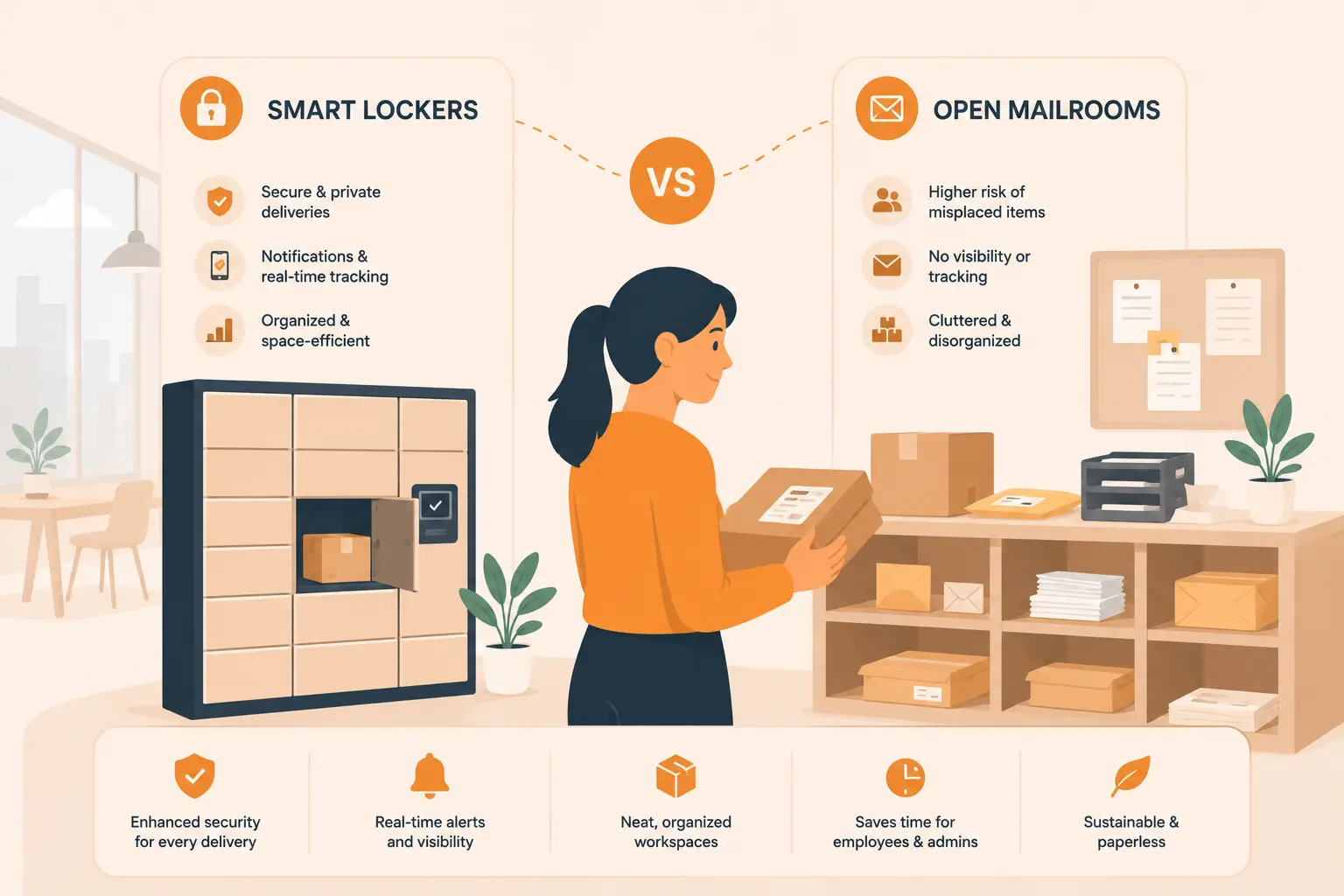
Table of Content
Try Vizitor for Free!
If a package shows up at your office and nobody’s at the front desk, where does it go? That’s not a trick question. For most offices running an open mailroom, the honest answer is “wherever there’s space,” which is usually someone’s desk, the floor near reception, or a corner near the kitchen.
Office package volume has grown sharply. In the United States alone, 23.4 billion packages were shipped in 2025, a 4.5% increase from 2024 (Smart Package Room, 2026). A growing share of those deliveries land at offices. Some are business supplies or equipment. Plenty are personal orders from employees who use their work address as a shipping destination. And the front desk, the mailroom attendant, or whoever happens to be near reception ends up managing all of it.
Smart package lockers have entered the picture as an alternative to the traditional open mailroom. But are they actually worth the upfront investment? And what do they change about how your mailroom actually runs on a daily basis? This article breaks down both systems side by side, covers the real numbers on cost and staffing, and helps you figure out which option makes sense for your specific office setup.
Key Takeaways:
Office package volume rose 4.5% in 2025, putting pressure on manual mailroom operations (Smart Package Room, 2026). Smart locker hardware typically costs between $6,000 and $21,000 upfront (Pitney Bowes, 2025), but open mailrooms carry hidden labor costs that often reach $15,000 to $20,000 per year in mid-sized offices. Hybrid work has made open mailrooms structurally harder to run. The right system depends on daily package volume, staff availability, and how predictably your employees come in.
What Is an Open Mailroom and Why Is It Struggling?
An open mailroom is the traditional model most offices have used for decades. Packages arrive, a staff member receives and logs them, places them on shelving or a trolley, and notifies the recipient by email, phone, or a paper slip. The recipient comes to collect at some point during their working day, signs off, and moves on.
It works. Until the volume climbs, the team gets busy, or someone doesn’t come in for three days.
The core problem with open mailrooms isn’t the concept itself. It’s that the concept was designed for a lower-volume, fully in-office world that many organizations no longer operate in. When a building handles 15 packages a day, manual tracking is manageable. When it handles 60 or 100, the process starts breaking down. Packages get misplaced. Staff spend time tracking down recipients. Someone comes to collect a delivery and finds it missing. The investigation involves a paper log that may or may not be complete, and it usually ends without a clear answer.
Security is another real concern. Open shelving means packages sit in an accessible space visible to anyone who walks in, couriers, contractors, visitors, and anyone else with building access. In a 30-person office, that’s a minor risk. In a 500-person building with rotating contractors and multiple entry points, it’s a genuine vulnerability.
The Staff Time Cost Nobody Budgets For
This is where open mailrooms quietly become expensive. Research from Smiota indicates that staff managing packages manually can spend 5 to 15 hours per week on tasks like logging arrivals, sending pickup notifications, managing collections, and handling disputes over missing deliveries (Smiota, 2025). In offices without a dedicated mailroom team, that time comes from reception staff who are also managing visitors, calls, and building access.
That’s not an abstract inefficiency. That’s a tangible cost you can calculate on a spreadsheet, and a reception cost calculator can help put an actual dollar figure on it.
What Is a Smart Package Locker for Offices?
A smart package locker is a secure, electronically controlled storage unit that connects to cloud-based management software. The system automates the entire package workflow from drop-off to pickup without requiring ongoing staff involvement.
Here’s how it works in practice. A carrier arrives with a delivery. They scan the package barcode at a touchscreen kiosk attached to the locker bank. The system identifies the recipient, selects an available compartment that matches the package size, opens the door, and locks it once the package is placed inside. The recipient gets a notification, by email, SMS, or app, containing a unique code or QR scan. They walk to the locker when it suits them, scan their code, and retrieve their delivery. The whole pickup process takes under 30 seconds.
From the facility management side, every step is logged automatically. You get a complete digital chain of custody for every package, including arrival time, assigned compartment, and pickup timestamp. That kind of audit trail is something an open mailroom can’t produce without significant dedicated effort.
What Offices Are Using Smart Lockers For Beyond Packages
Package delivery is the most common use case, but offices have expanded the application further. IT departments use smart lockers for laptop and device management, enabling employees to check out equipment without a manual handoff. HR teams use them to distribute onboarding kits to new hires who start on days when key staff aren’t available. Some offices use them for secure document exchange or to manage the return of equipment from departing employees. The compartments are just controlled access points, and the software can support any workflow that involves a secure, trackable handoff.
The Real Cost Breakdown: Smart Lockers vs Open Mailrooms
This is where the comparison gets specific. Smart lockers cost more to install. Open mailrooms cost more to operate. The question isn’t which one is cheaper. It’s which one is cheaper over a three-to-five-year window when you account for the actual resources each system consumes.
Upfront Costs
A smart package locker system for a mid-sized office typically requires between $6,000 and $21,000 for the hardware itself, depending on the number of compartments, the size configuration, and the manufacturer (Pitney Bowes, 2025). Factor in professional installation, electrical connections, and network setup, and a realistic total for a first deployment lands somewhere between $8,000 and $28,000. Most vendors also charge ongoing software licensing fees ranging from $100 to $400 per month.
An open mailroom by contrast requires shelving, a logging system (paper or a basic spreadsheet), and floor space. The upfront cost is usually under $1,000. That gap looks significant on paper.
The Hidden Costs of Running an Open Mailroom
Here is what most cost comparisons leave out. The true operating cost of an open mailroom is almost entirely in labor, and it compounds every year.
If two reception staff each spend 90 minutes per day on package-related tasks, that’s 15 hours per week of paid labor going toward logging, notifying, managing pickups, and resolving complaints. At an average administrative wage of $20 per hour in the United States, that’s $15,600 per year in labor costs tied specifically to package handling. Larger offices with higher daily volume spend more.
Lost packages add another line to the ledger. The average cost to replace a lost ecommerce order is $109 (Pitney Bowes, 2025), and open mailrooms without a digital chain of custody face these disputes regularly. Three or four package loss claims per month add up to several thousand dollars annually, plus the time spent investigating each one.
There’s also the harder-to-measure cost of staff distraction. Every time the front desk has to stop what they’re doing to help an employee find their delivery, that’s an interruption to visitor management, to call handling, to the work the role was actually hired to do.
Where the ROI Timeline Falls
Corporate offices that deploy smart lockers report recovering the hardware investment within 12 to 24 months through labor savings alone. Mailroom directors at universities, which often have higher package volume but similar manual workflows, have reported labor reductions of 60 to 70% after deployment, with some eliminating one full-time position entirely (Parcelhive, 2026). Office environments see more moderate numbers, but the pattern is consistent: the break-even point comes faster than the upfront price tag suggests.
Running an open mailroom might save you $20,000 upfront. But if it’s costing you $16,000 per year in labor and loss, the smart locker pays for itself by year two and keeps saving money after that.
Workflow Impact: What Actually Changes Day to Day?
The operational shift when moving from open mailroom to smart lockers is bigger than most facility managers expect, and it touches more departments than just the mailroom team.
What Changes for Staff
In an open mailroom, receiving a package triggers a chain of manual steps. Accept the delivery, log it, place it, notify the recipient, be available when they come to collect, confirm the pickup, update the log. If you’re handling 40 packages a day, those steps add up to a significant chunk of someone’s working hours, and they’re fragmented throughout the day in a way that makes it hard to stay focused on anything else.
With a smart locker, the staff role reduces to placing the package in the system. Everything after that is automated. Notifications go out without manual input. Pickups happen without staff involvement. The system sends reminders for packages that haven’t been collected and flags anything that’s been sitting in a compartment past a set time limit. Nobody has to chase anyone.
What Changes for Employees
Employees aren’t tied to front desk availability. They don’t have to leave a meeting because the notification board outside reception has their name on it. They collect when it suits their schedule, using the code sent to their phone or email.
This sounds small, but consider a building with 300 employees all receiving notifications around the same time that afternoon deliveries have arrived. The front desk becomes a queue. With lockers, that collection load spreads across the day and across the week, since packages remain available outside normal office hours if the locker area is accessible after hours.
What Changes for Dispute Resolution
When a package goes missing in an open mailroom, the investigation usually involves checking written logs, asking staff what they remember, and in many cases, not reaching a clear conclusion. With a smart locker system, every handoff is timestamped and stored in the cloud. You can pull the full history of any package in seconds: when it arrived, which compartment it was assigned, when it was collected, and by whom. Disputes resolve quickly. More often, they stop occurring at all, because accountability is built into the process from the moment the package is placed in the system.
Which System Works Better Based on Office Size?
Not every office needs a smart locker. The right choice depends on daily package volume, staffing structure, and the level of traceability your operation actually requires.
For small offices handling fewer than 15 packages per day, an open mailroom with a simple digital logging system is often adequate. The operational overhead is low, staff can manage it without significant disruption, and the cost-to-benefit ratio of a smart locker deployment doesn’t justify itself within a reasonable timeframe at that volume.
For mid-sized offices handling 25 to 80 deliveries daily, the math shifts. Staff time starts becoming a real, calculable cost. Missed pickups and delayed collections become a daily source of friction. The risk of package loss increases with volume, and the absence of a digital chain of custody starts to matter. This is the range where smart lockers typically show the most compelling return on investment.
For large offices and corporate campuses handling more than 80 deliveries per day, open mailrooms are difficult to run without a dedicated team. A smart locker system, or a combination of lockers for standard-sized packages and a managed overflow room for oversized items, becomes the practical choice for maintaining order and accountability at scale.
How Hybrid Work Changes the Equation
This is the angle that most comparisons between smart lockers and open mailrooms overlook entirely.
Hybrid work has broken the assumption that someone will be in the office to collect a delivery on the day it arrives. In a fully in-office environment, the odds of a recipient being available are high. In a hybrid model where employees might come in two or three days per week on different schedules, that assumption falls apart.
An open mailroom holds packages until the recipient comes in. That might be the next day. It might be four days later. During that window, the package is sitting on shared shelving, taking up space, and requiring someone to actively manage the backlog. Staff have to track who hasn’t collected, send follow-up notifications, and make judgment calls about what to do with packages that have sat uncollected for a week.
Smart lockers handle this without staff intervention. The recipient gets a notification on the day the package arrives, regardless of whether they’re in the office. They collect on their next in-office day. Automated reminders go out if pickup hasn’t happened after a set period. No package sits in a compartment indefinitely, and no staff member has to manage the process manually.
If your office has shifted to a hybrid schedule and hasn’t revisited the mailroom setup, the open mailroom model wasn’t built for how you’re working now.
Final Thoughts
The choice between a smart package locker and an open mailroom comes down to one real question: what is your current delivery process actually costing you?
Open mailrooms have a low sticker price. The combination of staff time, lost packages, missed pickups, and the daily friction of a manual process adds up to a real number, and in most mid-to-large offices, that number is higher than the spreadsheet shows.
Smart lockers cost more upfront. The tradeoff is a system that runs itself, produces a clean chain of custody for every delivery, handles the reality of hybrid work without manual workarounds, and frees your front desk and facilities team to focus on work that software cannot automate.
If your office handles more than 20 to 25 packages per day, runs on a hybrid schedule, or deals with recurring complaints about missing or delayed deliveries, the open mailroom is costing you more than you think. At the right scale, a smart locker system is not just a convenience improvement. It’s a workflow fix that pays for itself.
If your reception desk is already buried under parcels, this guide to package tracking software for enterprise workplaces covers additional options worth comparing.
Ready to eliminate mailroom chaos and cut delivery admin time for good? Try For Free and see how automated package management works for your office.
Frequently Asked Questions
See Vizitor in action check-in a visitor in under 30 seconds
Trusted by 500+ businesses. QR check-in, badge printing, NDA signing. Plans from $36/mo.