Desk Hoteling or Hot Desking: Which Fits Your Hybrid Team?
This blog compares desk hoteling (proactive, reservation-based booking) with hot desking (reactive, first-come, first-served seating), emphasizing why structured software is vital for hybrid workforce predictability. It highlights key software features like floor-plan visibility, auto-release, and utilization analytics that help mid-to-large organizations optimize real estate and improve employee experience.


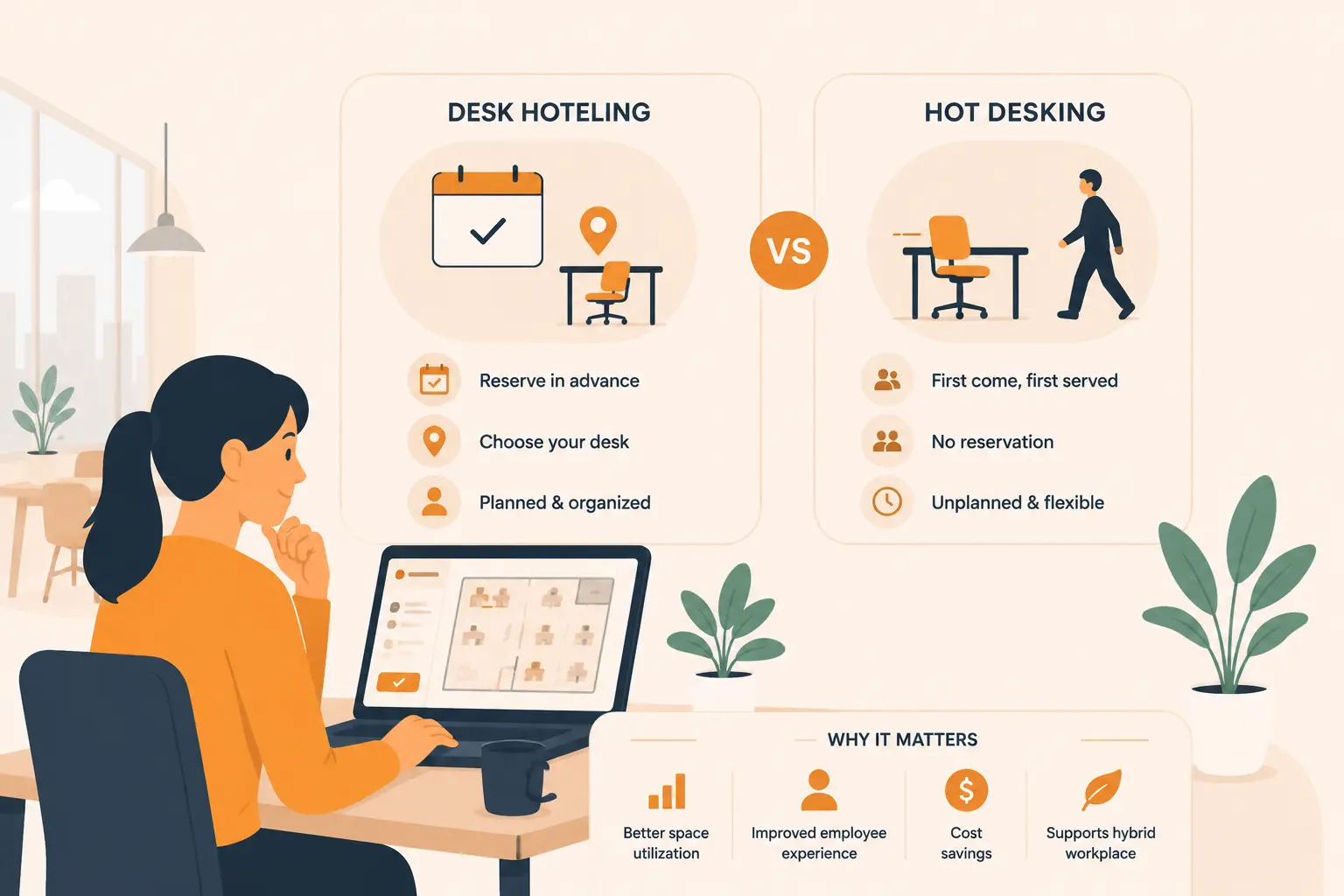
Table of Content
Try Vizitor for Free!
Office Hoteling Software: How Desk Hoteling Differs From Hot Desking and Why
Picture this. Two employees from the same team both come into the office on a Tuesday. One gets a desk near the window with a sit-stand option and a dual monitor, exactly where she planned to sit when she booked it the night before from home. The other walks in, looks around for ten minutes, and ends up squeezed into a corner far from anyone on his team. Both companies call their setup flexible working. One is using desk hoteling. The other is hot desking. The difference sounds minor on paper, but it shapes the entire experience of being in a hybrid office.
This guide breaks down exactly how desk hoteling and hot desking work, why office hoteling software has become the foundation of modern workspace management, and what features matter when you are evaluating a tool for your team.
What Is Office Hoteling?
Office hoteling is a workspace arrangement where employees reserve a specific desk or workspace before they arrive. The name comes directly from the hotel industry: just as you book a room before showing up, employees book a desk for a particular date and time through a digital reservation platform.
The key word here is advance. Employees open an app, select a date, pick a desk from an interactive floor plan, and confirm. When they walk in, their workspace is ready. No searching, no competing with someone who got in earlier, no settling for whatever is left.
Office hoteling software is the technology that makes this possible. It manages reservations, shows live availability, tracks who is in the office and when, and provides utilization data to facilities managers about how space is actually being used. The terms desk booking software, hot desk booking software, and office hoteling system are often used interchangeably, though there are real distinctions worth knowing.
What Is Hot Desking?
Hot desking is a workspace arrangement where employees have no assigned desks and simply sit wherever a space is open when they arrive. It works on a first-come, first-served basis. There are no reservations, no apps required, and no guarantees about which desk you will get.
Hot desking works well in small offices where attendance is light and unpredictable. It is cheap to implement, requires no software, and gives employees complete freedom to move around. For a small team that comes in twice a week with no particular need to sit near each other, hot desking is perfectly practical.
The problems become visible as teams grow, attendance gets denser, and employees need to plan collaborative work in advance. When a dozen people all show up on the same Wednesday expecting to sit near their team, hot desking has no mechanism for making that happen.
The Core Difference Between Desk Hoteling and Hot Desking
The most important operational difference is this: hot desking is reactive, while desk hoteling is proactive.
With hot desking, you find out what is available when you arrive. With desk hoteling, you know what is available before you leave home.
Everything else flows from that. Here is how the two models compare across the dimensions that matter most when planning workspace
| Factor | Hot Desking | Desk Hoteling |
|---|---|---|
| How you get a desk | First come, first served | Reserve in advance |
| Workspace guarantee | No | Yes |
| Software required | No | Yes |
| Admin overhead | Minimal | Managed by software |
| Space utilization data | None | Full analytics dashboard |
| Team coordination | Difficult | Supported |
| Employee experience | Unpredictable | Consistent |
| Setup time | Immediate | Days to weeks |
| Cost | Near zero | Subscription based |
| Suitable for hybrid teams | Partially | Yes |
Why the Difference Actually Matters in 2026
The gap between hot desking and desk hoteling has become strategically significant because hybrid work has completely changed how offices fill up.
According to JLL’s 2025 Global Occupancy Planning Benchmark, 67 percent of office workers now come in between one and four days per week. That means the same office might sit at 30 percent capacity on a Monday and hit 90 percent on a Thursday. Traditional assigned seating handles this badly because you are paying for desks that are empty most of the week. Pure hot desking handles it chaotically because there is no system to prevent everyone arriving at once and running out of space.
CBRE’s 2026 Global Workplace and Occupancy Insights report adds further context. Global building utilization has climbed to 53 percent, up from 38 percent in 2024. That improvement is largely driven by organizations adopting structured reservation systems rather than hoping attendance self-organizes. The same report shows that 69 percent of organizations now have more than 40 percent of their staff sharing desks, a figure that was far lower just two years ago.
This is the environment office hoteling software was built for. When attendance is unpredictable but patterns are starting to emerge, you need a system that captures those patterns, anticipates demand on peak days, and prevents both the ghost town problem (everyone works remote and the office sits empty) and the overcrowding problem (too many people arrive and fight for desks).
What Office Hoteling Software Actually Does
A good office hoteling system is considerably more than a calendar for desks. Here is what the best platforms handle in practice.
Desk Reservation With Floor Plan Visibility
Employees open the platform and see a live map of the office floor. Available desks appear in one color, booked desks in another. They can filter by desk type, available equipment, or proximity to a specific teammate who has already confirmed their booking nearby. One click reserves the desk and sends a confirmation to their calendar.
Check-In and Automatic Release
When employees arrive, they check in via QR code, mobile app, or a badge tap. If someone books a desk but does not check in within a defined window, the system releases that desk back into the available pool without any manual admin action. This solves one of the most frustrating recurring problems in shared offices: ghost bookings that block real desks from real people.
Colleague Visibility and Schedule Coordination
Most platforms let employees see who else is coming in on any given day before they book. This feature alone changes how hybrid teams plan their weeks. Instead of showing up and hoping teammates are in, employees can see that three colleagues from their project group are booked for Thursday and choose their own days accordingly. Workplace researchers call this social gravity, the tendency of people to align their schedules once they can see where their teammates plan to be.
Space Utilization Analytics
This is where office hoteling software creates value that goes well beyond individual bookings. Facilities managers get dashboards showing peak attendance days, underused zones, booking completion rates, and average desk utilization by floor and by team. That data directly informs decisions about lease renewals, office reconfigurations, and how space is divided between teams. JLL’s 2025 occupancy data shows that 90 percent of organizations track utilization, but only 7 percent rate their data quality as excellent. A proper hoteling system with check-in integration is what moves a company from the first group to the second.
Calendar and Communication Tool Integration
The best hoteling platforms sync with Microsoft Outlook, Google Calendar, Microsoft Teams, and Slack. When an employee books a desk, it appears in their calendar alongside their meetings for the day. When a meeting room is booked, the platform can automatically suggest adjacent desks for all attendees. This removes the friction of managing workspace through a separate tool and embeds it into the daily workflow employees already use.
Benefits of Desk Hoteling Over Hot Desking
When comparing the two in a hybrid environment, desk hoteling consistently performs better on the metrics that matter to both employees and leadership.
For employees, the most practical benefit is certainty. Knowing where you will sit before commuting is more meaningful than it sounds. According to Gallup’s 2025 data, employee satisfaction peaks when people spend roughly three days in the office and two at home. A hoteling system supports exactly that pattern by making each office day deliberate rather than uncertain.
For facilities teams, the analytics justify the cost on their own. When you can see that Tuesday through Thursday are your peak attendance days and Monday consistently sits at 25 percent capacity, you can make real adjustments. Turn off systems in unused zones. Redesign the floor plan around actual patterns. Stop paying for configurations nobody is using.
For finance and real estate teams, the math is direct. A hoteling model with a seat ratio of 0.7 (70 desks per 100 employees) in a 500-person hybrid organization reduces the required desk count by around 150. At average US per-seat real estate costs, that works out to roughly 1.4 million dollars in annual savings, according to OfficeRnD’s 2025 analysis. Companies that implement hoteling with a clear utilization strategy can realistically target space savings of 20 to 30 percent within the first year.
When Hot Desking Still Makes Sense
Desk hoteling is the right fit for most mid-to-large hybrid organizations, but hot desking still has genuine use cases worth acknowledging.
Small teams with fewer than 20 people and light, irregular attendance do not need a reservation platform. The overhead of managing a hoteling system will outweigh the benefit when everyone can see at a glance which three desks are available.
Companies in the early stages of switching to hybrid may also benefit from starting with hot desking to observe real attendance patterns before committing to a software investment. There is genuine value in letting organic behavior reveal itself before building a system around assumptions.
Creative agencies or organizations where spontaneous movement between spaces is part of the daily rhythm may also find hot desking a better cultural fit. If your team genuinely works well without structure and nobody minds not knowing where they will sit, imposing a booking requirement creates friction without solving a real problem.
The practical reality is that hot desking and desk hoteling are not always binary choices. Many organizations run both in the same building, using reservation-based hoteling for collaborative floors and open hot desking for casual drop-in areas or project pods. Good office hoteling software supports both models from the same admin interface.
How to Choose the Right Office Hoteling Software
There are dozens of desk booking platforms available in 2026, ranging from free tools for small teams to enterprise systems. Here is what to focus on when evaluating options.
Ease of booking matters most. If employees find the booking process cumbersome, adoption will collapse within weeks and the program will fail regardless of the software itself. The best tools allow a desk to be booked in under 30 seconds from a mobile phone without logging into a separate system.
Integration with tools your team already uses is equally important. If your team lives in Microsoft Teams or Google Calendar, your hoteling platform should work natively inside those tools, not require a separate login and a context switch.
Floor plan support is non-negotiable for any team larger than 30 people. Employees need to see where they are booking in relation to their teammates, not scroll through a list of desk identifiers that mean nothing without a map.
Analytics depth should match your reporting needs. Small teams can manage with basic occupancy numbers. Enterprise teams with multiple locations need zone-level breakdowns, peak demand trends, and export capabilities that connect to their reporting tools.
Auto-release and no-show handling is a core feature, not an optional extra. Any platform worth evaluating should handle ghost booking cancellations automatically rather than depending on manual admin intervention.
Visitor management integration is worth examining seriously if your team hosts external guests regularly. When a client comes in for a meeting, the same system managing employee desks should be able to handle visitor check-in, host notification, and meeting room coordination without switching between platforms. Vizitor’s desk booking system connects workspace reservations with visitor management, so desk allocation, room booking, and guest registration all run from one place. You can see how this works at Vizitor’s desk booking and space management page.
Common Questions About Office Hoteling Software
What is the difference between desk hoteling and hot desking?
Hot desking is a walk-in seating arrangement with no advance booking where employees sit wherever is open. Desk hoteling requires employees to reserve a specific desk in advance through a booking platform. The fundamental difference is predictability: hoteling guarantees a workspace, hot desking does not.
Do you need software to run hot desking?
No. Hot desking can operate with no software at all. Employees walk in and sit wherever is available. Desk hoteling, by contrast, cannot function without reservation software because the advance booking process is the entire operating model.
What is a reasonable desk-to-employee ratio for hoteling?
Most hybrid organizations target a ratio of 0.6 to 0.8 desks per employee, meaning 60 to 80 desks per 100 staff. You can calculate your own ideal ratio here. The right number depends on your peak attendance days. CBRE’s 2026 data shows 48 percent of organizations now target between 1.01 and 1.49 people per seat, reflecting growing confidence in managing shared space when you have reliable utilization data.
How much does office hoteling software cost?
Public pricing in 2026 ranges from free for small teams under 20 users to around five to eight dollars per user per month for mid-market platforms. Enterprise solutions typically use custom pricing. Most organizations find the cost is recovered quickly through real estate savings and reduced admin overhead.
Can hot desking and hoteling coexist in the same office?
Yes. Many organizations run both models in the same building: some zones reserved through advance booking and others available for walk-in use. Most office hoteling software platforms support both arrangements from the same admin dashboard.
The Bottom Line
The debate between hot desking and desk hoteling is not really about which model sounds more appealing. It is about which one matches how your team actually works. For most organizations running a hybrid schedule with variable daily attendance, desk hoteling backed by good office hoteling software is the more dependable and measurable choice. It gives employees certainty before they commute, gives managers data they can act on, and gives leadership the evidence they need to make smarter real estate decisions.
Hot desking works until it does not. The moment your team grows past the point where desk availability is obvious to everyone, or the moment a key employee shows up and cannot find a seat near their team, you have crossed the threshold where a reservation system pays for itself. Most hybrid teams cross that threshold faster than they expect.
The right office hoteling software does not just manage where people sit. It coordinates when people come in, what they need when they arrive, and how the space adapts to serve the team better over time. That is a very different value proposition from a first-come-first-served arrangement, and understanding that difference is the first step toward a workspace strategy that works in practice and not just on a floor plan diagram.
See Vizitor in action check-in a visitor in under 30 seconds
Trusted by 500+ businesses. QR check-in, badge printing, NDA signing. Plans from $36/mo.