What is a Visitor Management System? Complete 2026 Guide
This page is the definitive guide to visitor management systems covering what a VMS is, how it works step by step, who counts as a visitor, the 12 core features, five deployment types, and ten data-backed benefits. It addresses US compliance requirements including HIPAA, OSHA, GDPR, SOC 2, and C-TPAT, along with watchlist and denied-party screening, emergency evacuation management, system integrations, AI and biometric developments, a VMS pricing guide, and an eight-step implementation framework. Vizitor is presented as a cloud-based VMS that has managed over 1.5 million check-ins and 60,000+ digital NDA signings across 500+ businesses, with plans from $36 per month and five-minute setup.


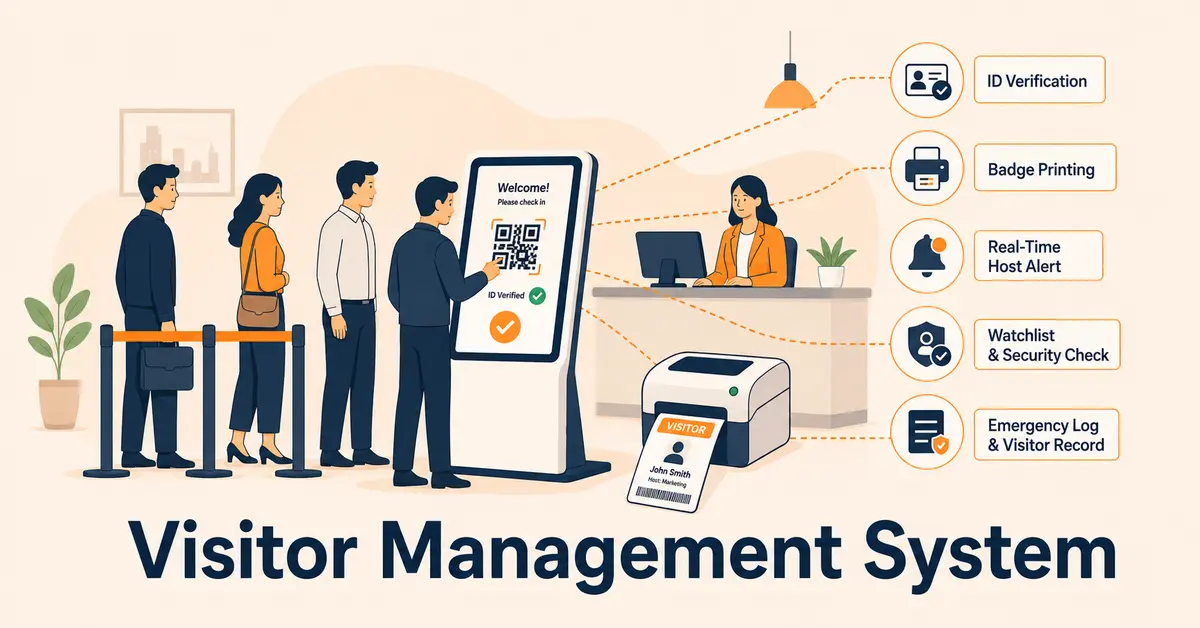
Table of Content
Try Vizitor for Free!
Every organization has a front door. And whether it’s a corporate headquarters, a hospital, a manufacturing facility, or a school, the people who walk through that door are either being managed or they’re not.
A visitor management system is what makes the difference.
A visitor management system (VMS) is a digital solution that automates how your organization registers, verifies, tracks, and manages every person who enters your facility. It replaces paper logbooks with touchless check-ins, ID verification, badge printing, host notifications, and searchable digital records giving you complete visibility into who is on your premises at any given moment.
The global VMS market hit $2.16 billion in 2025 and is projected to reach $6.77 billion by 2034, growing at a 13.56% CAGR, according to Fortune Business Insights. North America leads with 40% of global market share. That growth isn’t driven by convenience. It’s driven by security threats, compliance mandates, and the recognition that an unmanaged front door is one of the most overlooked risks in the modern workplace.
Whether you manage a 10-person startup in Chandigarh or a 5,000 employee workplace in USA, this guide will give you everything you need to understand visitor management systems; how they work, what features to look for, which industries benefit most, and how to choose the right one for your organization.
What is a Visitor Management?
A visitor management is something you do to handle the people walking into your facility. Contractors. Clients. Auditors. Interview candidates. Delivery drivers. Vendors. Anyone who isn’t a full-time employee but still needs to get through your front door.
Done well, it turns reception from a bottleneck into a first impression. And it gives you a clear, searchable record of everyone who’s ever walked through your door not just the ones who remembered to sign in.
What Is a Visitor Management System?
A visitor management system is the software that handles all front-desk operations for you. It captures visitor details, manages check-in and check-out, notifies the right host the moment someone arrives, and gives you a single, reliable record of everyone on your premises at any given moment.
Systems range from simple QR code check-in apps that replace paper logbooks all the way to fully integrated platforms that connect your front door to your access control system, your HR tools, your communication channels, and your emergency evacuation procedures.
Who Counts as a “Visitor”?
This is a question most organizations don’t think through until something goes wrong. A visitor is any person entering your facility who is not a full-time employee. In practice, this covers a much wider range than most organizations manage:
- Clients and business guests - attending meetings, presentations, or sales calls
- Contractors and vendors - providing maintenance, installation, or services
- Job candidates - coming in for interviews
- Delivery personnel - dropping off packages, equipment, or supplies
- Temporary and contingent workers - contractors with recurring access over a project period
- Auditors and inspectors - from regulatory bodies, clients, or certification agencies
- Former employees - returning for transition assistance or equipment retrieval
- VIP guests - executives, board members, or high-value clients requiring special handling
- Journalists and media - in any facility with a public profile
Every one of these visitor types represents a different risk profile, a different compliance consideration, and a different workflow requirement. A robust VMS handles all of them with configurable workflows that reflect those differences.
How Does a Visitor Management System Work?
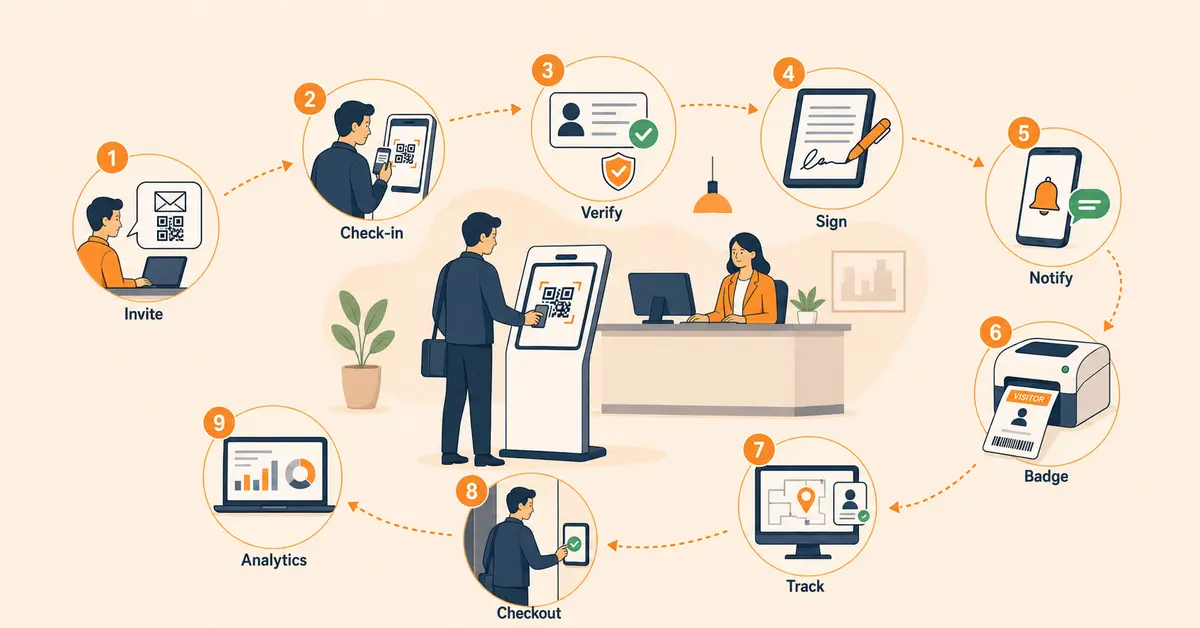
A visitor management system follows a structured workflow that covers the complete visitor journey. Here’s how it works, step by step:
Step 1: Pre-Registration (Before Arrival)
The host sends a digital invitation to the expected visitor via email, SMS, or WhatsApp. The invite contains the visit date, time, host details, and a unique QR code. For scheduled meetings, this eliminates front-desk bottlenecks entirely.
Step 2: Arrival & Check-In
When the visitor arrives, they check in using one of several methods: scanning the pre-sent QR code on a kiosk or tablet, entering their details on a self-service touchscreen, or using a mobile app. The system captures their photo, purpose of visit, and ID details automatically.
Step 3: Identity Verification
Depending on the security level required, the VMS can verify the visitor’s identity through government ID scanning (Aadhaar, PAN, driving licence in India), facial recognition, OTP-based mobile verification, or manual approval by the host.
Step 4: Document Collection and Signing
Before entry is completed, the VMS can prompt visitors to review and digitally sign required documents like NDAs, safety agreements, health declarations, liability waivers, or any policy acknowledgment the organization requires. These signatures are timestamped and stored with the visit record, creating a legally defensible paper trail.
Step 5: Host Notification
The moment check-in is complete, the host receives an instant notification via SMS, email, app push notification, or even WhatsApp that their visitor has arrived. No more calling reception to ask if your 3 PM meeting has shown up.
Step 6: Badge Printing
The system automatically prints a visitor badge with their name, photo, host name, date, and access level. This makes it easy for security and employees to identify authorised visitors on the premises.
Step 7: On-Premises Tracking
The VMS tracks the visitor’s presence in real time. If a visitor overstays their expected duration, the system can send overstay alerts to the admin or security team. This is critical for compliance-heavy environments like hospitals, data centres, and government facilities.
Step 8: Check-Out
When the visitor leaves, they check out through the app, kiosk, or are manually checked out by reception. The system logs the exact departure time, completing the visit record.
Step 9: Data Logging & Analytics
Every visit is permanently logged in a searchable cloud database. Admins can pull reports on visitor volume, peak hours, frequent visitors, average visit duration, and host-wise analytics, all from a single dashboard.
Key Features of a Visitor Management System
Not all visitor management systems are created equal. Here are the features that separate a professional-grade VMS from a basic digital register:
QR Code Check-In
Visitors scan a code on their own phone and check in touchlessly, no shared devices, no queues, no paper.
Visitor Pre-Registration
Hosts invite guests in advance so they walk straight in without stopping at reception.
Host Notifications
The right person gets an instant alert: SMS, email, Slack, or Teams, the moment their visitor arrives.
ID Verification
Captures visitor photo and verifies identity through government-issued ID, OTP, or facial recognition.
Badge Printing
Automatically prints a visitor badge with name, photo, host, and access level at check-in.
Digital Document Signing
Visitors sign NDAs, waivers, safety agreements, or health declarations digitally during check-in.
Watchlist Screening
Every visitor is checked against internal blocklists and denied-party databases before entry is granted.
Real-Time Dashboard
Live view of everyone currently on-premises, searchable, filterable, and exportable in seconds.
Emergency Evacuation List
Instant export of all on-site visitors for accurate headcounts the moment an emergency is called.
Multi-Location Management
One dashboard for all your offices, facilities, or campuses; consistent policies, centralized records, no switching between systems.
Analytics and Reporting
Visitor volume, peak hours, host activity, compliance reports, all in one place without manual data pulls.
Access Control Integration
Connects with door locks, turnstiles, and elevators to grant or restrict access automatically based on check-in status.
Still Running Visitors Through a Paper Register?
Vizitor replaces it with a digital check-in that takes under 15 seconds and keeps a timestamped record of every visit automatically.
Types of Visitor Management Systems
Visitor management solutions come in different deployment models. The right choice depends on your organization’s size, security requirements, budget, and IT infrastructure.
Cloud-Based VMS (SaaS)
The most popular option in 2026. The software is hosted on the vendor’s servers, and you access it through a web browser or mobile app. There’s no hardware to maintain, updates are automatic, and you can manage multiple locations from anywhere. This is ideal for SMBs, startups, co-working spaces, and organizations with multiple branches. Vizitor is a cloud-based VMS, which means you can get started in minutes without any IT overhead.
On-Premise VMS
The software is installed on your own servers within your facility. This gives you complete control over data but requires in-house IT resources for maintenance, updates, and security. This model is typically chosen by government facilities, defence installations, and organizations with strict data residency requirements.
Hybrid VMS
Combines cloud and on-premise elements. For example, core visitor data stays on local servers while analytics and reporting run in the cloud. This suits large enterprises that want the flexibility of cloud with the data control of on-premise.
Kiosk-Based VMS
Uses self-service kiosks (often iPads or Android tablets) placed at reception. Visitors interact with the kiosk directly for check-in, photo capture, and badge printing. This works well for high-traffic lobbies, hospitals, and event venues where a dedicated receptionist may not always be available.
App-Based VMS
Relies entirely on mobile apps for both visitors and hosts. The visitor receives an invite with a QR code, checks in via their phone, and the host manages everything from their app. This is the most contactless option and is growing rapidly in post-COVID workplaces across India.
Benefits of Using a Digital Visitor Management System
Switching from a paper logbook to a digital VMS isn’t just an upgrade, it’s a transformation in how your organization handles security, compliance, and first impressions. Here are the key benefits:
Enhanced Workplace Security
A VMS creates a verified, auditable record of every person who enters your facility. With features like ID verification, photo capture, and watchlist screening, you know exactly who is on your premises and can flag unauthorized individuals instantly. For Indian organizations dealing with sensitive data; IT companies, financial institutions, healthcare facilities, this level of security is non-negotiable.
Faster, Frictionless Check-Ins
Manual sign-ins take an average of 2-3 minutes per visitor. A QR code-based check-in takes under 15 seconds. For a facility receiving 50 visitors a day, that’s over 2 hours of cumulative time saved daily for both visitors and front-desk staff.
Instant Host Notifications
No more reception staff calling around to find the host, no more visitors waiting awkwardly in the lobby. The moment a guest checks in, the host is notified instantly. This alone transforms the visitor experience and reduces reception workload dramatically.
Compliance & Audit Readiness
Regulatory bodies and corporate auditors increasingly require accurate visitor records. A VMS maintains timestamped, tamper-proof digital logs that can be retrieved in seconds. Whether it’s ISO certification, fire safety compliance, or data protection regulations, a VMS keeps you audit-ready at all times.
Professional First Impression
Your reception is your brand’s handshake. A sleek digital check-in with a branded kiosk, a personalized welcome message, and an instantly printed badge creates a professional, modern impression that a dog-eared paper register simply cannot match.
Touchless & Hygienic
Post-COVID, the demand for contactless interactions hasn’t faded, it’s become a permanent expectation. QR code check-ins and app-based entry ensure visitors never have to touch shared devices, reducing health risks in the workplace.
Data-Driven Insights
A digital VMS doesn’t just log visits, it analyses them. You can track visitor volume trends, identify peak hours, see which departments receive the most guests, and optimize your front-desk staffing and resource allocation accordingly.
Cost Savings
Eliminating paper registers, reducing reception headcount needs, preventing security breaches, and streamlining compliance, the ROI of a VMS compounds over time. For most Indian businesses, a VMS pays for itself within the first 3 months of deployment.
Emergency Evacuation Accuracy
In an emergency like fire, security threat, active evacuation you need an accurate real-time count of who is in the building. Paper logbooks are incomplete, often illegible, and may be inaccessible during an evacuation. A VMS provides an instant, exportable list of every person currently on-site, enabling emergency responders and safety officers to account for everyone quickly and accurately.
OSHA’s emergency action plan requirements (29 CFR 1910.38) require employers to maintain accurate employee and visitor headcounts during evacuations. A VMS fulfills this requirement automatically.
Centralized Multi-Location Management
For organizations managing multiple offices, facilities, or campuses, a cloud-based VMS provides a single dashboard showing visitor activity across every location, real-time. Policies are consistent, records are centralized, and the security team isn’t managing separate disconnected systems for each site.
Who Uses Visitor Management Systems? (Industry Applications)
Visitor management systems are used across virtually every industry that receives external guests. Here are the most common use cases in India:
| Industry | Why VMS is Critical | Key Feature Needed |
|---|---|---|
| Corporate Offices & IT Parks | High visitor volume, NDA requirements, access control for sensitive areas | Pre-registration, NDA signing, multi-floor access management |
| Schools & Universities | Child safety, parent tracking, contractor verification | Watchlist alerts, parent notification, visitor badge printing |
| Hospitals & Healthcare | Patient queue management, queue control, regulatory compliance | Health screening, time-limited access, emergency evacuation lists |
| Residential Societies | Delivery tracking, domestic help management, guest entry for residents | Resident approval workflow, delivery logging, gate pass system |
| Hotels & Hospitality | Guest experience, fast check-in, VIP management | Personalised welcome, digital document signing, loyalty integration |
| Co-Working Spaces | High turnover of visitors, shared amenity access, billing for guest usage | Multi-tenant management, meeting room booking integration, QR check-in |
| Manufacturing & Factories | Safety compliance, contractor management, restricted zone access | Safety induction signing, PPE acknowledgment, zone-based access control |
| Government Offices | Public accountability, high traffic, security protocols | Aadhaar/ID verification, audit trails, appointment scheduling |
Visitor Management and Compliance: What Organizations Need to Know
Compliance is one of the most underestimated drivers of VMS adoption in the United States. Here’s what each major regulatory framework requires and how a VMS addresses it.
OSHA (Occupational Safety and Health Administration)
OSHA’s General Industry Standards (29 CFR 1910) and Emergency Action Plan requirements (29 CFR 1910.38) require employers to maintain accurate visitor records and be able to account for all individuals including non-employees on their premises during emergency evacuations.
OSHA willful violations carry penalties up to $165,514 per violation in 2025. A VMS provides the real-time occupancy data and instant visitor logs that OSHA emergency preparedness requirements demand.
HIPAA (Health Insurance Portability and Accountability Act)
Healthcare organizations are required to control physical access to areas containing protected health information (PHI). Visitor logs must be maintained to document who entered PHI-accessible areas, when, and why. Healthcare leads VMS adoption with a 24.9% market share in 2025, driven directly by HIPAA physical security requirements.
A VMS with digital consent collection, timestamped access logs, and role-based access controls directly addresses HIPAA’s physical safeguard standards.
GDPR and CCPA (Data Privacy Laws)
For organizations subject to GDPR (operating in or serving EU markets) or CCPA (operating in California), visitor data is personal data and it carries the same rights and obligations as any other personal data the organization collects. This means visitors must be informed of what data is collected, how it will be used, and when it will be deleted.
A VMS with configurable consent forms, encrypted storage, automated data retention policies, and deletion workflows keeps visitor data management GDPR and CCPA compliant.
SOC 2
Companies undergoing SOC 2 Type II assessments, common in SaaS, financial services, and healthcare technology, face auditor reviews of physical access controls. Auditors routinely review visitor logs, identity verification procedures, and access control documentation as part of the physical security assessment.
A VMS provides the digital, searchable, tamper-evident visitor records that SOC 2 auditors request.
C-TPAT (Customs-Trade Partnership Against Terrorism)
For companies in international trade and supply chains, C-TPAT requires documented visitor access controls, verified visitor identification, signed access logs, and documented escort procedures for visitors in controlled areas.
A VMS with ID verification, digital visitor logs, and badge printing directly supports C-TPAT physical security requirements.
Visitor Management System vs Paper Register: Why It’s Time to Switch
Many Indian organizations especially smaller offices, societies, and local businesses still rely on paper registers. Here’s a direct comparison:
| Parameter | Paper Register | Digital VMS |
|---|---|---|
| Check-in speed | 2-3 minutes per visitor | Under 15 seconds |
| Data accuracy | Illegible handwriting, fake entries common | Verified, structured digital data |
| Security | No identity verification | Photo, ID scan, OTP, watchlist checks |
| Host notification | Receptionist calls manually | Instant automated alerts (SMS/email/app) |
| Data retrieval | Flip through pages; often impossible | Instant search in cloud database |
| Compliance | No audit trail, no timestamping | Complete, tamper-proof digital records |
| Touchless option | Not possible | QR code, app-based, contactless |
| Cost | Low upfront, high hidden costs (time, risk) | Varies according to plan |
The bottom line: paper registers create an illusion of security. A digital visitor management system provides actual security.
Emergency Evacuation Management
Emergency preparedness is where the gap between paper-based and digital visitor management becomes most visible and most consequential.
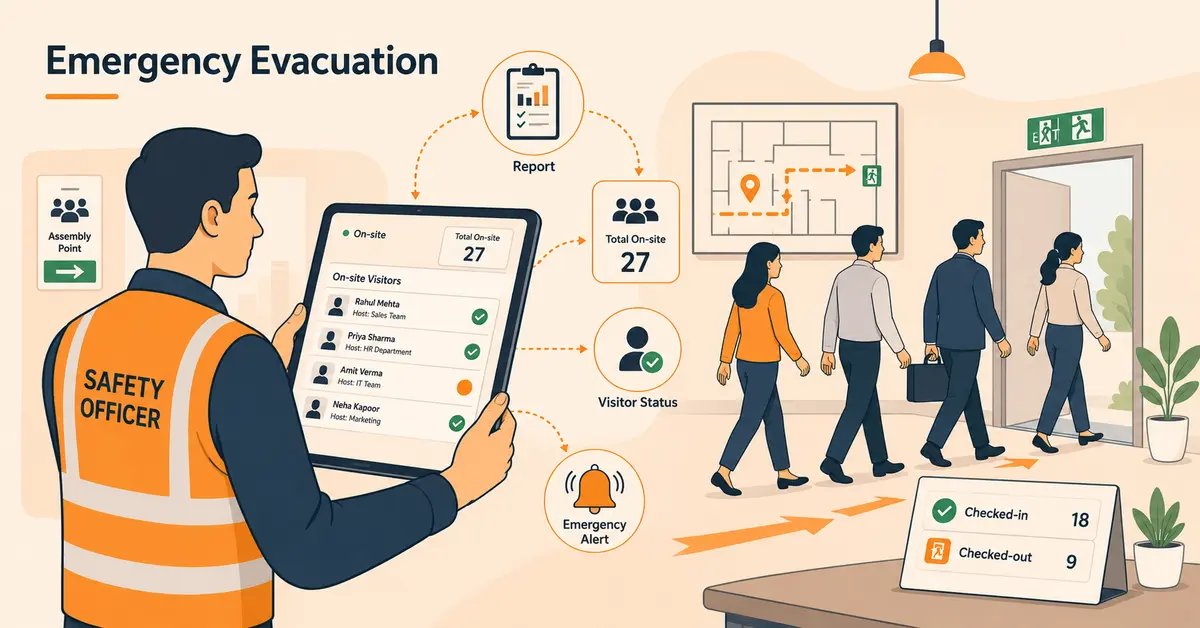
In an emergency, a safety officer or fire warden needs to know, in real time, exactly who is in the building. With a paper logbook, they’re flipping through pages trying to reconcile incomplete sign-ins with missing sign-outs, hoping nobody forgot to log their arrival or left without signing out. With a VMS, they pull up the dashboard on a phone or tablet and see an accurate, real-time list of every visitor currently on-site.
A modern VMS supports emergency management through:
- Instant evacuation reports exportable from a mobile device, no need to retrieve a physical logbook from the front desk
- Real-time occupancy data showing exactly who is on-site, in which building or floor, at the moment of the emergency
- Visitor status tracking that shows check-in and check-out times, distinguishing who is still on-premises from who has already left
- Integration with emergency notification systems to alert visitors on-site to evacuation procedures
For manufacturing, healthcare, and government facilities with strict OSHA emergency action plan requirements, this capability isn’t optional, it’s a documented safety obligation.
Integration Capabilities: How VMS Connects to Your Existing Systems
A VMS that operates in isolation is useful. A VMS that integrates with your existing infrastructure is transformative. Here are the most common and high-value integrations.
Access Control Systems: When a VMS integrates with electronic door locks, turnstiles, or elevator controls, visitor credentials can grant or restrict building access automatically based on check-in status, access level, and time window. A visitor who checks in for a conference room on the 12th floor can be granted access to that floor without a physical keycard and that access expires automatically when their visit is logged as complete.
Calendar Integrations (Google Workspace, Microsoft 365): Pre-registration can be triggered directly from calendar invites. When a host schedules a meeting and includes an external guest, the VMS automatically sends a pre-registration invite to the visitor, no separate step required.
Communication Platforms (Slack, Microsoft Teams): Host notifications and admin alerts flow through the channels teams already use, eliminating the need to check a separate notification system.
HR and HRIS Systems: Employee rosters stay synchronized, ensuring the VMS always reflects current staff. Terminated employees are removed from host lists automatically when they’re offboarded in the HR system.
Workplace Management Platforms: For organizations using Vizitor’s full platform, visitor management connects directly with meeting room booking, attendance tracking, desk reservation, mailroom management, and queue management, creating a single operational view of everything happening in the facility.
AI and the Future of Visitor Management
The VMS category is evolving rapidly, driven by AI, biometrics, and the convergence of physical and digital security. Here’s what’s real in 2026 and what’s coming next.
Facial Recognition and Biometric Check-In
Facial recognition check-in allows visitors to verify identity without touching any device. The visitor’s face is matched against their pre-registered photo in sub-second intervals. US Customs and Border Protection deployed facial biometrics that blocked 2,229 impostors by late 2025. VMS platforms are implementing the same technology, validated by NIST accuracy standards that maintain performance even with masks or glasses.
AI-Powered Watchlist Matching
AI now enables real-time identity matching against watchlists at the moment of check-in without requiring manual name searches. Algorithms flag anomalies like repeat denied-entry attempts, unusually long dwell times in restricted areas, or visitor behavior patterns that deviate from baseline.
Predictive Visitor Analytics
AI-driven analytics forecast peak visitor times based on historical patterns, meeting schedules, and facility calendars enabling proactive staffing and resource allocation rather than reactive responses to lobby crowding.
Smart Building Integration
VMS platforms are increasingly integrated with building management systems like HVAC, lighting, elevator control, and digital signage. A visitor checking in for a conference room can trigger the room to be unlocked, the HVAC to adjust, and digital signage to display a personalized welcome message, all automatically.
Autonomous Check-In Stations
Kiosk hardware is evolving toward fully autonomous AI-powered stations that handle complete identity verification, document signing, and access provisioning without any receptionist involvement even for first-time visitors with no pre-registration.
What to Look For When Choosing a Visitor Management System
With dozens of VMS options available in India, selecting the right one requires evaluating several factors:
Ease of Use:
Can your receptionist, security guard, and visitors use it without training? The best VMS should be intuitive enough to deploy in a single day.
Cloud vs On-Premise:
For most Indian businesses, cloud-based is the way to go, no IT overhead, automatic updates, accessible from anywhere.
Mobile App Availability:
Both iOS and Android apps should be available for hosts and visitors. Check that the app works well on low-end smartphones common in India.
Customisation:
Can you customize the check-in form, add your company logo, choose which fields to capture, and configure different workflows for different visitor types?
Multi-Location Support:
If you have multiple offices or branches, choose a VMS that lets you manage them all from a centralised dashboard.
Integration Capabilities:
Check whether the VMS integrates with your existing access control, CCTV, HR, or property management systems.
Data Security & Privacy:
Ensure the VMS encrypts visitor data, complies with data protection norms, and offers role-based access for admins.
Pricing Transparency:
Avoid vendors with hidden costs. Look for clear per-location or per-feature pricing. A free trial is a strong sign of confidence.
Local Support: For Indian businesses, having local customer support (in your timezone, ideally in your language) makes a real difference during onboarding and troubleshooting.
How to Implement a Visitor Management System: Step by Step
Step 1: Define your requirements.
Document your visitor types, check-in workflows, compliance obligations, integration needs, and the number of locations you’re managing. The clearer your requirements, the faster your evaluation and the smoother your deployment.
Step 2: Choose your hardware configuration.
Cloud-based VMS can run on existing iPads or tablets. Decide whether you want a dedicated kiosk stand, a badge printer, or a QR code-only touchless setup. For most businesses, starting with a tablet kiosk and badge printer delivers the best balance of capability and investment.
Step 3: Configure your check-in workflows.
Set up visitor types (guest, contractor, delivery, candidate) with the appropriate fields, document requirements, and routing for each. Keep it simple initially, you can add complexity after your team is comfortable with the system.
Step 4: Set up host lists and notifications.
Import your employee roster so visitors can select their host during check-in. Configure notification preferences which channels each department uses for alerts.
Step 5: Test with a pilot group.
Run 1-2 weeks of live check-ins with real visitors before full deployment. Have reception staff and hosts provide feedback. Fix the friction points you find before they become habitual workarounds.
Step 6: Announce the change internally.
Employees need to know how to invite visitors through the new system before it goes live. A simple internal announcement with a direct link or tutorial removes the biggest adoption barrier.
Step 7: Review and refine at 30 days.
Pull your first month of data: check-in volume, peak hours, check-in method breakdown, host notification response times. Adjust workflows, staffing, and hardware placement based on what you see.
How Vizitor Helps Workplaces
Vizitor is a cloud-based, contactless visitor management system built specifically for the needs of Indian workplaces. Trusted by brands like Hard Rock, Veolia, Shiprocket, and Digicel, it offers a complete workplace platform that goes beyond visitor management.
Here’s what makes Vizitor different:
Touchless QR Code Check-In:
Visitors scan a QR code from their phone, no shared devices, no queues, no germs.
Instant Host Notifications:
Hosts get real-time alerts via SMS, email, WhatsApp, or the Vizitor app the moment their guest arrives.
Digital Badge Printing:
Professional visitor badges with photo, name, and access details printed in seconds.
NDA & Document Signing:
Visitors sign NDAs, health declarations, and waivers digitally during check-in.
Visitor Pre-Registration:
Hosts invite visitors in advance so they walk in without any front-desk friction.
Multi-Platform:
Available on Web, iOS, and Android; manage your workplace from any device.
Emergency Evacuation:
With Vizitor, you can pull up the dashboard on a phone or tablet and see an accurate, real-time list of every visitor currently on-site.
Watchlist and Blocklist Screening:
Every visitor is checked against internal blocklists at the point of check-in. Real-time alerts go to designated staff if a match is detected.
Real-Time Occupancy Dashboard:
See who is currently on-site across every location, in real time, from any device. Emergency evacuation lists are exportable in seconds.
Beyond Visitors:
Vizitor also offers attendance management, mailroom management, meeting room booking, space management, and queue management; all from a single platform.
Final Thoughts
A visitor management system is no longer a nice-to-have. In 2026, it is fundamental infrastructure for any organization that takes security, efficiency, and professionalism seriously.
Whether you run a 10-person office or a 10-building campus, the shift from paper to digital visitor management is one of the highest-ROI technology investments you can make. The check-in experience is often the very first interaction a person has with your organization, make it count.
Vizitor has managed over 1.5 million check-ins and 60,000+ digital NDAs for 500+ organizations worldwide. Plans start at $36/month. Setup takes under 5 minutes.
Ready to upgrade your visitor management?
Frequently Asked Questions
A visitor management system (VMS) is software that automates the process of registering, verifying, tracking, and managing visitors at a facility. It replaces paper logbooks with digital check-in (via QR code, kiosk, or mobile app), identity verification, badge printing, host notifications, document signing, and searchable digital records giving organizations complete, audit-ready visibility into who is on their premises at any given moment.
A VMS follows the visitor's complete journey: a host sends a pre-registration invite with a QR code → the visitor arrives and scans in under 15 seconds → identity is verified and documents are signed digitally → the host is instantly notified → a visitor badge is printed → the visitor's presence is tracked in real time → check-out is logged automatically → every detail is stored in a searchable cloud database for compliance and reporting.
An access control system manages physical entry points: doors, turnstiles, elevators using keycards, PINs, or biometrics, primarily for employees. A visitor management system manages external guests: registration, identity verification, host notification, document signing, and visit logging. The most secure facilities integrate both systems, access control enforces who can open which doors, while the VMS manages the visitor experience and compliance documentation around every external entry.
Any organization that receives external visitors: clients, contractors, vendors, candidates, delivery personnel benefits from structured visitor management. The urgency increases with visitor volume, security sensitivity, and compliance requirements. In the US, organizations in healthcare (HIPAA), manufacturing (OSHA), financial services (SOC 2), government contracting (C-TPAT), and any business subject to GDPR or CCPA have specific regulatory obligations that a VMS helps fulfill.
Yes, Small businesses are often more vulnerable to security gaps because they lack dedicated security teams. Cloud-based VMS platforms like Vizitor are cost-effective (starting at $36/month), require no IT infrastructure, and can be set up in under 5 minutes, making them accessible and practical for small offices, clinics, and startups. SMEs are the fastest-growing VMS segment, at a 17.5% CAGR, precisely because affordable SaaS plans have removed the cost barrier that once made VMS an enterprise-only tool.
A touchless VMS allows visitors to complete check-in without touching any shared device. This is achieved through QR code scanning from the visitor's own smartphone, mobile app check-in, or pre-registration links sent via email or SMS. The visitor scans, completes their information on their own device, and receives a digital confirmation, the entire process is contactless. For facilities with health-sensitive environments or high-volume traffic, touchless check-in is the standard configuration.
ROI comes from multiple sources: time savings (QR check-in saves 2-3 minutes per visitor vs. paper over 2 hours daily at 50 visitors/day), staff reallocation (reception staff redirected from manual check-in to higher-value tasks), compliance cost avoidance (non-compliance costs an average of $14.82 million/year per the Ponemon Institute), and security incident prevention. Johnson Controls reported 155% ROI with an 8-month payback. G2's 2025 report found most organizations realize measurable ROI within 1-3 months of deployment.
See Vizitor in action check-in a visitor in under 30 seconds
Trusted by 500+ businesses. QR check-in, badge printing, NDA signing. Plans from $36/mo.