How Clinics Cut Wait Times With Digital Queue Tokens
A queue management system for clinics uses digital tokens, real-time wait alerts, and department routing to organise walk-ins and appointments in one stream. It reduces front desk congestion, shortens perceived wait times, and gives staff a calmer, more predictable day. Vizitor delivers this through token generation, notifications, department handling, and patient transfers.


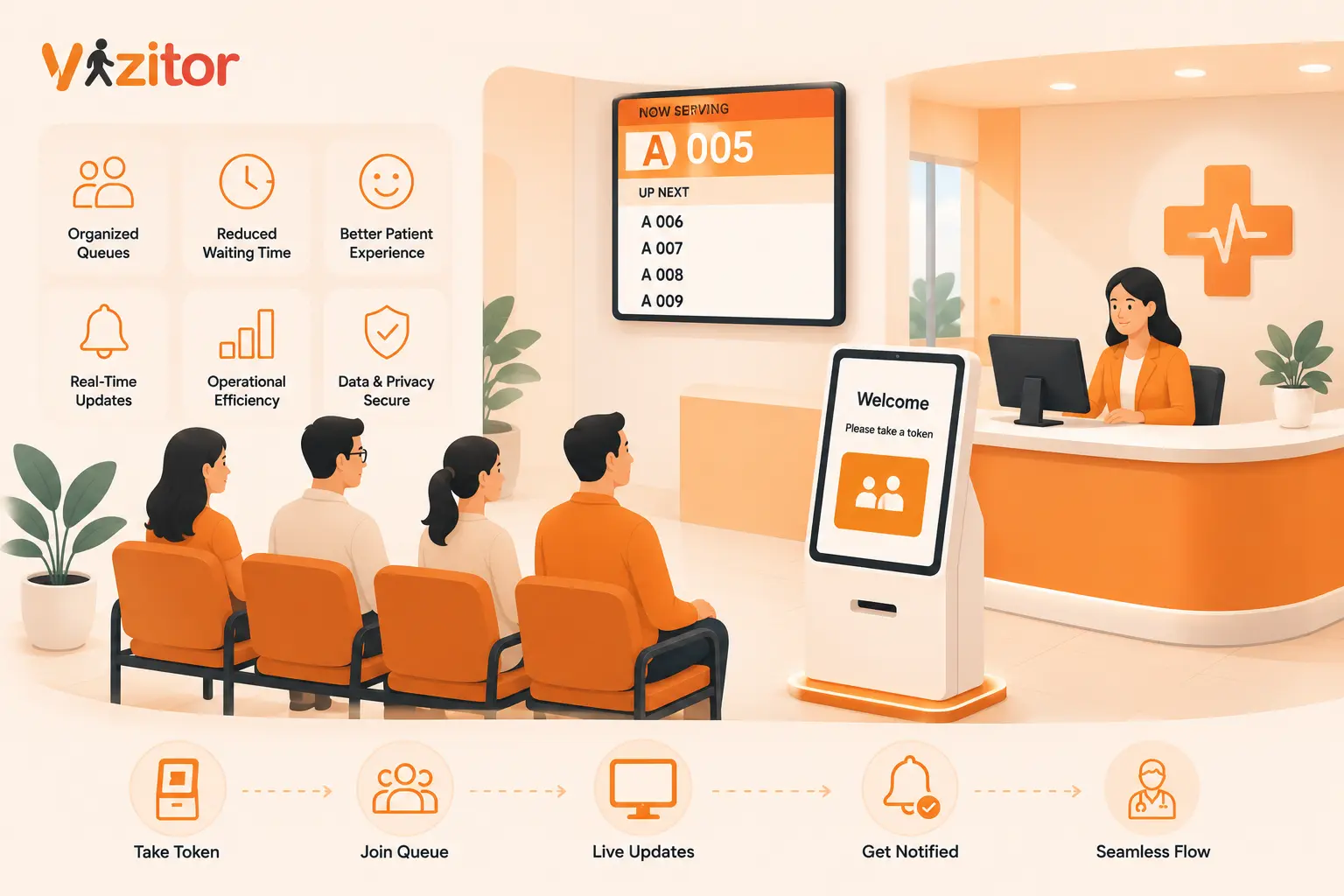
Table of Content
Try Vizitor for Free!
Rescue Your Clinic Desk: The Queue Management System Hack
Picture a Monday morning at a busy clinic. The doors open at nine and by ten past, the waiting room already looks like a train platform at rush hour. Someone is asking the receptionist for the third time how long the wait will be. Two walk-ins are hovering at the desk, unsure if they need to sign a register or just sit down. A patient who booked an appointment is quietly furious because three people who arrived after her have already gone in. The receptionist is fielding a phone call, a delivery, and a distressed elderly patient all at once.
If any part of that felt familiar, you are not running a badly organised clinic. You are running a clinic without a proper queue system, and there is a real difference.
Most clinics try to solve front desk chaos by hiring another receptionist or asking staff to work faster. It rarely works, because the problem is not effort. The problem is that human beings are trying to hold an invisible, constantly shifting queue in their heads while also doing five other jobs. This blog walks through how a queue management system quietly takes that burden off your desk, why it works better than throwing more staff at the issue, and what to actually look for when you choose one.
The Real Reason Your Clinic Front Desk Feels Like a Warzone
The front desk in a clinic is doing something genuinely hard. It is managing two completely different types of patients at the same time. There are scheduled appointments, who arrive expecting to be seen at a fixed time, and there are walk-ins, who arrive whenever they arrive and expect to be seen in some fair order. Blending these two streams by hand, in real time, while people watch you do it, is close to impossible on a busy day.
When there is no system, the queue lives in the receptionist’s memory and on scraps of paper. That creates a specific set of failures. Patients cannot see where they stand, so they keep coming to the desk to ask. Every interruption resets the receptionist’s focus. Fairness becomes a matter of who complains loudest rather than who arrived first. And when a doctor runs late, which happens in every clinic on earth, there is no clean way to tell twenty people at once that things have slipped by fifteen minutes.
The result is not just longer waits. It is a waiting room full of anxious, uncertain people, and a front desk team that ends every shift drained. A queue management system does not make your doctors faster. It makes the wait organised, visible, and fair, which turns out to matter far more than raw speed.
What a Queue Management System Actually Does in a Clinic
At its simplest, a queue management system for clinics is software that takes charge of the order in which patients are seen and keeps everyone informed while they wait. Instead of a register and a receptionist’s memory, you get a structured digital line that the whole clinic can see and trust.
Here is how the flow usually works in practice. A patient arrives and checks in, either at a kiosk, on a tablet at reception, or by scanning a code with their phone. The system issues them a digital token, which is simply a place in line with a number attached. That token is routed to the right queue, whether that is a general physician, a lab, a dressing room, or a specific department. As their turn approaches, the system sends them an update, so they are not glued to a chair staring at a door. When they are called, their token appears on a display or is sent to their phone.
None of this replaces clinical judgement or triage. A queue system is not deciding who is sickest. It is handling the logistics of order and communication so your team can focus on the medicine. Everything the receptionist used to juggle mentally now lives in one place that never forgets a name and never loses track of who is next.
The Psychology Nobody Tells You About Waiting Patients
This is the part most clinics underestimate, and it is backed by decades of research. Back in 1985, service expert David Maister published a now-famous set of principles on how people experience waiting. One of his central findings has held up remarkably well: people wait far more calmly when they are told the doctor will see them in thirty minutes than when they are simply told the doctor will see them soon.
That single insight explains why so much front desk stress is avoidable. Decades of queueing research point to the same conclusion, which is that uncertain waits feel longer than known, finite waits, and unexplained waits feel longer than explained ones. In other words, a patient who knows they are seventh in line and has roughly twenty minutes to go is far more relaxed than a patient who has no idea whether they will be called in five minutes or fifty.
Maister also observed that occupied time feels shorter than unoccupied time. A patient who can step out for a coffee because they will get an alert when their turn nears is having a completely different experience from one who feels trapped in a chair, afraid to move in case they miss their name.
A queue management system is, at heart, a machine for reducing uncertainty. It tells patients where they stand, roughly how long they have, and frees them to occupy that time however they like. You are not just shortening the wait. You are changing how the wait feels, and that is what patients actually remember.
Five Front Desk Problems a Queue System Quietly Fixes
It helps to get specific about what changes on the ground once a system is in place.
The first problem it solves is the constant stream of “how much longer” questions. When patients can see their position and receive updates, they stop crowding the desk, and your receptionist gets long stretches of uninterrupted focus for the first time in years.
The second is unfairness, or the perception of it. A digital token stamps arrival order automatically. Nobody can jump the line by being pushy, and nobody has to referee an argument about who was there first.
The third is the overcrowded waiting room itself. When patients trust that they will be alerted, they are comfortable waiting in the corridor, the car park, or a nearby cafe. The physical space calms down, which matters enormously for infection control and for the general mood of the place.
The fourth is the delay cascade. When a doctor runs behind, the system can push an update to everyone affected at once, rather than leaving the receptionist to break the news patient by patient and absorb the frustration each time.
The fifth is the invisible one, which is data. A queue system quietly records when your clinic is busiest, how long patients typically wait, and where the bottlenecks sit. Over a few weeks that gives you something you have never had before, which is a factual picture of your own patient flow instead of a gut feeling.
How Digital Tokens and Department Routing Work Together
Tokens and routing are the two features that make a clinic queue system genuinely powerful rather than just a fancy number ticket.
A token is the patient’s anchor in the system. It captures their arrival time, their place in line, and which service they need, all in one small digital object. Because it is digital rather than a paper slip, it can move. That is where routing comes in.
Say a patient arrives to see a general physician, gets seen, and then needs a blood test and a follow-up dressing. In a paper-based clinic that means walking back to reception twice and re-joining two more informal queues. With department routing, the patient’s token can be transferred from the physician’s queue to the lab queue to the dressing queue, carrying their details along the way. The patient moves through the clinic as a single, tracked journey instead of starting from scratch at every stop.
Vizitor’s queue management system is built around exactly this: token generation, real-time notifications, department management, and the ability to transfer patients between queues while tracking their progress. For a multi-service clinic, that transfer capability is often the feature that turns a chaotic afternoon into a manageable one.
What to Look For Before You Pick a System
Not every queue tool fits a clinic. A few things separate the ones that will help from the ones that will gather dust.
Start with check-in flexibility. Your patients range from tech-comfortable young adults to elderly visitors who have never scanned a code in their lives. A good system offers more than one way to join the queue, whether that is a kiosk, a reception tablet, or a phone scan, so nobody is excluded.
Next, look hard at the notification system. This is the feature that does most of the psychological heavy lifting, so it needs to be reliable and clear. Patients should get a genuinely useful heads-up as their turn approaches, not a vague message that leaves them guessing.
Department handling matters the moment your clinic offers more than one service. If you have consultation, lab work, and procedures happening under one roof, you want a system that can route and transfer patients between those queues rather than treating them as one undifferentiated line.
Real-time visibility for staff is the fourth thing to check. Your team should be able to glance at a dashboard and instantly understand the state of the clinic: who is waiting, for how long, and where the pressure is building.
Finally, pay attention to how easy it is to roll out and how little training it demands. A system that takes weeks to learn will quietly get abandoned. The best ones feel obvious within a day. If you want to see whether it fits before committing, Vizitor offers a 10-day free trial, which is the sensible way to test any of this against your own Monday morning.
A Simple Rollout Plan for Busy Clinics
The idea of installing new software can feel like one more thing on an already impossible list, but a clinic queue system does not need a big-bang launch. A staged approach works better.
Begin by mapping your actual patient journeys for a week. Note the services patients typically move between and where the pinch points are. This tells you how to set up your queues and routing before you switch anything on.
Then run a soft launch. Pick your busiest day and use the system alongside your existing process, so staff can build confidence without the pressure of it being the only option. Assign one person to own the queue during this phase, someone who becomes the go-to for questions.
Once your team is comfortable, retire the paper. Communicate the change to regular patients with a simple sign at the entrance explaining the new check-in, and have staff gently guide first-timers through it. Within a couple of weeks the new flow stops feeling new and simply becomes how the clinic runs.
Finally, look at your data at the end of the first month. The busiest hours and average wait times the system reveals will almost certainly suggest small scheduling tweaks that make the next month calmer still.
Bottom Line
Front desk chaos is not a sign that your clinic is disorganised or your staff are slow. It is what happens when human memory is asked to manage an invisible, shifting queue while doing several other jobs at once. A queue management system takes that impossible task and turns it into something visible, fair, and calm.
The real win is not shaving minutes off the clock. It is replacing uncertainty with clarity, for patients and staff alike. Patients who know where they stand wait more patiently. Receptionists who are not fielding constant “how much longer” questions do their jobs better. And you finally get a factual picture of your own patient flow instead of surviving each day on instinct. If your desk feels like a warzone by mid-morning, the fix is not another pair of hands. It is a system that holds the queue so your people do not have to.
Frequently Asked Questions
See Vizitor in action check-in a visitor in under 30 seconds
Trusted by 500+ businesses. QR check-in, badge printing, NDA signing. Plans from $36/mo.