Published on: Fri, Dec 21, 2018
Last updated: 2026-04-05
Read in 9 minutes
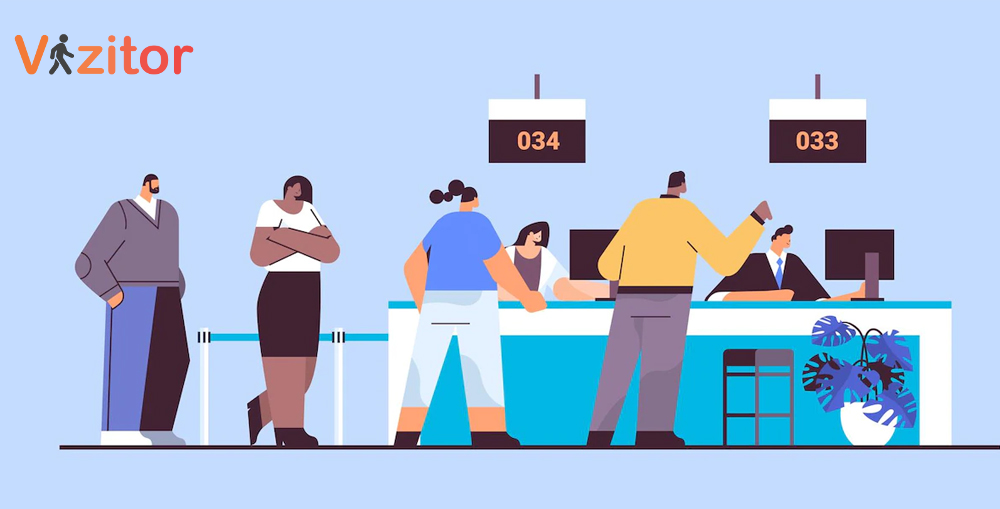
A visitor management system is software that helps organizations track, verify, and manage everyone who enters their premises. This includes employees, clients, contractors, delivery personnel, and any other visitors. The system collects personal information, logs entry and exit times, issues visitor badges, and stores records securely in a cloud-based platform.
Unlike a paper logbook at the reception desk, a digital visitor management system creates searchable, auditable records. It enables pre-registration, automated host notifications, ID verification, and real-time reporting. The result is a front desk that operates more securely, more professionally, and with significantly less manual effort.
Businesses of all sizes use visitor management software to solve real operational problems: long queues at reception, compliance gaps in visitor records, inconsistent security screening, and poor first impressions for visiting clients.
Visitor management software has become essential for organizations across industries. Here’s why:
Accurate check-in and check-out records. The system collects all necessary visitor information electronically during check-in and check-out. This creates a reliable record of who was on-site and when, without depending on manual entry or legible handwriting.
Photo capture and identification. During check-in, the system captures a photo of the visitor. This photo is automatically added to their visitor badge and linked to their record, enabling easy identification throughout their visit and providing a visual record for security purposes.
Visitor badge printing. Once registered, visitors receive a printed badge with their name, photo, host, company, and any relevant access permissions. These badges allow staff to identify authorized visitors at a glance and help ensure that only authorized individuals access restricted areas.
Movement tracking. A digital VMS logs the full visitor journey from check-in through check-out, including any areas accessed if integrated with access control systems. This data is available to security and compliance teams on demand.
Document verification and NDA signing. The system supports scanning of legal documents, NDA signing, and other compliance requirements at check-in. This closes a common gap where important compliance documents go unsigned because no one was tracking them.
Pre-registration for expected visitors. Hosts can pre-register their expected visitors in advance. When the visitor arrives, their details are already in the system and check-in takes under 30 seconds. This reduces queues and creates a more professional experience.
Here’s the typical flow for a visitor using a digital check-in system:
Arrival and initial check-in. The visitor enters the premises and approaches the self-check-in kiosk or reception tablet. The system prompts them for their name, contact details, purpose of visit, and the name of the person they’re visiting.
Data collection and verification. The system collects all required information: name, address, contact details, identification proof, and purpose of visit, along with a photo. For pre-registered visitors, most fields are pre-populated and only need confirmation.
Document signing. If required, the visitor signs any necessary documents digitally, including NDAs, safety agreements, or health declarations. The signed documents are stored automatically in the visitor’s record.
Badge issuance. The visitor receives a printed badge containing their photo, name, host, company, and visit details. This badge serves as their credential for moving through the facility during their visit.
Host notification. The host receives an automatic notification the moment the visitor checks in, via email, SMS, Slack, or WhatsApp. No phone calls required from reception.
Check-out. When the visit is complete, the visitor checks out. The record closes with a timestamp, and the visitor’s badge becomes inactive. The full visit record is retained in the cloud dashboard.
For a small office with 10 visitors per week, a paper logbook might seem sufficient. But consider what happens as the organization grows, adds locations, or faces regulatory scrutiny.
Security at scale. A paper logbook can’t screen visitors against a watchlist. A digital system can. The moment a flagged individual attempts to check in, an automated alert fires to security staff before they gain access.
Compliance under pressure. When an auditor asks for a complete record of everyone who visited your office in the past six months, a paper log is unreliable. A digital system produces that report in minutes with timestamped, verified records.
Emergency response. When the fire alarm sounds, who is in your building? A paper logbook can’t answer that question in real time. A digital VMS shows you exactly who checked in and hasn’t checked out, enabling an accurate evacuation headcount.
Visitor experience. Clients and partners notice how they’re treated at your front desk. A fast, professional digital check-in makes a different impression than a paper form and a wait while someone finds the right contact.
For a comprehensive look at all these capabilities, see our complete visitor management system guide.
Different organizations have different requirements. Here’s what to evaluate when choosing a system:
Cloud-based storage. Visitor data should be stored securely in the cloud, accessible to authorized staff from any location, and backed up automatically. On-premise solutions introduce maintenance complexity without security benefits.
Mobile and QR check-in. Visitors should be able to check in from their own smartphone by scanning a QR code, without downloading an app. This reduces hardware requirements and enables contactless entry.
Host notifications. The system should notify hosts automatically when their visitor checks in, via the channels they actually use (Slack, Teams, email, SMS). Manual phone calls from reception are a bottleneck.
Badge printing. Visitor badges should be printable instantly with the visitor’s photo, name, host, and access permissions encoded as a QR code.
Multi-location support. If you operate from more than one office, the system should manage all locations from a single dashboard with standardized processes.
Compliance tools. GDPR-compliant consent capture, data retention policies, audit logs, and deletion workflows are essential for regulated industries and increasingly expected in all industries.
Integration capabilities. Connection to access control, HRMS, calendar tools, and communication platforms multiplies the value of the system by reducing manual coordination between tools.
See how Vizitor handles visitor management
Join 2,000+ workplaces using Vizitor to manage visitors securely. Free trial, no credit card required.
Book a DemoVizitor is a cloud-based visitor management system built for businesses of all sizes. It starts at $20/month and includes a free trial with no credit card required. The system runs on any Android or iOS tablet, which means you don’t need to purchase dedicated hardware to get started.
Key capabilities:
Organizations that switch to Vizitor typically go live within a single afternoon. The configuration process, setting up visitor types, uploading documents, building the host list, takes a few hours. After that, the system runs with minimal ongoing management.
For a comparison of what differentiates strong visitor management systems from weak ones, see our guide to avoiding common VMS buying mistakes.
With many visitor management systems on the market, the evaluation process matters. Here’s a practical framework for making a good decision without spending months on vendor comparisons.
Step 1: Define your requirements. Write down the specific problems you’re trying to solve. Slow check-in? Missing NDAs? Compliance gaps? Multi-site inconsistency? The specific problems drive the feature requirements. Systems that solve your problems are better investments than systems with the longest feature lists.
Step 2: Shortlist based on must-haves. Identify 2-3 vendors who clearly meet your core requirements. Look for free trials (so you can test before committing), clear pricing (so you can plan the budget), and hardware flexibility (so you’re not forced into expensive new equipment).
Step 3: Test with real visitors. Run the free trial with actual visitors during the evaluation period. Does the kiosk flow feel intuitive? Do host notifications arrive promptly? Are the records accurate? Real-world testing beats demo environments.
Step 4: Evaluate support. Call the support team with a question before you sign up. The quality and responsiveness of support is a reliable predictor of your experience as a customer.
Step 5: Check the integration story. Ask specifically which integrations are available and how they’re configured. A VMS that connects cleanly to your existing tools reduces manual coordination. One that requires complex IT work to integrate may create more problems than it solves.
Step 6: Evaluate total cost over 24 months. Include setup costs, per-location fees, feature upgrade costs, and integration costs. A low headline price with expensive add-ons can cost more than a slightly higher all-inclusive plan.
Vizitor passes this evaluation for most organizations. Free trial, transparent pricing starting at $20/month, hardware flexibility, strong integration options, and a support team that responds quickly. See the full platform at vizitorapp.com.
The right visitor management solution depends on your specific needs:
Small businesses (1-2 locations, under 50 daily visitors): The core Vizitor plan covers everything needed for professional visitor management. Digital check-in, badge printing, host notifications, and cloud records.
Mid-market organizations (multiple locations, 50-200 daily visitors): Multi-site dashboard, standardized workflows, compliance reporting, and integration with existing workplace tools.
Enterprise organizations (many locations, high visitor volume, complex compliance requirements): Custom enterprise plans with dedicated support, advanced integrations, API access, and compliance documentation.
All plans start with a free trial. You can validate the system against your real-world use case before committing.
What is the difference between a paper logbook and a visitor management system? A paper logbook records names manually with no verification, no automation, no compliance capabilities, and no real-time visibility. A digital VMS captures verified information, notifies hosts automatically, prints badges, stores records securely, and generates compliance reports on demand. The operational difference is substantial.
How long does it take to implement a visitor management system? Most organizations are fully configured and live within a single afternoon. Hardware requirements are minimal (any existing tablet works), and configuration is straightforward. See our step-by-step migration guide for a detailed walkthrough.
Is visitor management software suitable for small businesses? Yes. Vizitor starts at $20/month and scales with your needs. Small businesses benefit from the same core features as large enterprises: professional check-in, automated host notifications, and secure visitor records.
Can a visitor management system handle different types of visitors? Yes. The system supports different check-in flows for different visitor categories: clients receive one flow, contractors another, delivery personnel a third. Each flow collects the relevant information and triggers the appropriate notifications.
How does visitor management software improve security? The system verifies visitor identities, screens against watchlists, issues access-controlled badges, and maintains a real-time record of everyone on-site. Security staff can act on alerts before unauthorized individuals gain access.
What happens to visitor data after the visit? Data is retained according to your configured retention policy and then automatically deleted. Visitors can request access to or deletion of their data in compliance with GDPR and similar regulations.

Try Vizitor Free
No credit card required. Setup in under 5 minutes. Manage visitors, queues, meeting rooms, and more.
Start Free Trial