What Digital Visitor Badges Include and Why They Matter
This page is a complete guide to digital visitor badges covering what they are, what they include, the difference between paper and digital badges, the six main badge types, and how digital badges improve identity management, access control, and safety. It explains the function of QR codes on visitor badges, color-coded access zone systems, badge expiry alerts, and integration with access control hardware. Industry applications are covered across corporate offices, healthcare, schools, manufacturing, and government facilities. Vizitor is presented as a digital badge management system that prints photo badges in under five seconds, supports custom templates by visitor type, and connects badge data to a live visitor dashboard used by 500+ workplaces.


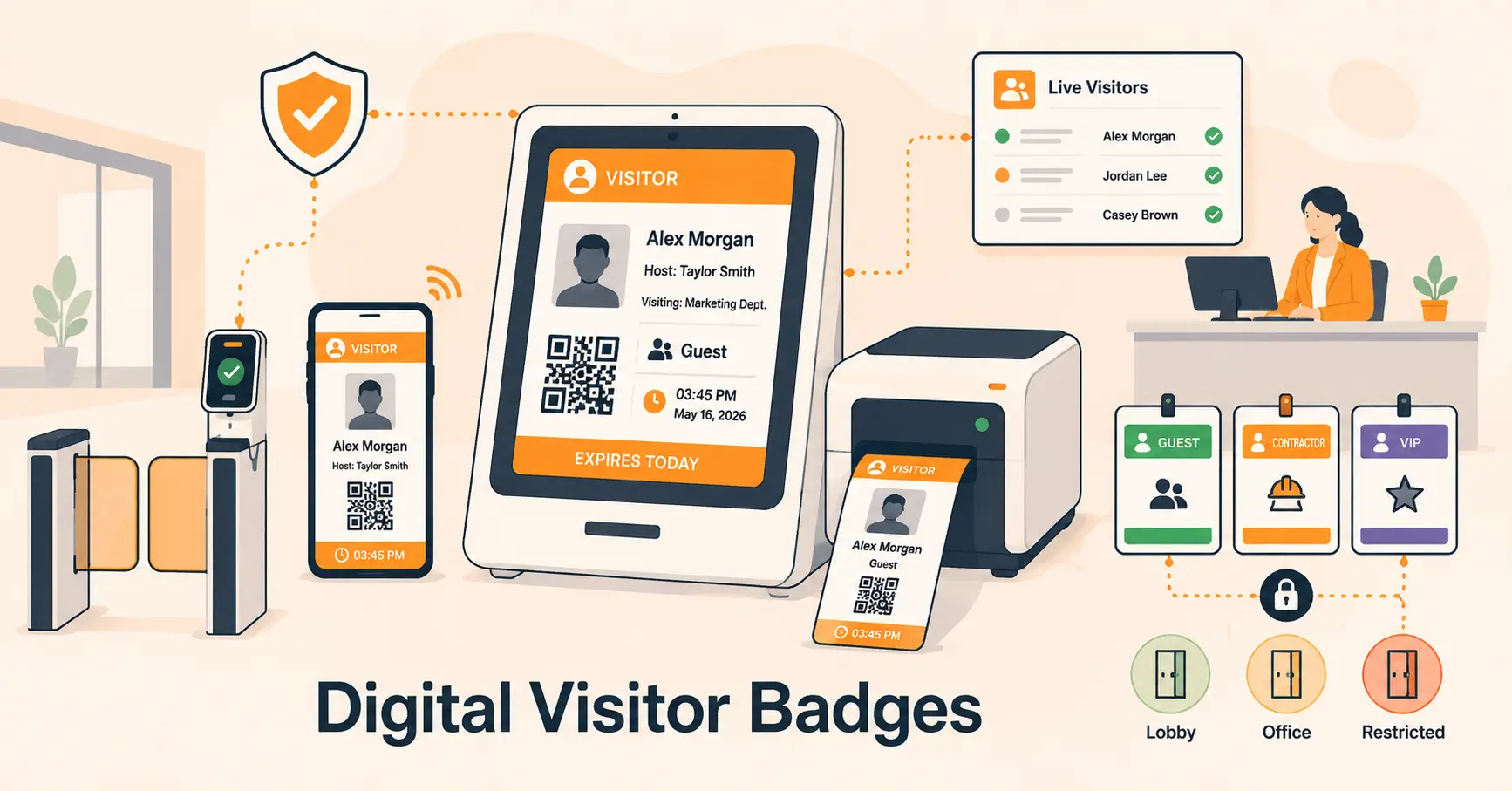
Table of Content
Try Vizitor for Free!
Walk into most offices, hospitals, or manufacturing plants today. You’ll see visitors wearing a badge.
Some are handwritten slips of paper with a first name and a time. Some are printed cards with a photo, a QR code, and an expiry time. The difference between these two badges is not just design. It’s the difference between logging that someone came in and actually managing who they are, where they can go, and when they need to leave.
A digital visitor badge is the second kind. And this blog covers everything about it, what it includes, why it matters, and how to use it properly.
What Is a Digital Visitor Badge?
A digital visitor badge is an identification credential issued to a visitor at the point of check-in. It is created automatically by a visitor management system, not handwritten by a receptionist.
At minimum, a visitor badge includes the visitor’s name, their host, the date, and the reason for the visit. Modern digital badges go further: adding a photo, a QR code, color-coded access levels, and an expiry time that shows when the visitor’s authorization ends.
The goal is simple: anyone in the building should be able to glance at a badge and immediately know whether that person is a guest, a contractor, a delivery driver, or someone who should not be there at all.
That’s what a digital badge delivers. Not just a name but a complete, verifiable identity signal that travels with the visitor throughout their time on-site.
See What Your Visitor Badge Could Look Like
Design a branded visitor badge in under 2 minutes, no signup, no design skills needed.
Paper Badge vs Digital Visitor Badge
Most organizations started with paper. A printed slip, a handwritten name, sometimes a sticky label. These work until they don’t.
Here’s the honest comparison:
| Paper Badge | Digital Visitor Badge | |
|---|---|---|
| Created by | Receptionist, by hand | Visitor management system, automatically |
| Contains | Name and sometimes time | Photo, host, purpose, QR code, expiry, access level |
| Identity verification | None, anyone can write any name | Photo capture, ID scan, or OTP at check-in |
| QR code | No | Yes, staff can scan to verify instantly |
| Expiry time | Not shown | Clearly displayed, overstay is visible |
| Color-coded access | No | Yes, zone restrictions visible at a glance |
| Forgeable | Yes, easy to duplicate | No, unique QR code tied to that visit |
| Audit trail | None | Complete digital record linked to the badge |
| Emergency use | Unreliable | Live dashboard shows who is on-site now |
Paper badges are better than no badge. Digital badges are a security control. That’s the real difference.
What a Digital Visitor Badge Includes
A well-designed digital visitor badge carries more information than most people realize. Here’s what each element does.
Visitor photo
Captured at check-in, the photo ties the badge to the specific person holding it. Any staff member can look at the badge and compare it to the face in front of them. Without a photo, a badge can be passed to someone else inside the building.
Full name and company
Not just a first name. A full name and organization confirm who the visitor is and who they represent.
Host name
Shows which employee authorized the visit. If a visitor is seen somewhere they shouldn’t be, any staff member can immediately contact the host.
Purpose of visit
Client meeting, maintenance, interview, delivery, the purpose signals how the visitor should move through the building.
Date and valid time window
When the badge was issued and when it expires. A badge showing a visit from yesterday is immediately visible as expired.
Access level
Color-coded or labelled to show which areas are authorized. Reception only. Second floor. Server room. Manufacturing floor. The badge communicates the boundary without needing a security guard to explain it.
Unique QR code
Each badge includes a unique QR code that any staff member can scan to pull up verified visitor details instantly. The QR code is tied to that specific visit, it expires when the visitor checks out and cannot be reused.
Expiry time
Shows security and staff when a visitor’s authorization ends. A visitor still on-site after their expiry triggers an overstay alert in the system.
Types of Digital Visitor Badges
Not every visitor is the same. A digital badge system issues different badge types based on the visitor category each with different fields, colors, and access levels.
Guest / Client Badge
For one-time or occasional visitors. Typically shows name, host, meeting purpose, and authorized floor or area. Short validity window. Restricted to non-operational areas.
Contractor Badge
For workers performing a specific job on-site. Includes company name, work order reference, and authorized work areas. May include safety induction acknowledgment. Validity tied to the project duration, not just the day.
Delivery / Vendor Badge
For delivery drivers or vendors dropping off goods. Usually restricted to reception or the loading bay. Short validity. May include vehicle registration.
VIP Badge
For executive guests, board members, or high-value clients. Branded prominently. May include special access to floors or amenities not available to standard visitors. Host is typically senior staff.
Multi-Day Badge
For visitors on-site across multiple days; consultants, embedded contractors, long-term project workers. Renewable rather than reprinted daily. Access levels can be adjusted mid-engagement.
Event Badge
For large-scale events, conferences, or open days. Often uses color or design to indicate session access rather than physical zones.
How Digital Badges Improve Identity Management
Identity management is the process of confirming that the person in front of you is who they say they are. Paper badges do not do this. They record a name that anyone could have written.
A digital visitor badge starts with verification, not trust.
When a visitor checks in, the system can require photo capture, government ID capturing, OTP mobile verification, or watchlist screening before a badge is issued. The badge that comes out the other side of that process is tied to a verified identity not a self-reported one.
Visible identification lets any employee distinguish an approved visitor from someone who has not signed in, which is the practical front line of physical security.
This matters inside the building as much as at the entrance. An employee who sees someone without a badge, or with a badge showing an expired time or the wrong color for that floor, has an immediate, actionable signal without needing training in security protocols.
How Digital Badges Improve Access Control
Access control is about who goes where. A digital badge makes access visible without needing a security team member at every door.
Color coding by zone
A visitor badge showing a green band means public areas only. Orange means escorted access only. Red means no access without a security override. Any employee reading the badge knows this without asking.
Time-limited access
The badge shows when access expires. A visitor authorized until 3pm whose badge still shows active at 4pm triggers an overstay alert. Security is notified automatically not after someone notices.
Integration with access control hardware
In high-security environments, the badge QR code or credential links directly to door readers, turnstiles, and elevators. The visitor can only physically open doors that match their authorized access level. The credential is automatically revoked at check-out.
Contractor zone management
A contractor working on the third floor server room should not be walking the executive floor. Digital badges make zone restrictions explicit and enforceable not just a verbal instruction at reception.
Organizations using comprehensive access control experience 58% lower breach costs, according to IBM’s 2024 Cost of Data Breach Report. A digital badge system is a direct input to that access control layer.
How Digital Badges Improve Safety
Safety is where digital badges move from a convenience feature to a genuine operational requirement.
Emergency evacuations
In a fire, a security incident, or any evacuation, the safety officer needs to know who is in the building. A paper badge system gives them an incomplete, potentially unreadable logbook. A digital badge system gives them a real-time list of every badged visitor currently on-site accessible from a phone or tablet, away from the reception desk.
Overstay alerts
A visitor whose badge has expired but who is still in the building represents a safety and security risk. Digital systems alert security automatically when a visitor has not checked out within their authorized window. No manual monitoring required.
Emergency mustering
During a drill or real evacuation, the digital visitor list confirms who needs to be accounted for. Every visitor who was badged in that day appears on the list until they check out. The warden knows who to look for.
Document signing before entry
Safety waivers, health declarations, and site rules can be signed digitally before the badge is printed. Paper acknowledgments are hard to track, easy to lose, and difficult to produce during an audit. Digital workflows confirm that the right documents are completed by the right visitor type at the right time.
Color-Coded Badges: The Simplest Security Signal
Color coding is one of the most effective and underused features of a digital badge system. The idea is simple: the color of a badge communicates access level at a glance.
Every employee, contractor, and security officer becomes a passive security monitor when color coding is implemented. They do not need training. They do not need to check a list. They just look at the badge color and know whether that person should be where they are.
Common color coding conventions:
- Blue: Standard guest, reception and meeting rooms only
- Green: Extended access, can move through operational areas with escort
- Yellow: Contractor, specific authorized work zones only
- Red: High security, access by authorization only, must be escorted at all times
- White: Delivery, restricted to loading and reception areas
The specific colors do not matter consistency does. Once the system is established, the entire building operates as a distributed identity checkpoint without adding to anyone’s workload.
QR Codes on Visitor Badges: What They Actually Do
Every digital visitor badge issued through a visitor management system includes a unique QR code. This is not decoration.
Instant verification
Any staff member with the admin app can scan the badge QR code and immediately see the visitor’s full check-in record; name, company, host, purpose, authorized areas, and expiry time. In under two seconds, they can confirm whether the person is legitimate and where they are allowed to be.
Check-in and check-out
The QR code can be used at exit points to log check-out automatically. This closes the visit record and ensures the real-time occupancy dashboard is accurate.
Access control integration
In facilities with electronic door readers, the badge QR code or embedded credential is what unlocks authorized doors. The code is tied to that specific visit and expires the moment the visitor checks out.
Anti-duplication
Each QR code is unique to that visit. A copied or photographed badge produces a different code than the original. Attempts to reuse a badge are detectable.
Industries That Use Digital Visitor Badges
Corporate offices use digital badges for client visits, vendor access, and interview candidates. Color-coded badges distinguish guests from contractors. QR codes allow employees to quickly verify who they’re seeing in the elevator.
Healthcare facilities use badges as part of HIPAA compliance, controlling who accesses patient care areas. In an emergency, security personnel can immediately access a complete list of everyone in the building, including visitors, contractors, and employees. Badges also confirm that visitors have signed any required consent or health declaration before entering.
Schools and universities use digital badges to verify every adult entering the premises. Photo badges make it immediately clear to any teacher or administrator whether an adult is authorized. Badge systems can integrate with custody restriction alerts and sex offender registry screening. Badge printing is only one piece of that setup; see how schools use visitor software to stop unauthorized entry for the OTP verification, watchlist, and dismissal-authorization checks that typically run alongside it. Badges are also just one piece of a bigger picture on a college campus; see how these checks extend to campus-wide emergency response for schools and universities managing everything from daily check-ins to evacuation accounting.
Manufacturing and industrial facilities use badges to enforce PPE requirements and restricted zone access. A contractor badge for the production floor shows different access than a delivery badge for the loading dock. Safety acknowledgment signing happens before the badge is printed.
Government buildings and defense facilities use the most stringent badge requirements, full ID verification, security clearance cross-reference, escort requirements, and color or design coding that communicates clearance level to every person in the building.
Events and venues use badges for large-scale visitor management distinguishing attendees, speakers, media, sponsors, and staff through badge design and color.
Choosing a Digital Visitor Badge System
The system that prints the badge matters as much as the badge itself. Here’s what to evaluate.
Photo capture at check-in
The badge must show the actual person holding it. If the system does not capture a photo at check-in, the badge is not identity-linked, it is just a printed name.
Custom templates by visitor type
A contractor badge should look different from a guest badge. A delivery badge should look different from a VIP badge. Custom templates make this automatic, the right badge prints for the right visitor without staff intervention.
QR code with backend verification
The QR code should link to a live record that staff can pull up instantly. A QR code that links nowhere is a design element, not a security feature.
Badge expiry display
The badge should show when it expires. Security staff should not need to check a system to know whether a badge is still valid, it should be visible on the badge itself.
Access level visibility
Color coding or zone labelling should be configurable and applied automatically based on visitor type. A manual process where staff choose badge color is an inconsistency waiting to happen.
Integration with your visitor management system
The badge is the output of the check-in process. It should carry information from that process verified identity, signed documents, authorized access not exist as a separate step.
How Vizitor Handles Digital Visitor Badges
Vizitor’s visitor badge system issues branded, photo-bearing digital badges automatically as part of the check-in workflow.
When a visitor completes check-in via QR code, kiosk, or mobile app, the system captures their photo, logs their visit details, and prints a badge in under five seconds. The badge includes their photo, name, host, visit purpose, authorized access level, and expiry time.
For organizations that have signed NDAs or safety waivers digitally during check-in, those signed documents are stored against the visitor’s record and downloadable as a PDF, ready for any compliance review.
Over 500 workplaces use Vizitor to print visitor badges. Setup takes under 30 minutes.
See Vizitor’s visitor badge management system
Conclusion
A visitor badge is one of the simplest security tools an organization can deploy. It does not require infrastructure, significant investment, or technical expertise to implement. But the difference between a paper slip and a properly designed digital badge is significant.
A digital visitor badge verifies the person holding it. It communicates where they are authorized to go. It expires when their authorization ends. It sounds an alert when they overstay. It provides a real-time list for emergency evacuations. And it stores a complete, searchable record of every visit for compliance and security review.
That is the full job of a visitor badge. A name on a paper slip does none of it.
Frequently Asked Questions
See Vizitor in action check-in a visitor in under 30 seconds
Trusted by 500+ businesses. QR check-in, badge printing, NDA signing. Plans from $36/mo.