Walk-In vs Appointment Queues: How Front Desks Should Route Visitors
This article explains how front desks should route scheduled visitors, early and late arrivals, and walk-ins so the lobby feels organized rather than chaotic. It lays out a practical routing model based on arrival state and purpose, and shows why a digital queue system beats a paper sign-in sheet for handling mixed visitor traffic.


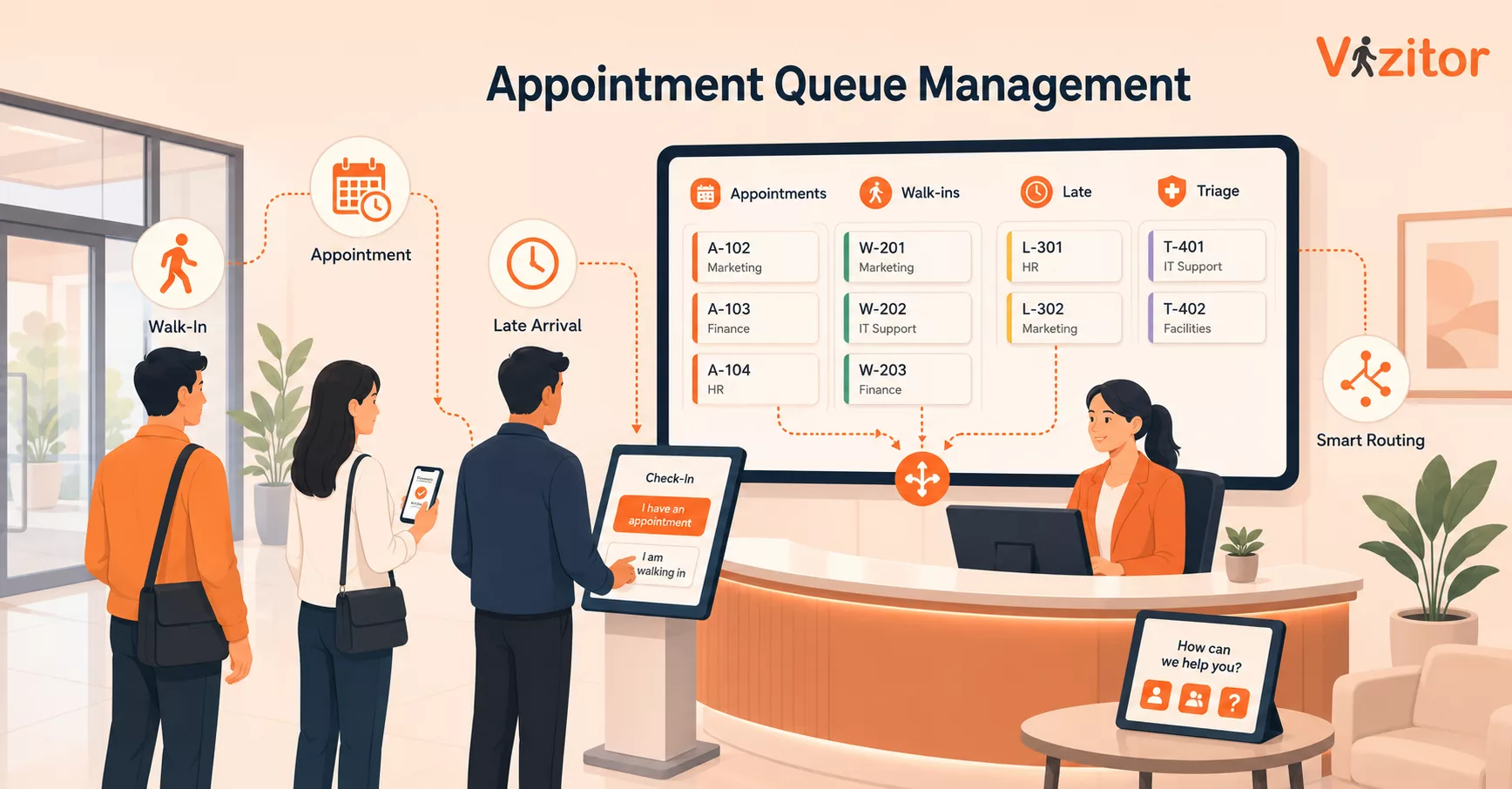
Table of Content
Try Vizitor for Free!
Appointment queue management is the front-desk process for deciding what happens when scheduled visitors, early arrivals, late arrivals, and walk-ins all reach reception at the same time. The mistake is treating every arrival as one line. A better front desk routes visitors by promise made, risk level, host readiness, and service type, then makes the waiting order visible.
That is the difference between a line that feels unfair and a line that feels managed.
Most queue advice focuses on shorter wait times. That is useful, but incomplete. The real problem sits at the front desk: it is routing. If a visitor booked 10:00 AM with the finance team, a vendor arrived without an appointment, and an interview candidate came 20 minutes early, the receptionist needs a rule before the lobby gets tense.
Vizitor’s queue management system sits in that exact handoff: visitor arrival, token or queue position, staff notification, department routing, and a record of what happened.
The routing rule: appointment time matters, but it should not be the only rule
Appointments deserve priority because the business made a promise. Walk-ins deserve structure because ignoring them creates crowding, repeat questions, and pressure on reception. The front desk should not have to improvise between those two truths all day.
Use this operating rule:
Booked visitors go first when the host is ready and the visitor arrives inside the arrival window. Walk-ins go into the next available queue based on purpose and department. Early visitors wait until their window unless the host accepts them. Late visitors keep their appointment only if the host and service queue can still absorb them without breaking the next promise.
That sounds strict. It is kinder than chaos.
The point of appointment queue management is not to punish late visitors or reward walk-ins. It is to protect the order the business already committed to, while giving unplanned arrivals a visible path instead of a shrug from reception.
Why front desks get this wrong
Front desks usually fail at mixed queues for one of four reasons.
First, they use appointment time as the only rule. That works until someone arrives early, a host is unavailable, or an urgent vendor delivery needs attention before a routine appointment.
Second, they use check-in time as the only rule. That feels fair to the people in the room, but it quietly breaks scheduled commitments. A visitor who booked ahead can end up behind a line of walk-ins because they arrived at the wrong minute.
Third, they let hosts decide everything manually. That creates hidden priority. The lobby sees one person being called before another and assumes favoritism, even when the reason is valid.
Fourth, they split queues by memory. Reception knows that delivery vendors go one way, interview candidates another, and contractors somewhere else. That knowledge disappears during lunch breaks, shift changes, busy mornings, and multi-site operations.
A front-desk queue system should remove that memory tax. It should make the next action obvious.
Separate visitors by arrival state
Do not begin with visitor type. Begin with arrival state.
Scheduled and on time: Check them in, notify the host, and keep them ahead of general walk-ins for that department.
Scheduled and early: Check them in as arrived, but do not move them ahead of current appointments unless the host accepts early entry.
Scheduled and late: Check them in with a late status. The host or department can accept, reschedule, or move them into a standby queue.
Walk-in with a clear purpose: Route them to the right department queue. They should receive a visible position or token, not a vague “please wait.”
Walk-in without a clear purpose: Keep them in a triage queue until reception identifies the department, host, document need, or security step.
This is where visitor queue management becomes practical. You are not asking the receptionist to make a judgment call on every person. You are giving reception a small routing map.
Appointment visitors need a window, not a throne
Appointments should have priority, but unlimited priority creates its own mess.
If a 10:00 AM visitor arrives at 9:15 AM, treating them as first in line punishes people who arrived for earlier valid slots. If they arrive at 10:40 AM, treating them as first in line punishes the 10:30 AM and 10:45 AM visitors who kept their time. The fairer rule is an arrival window.
A simple policy works:
- Early arrivals are checked in but held until the host accepts them or the appointment window opens.
- On-time arrivals are routed ahead of walk-ins for the same host or department.
- Late arrivals are marked late and need host confirmation before they jump ahead.
- Missed appointments move to reschedule or standby, depending on the visit type.
The exact minutes can vary by office, hospital, government counter, school, or plant gate. The principle should not vary. Appointment time creates a promise, but arrival behavior decides how that promise is handled.
Walk-ins need a visible path
Walk-ins become a problem when they have no answer to three questions: Am I in the right place? How long will this take? What happens next?
That is why walk in queue management should avoid the lazy “first come, first served” answer. First come, first served is fine for one service counter. It breaks down when a lobby handles interviews, vendors, deliveries, contractors, clients, students, patients, or citizens in the same physical space.
A walk-in should be routed by purpose:
- Sales or client visit
- Vendor or delivery
- Candidate or interview
- Contractor or maintenance
- Support desk or service request
- Unknown purpose
Each purpose needs a destination, a host or department, and a queue status. Once that exists, the visitor stops asking reception for updates every few minutes. Staff also stop guessing who is waiting for whom.
Vizitor’s broader visitor management system is useful here because walk-ins rarely need queue order alone. They may also need check-in, host notification, badges, approvals, document capture, or a visitor log.
For a broader playbook on unplanned foot traffic, use Vizitor’s guide to managing walk-in customer traffic. This article is narrower: it is about what happens when walk-ins and scheduled visitors collide in the same lobby.
The front desk should route promises, not personalities
When the lobby is full, the front desk is under social pressure. The loudest visitor gets attention. The familiar vendor gets waved through. The early executive guest gets moved ahead. The quiet visitor waits.
That is how routing becomes political.
A better system moves the decision into policy:
- Safety and security exceptions go first.
- Scheduled visitors go by appointment window and host readiness.
- Walk-ins go by service type and check-in time inside that service queue.
- Late arrivals need host or department confirmation.
- Unknown-purpose visitors stay in triage until reception can classify them.
This protects reception staff. They can point to the process instead of personally defending every call.
It also protects the visitor experience. People tolerate waiting better when the order is visible and the rule is clear, a point covered in more depth in the psychology of queues and waiting. What they dislike is the feeling that the line is fake.
A simple front-desk routing model
Use this as the article’s practical takeaway.
Step 1: Identify the arrival source. Is the visitor pre-registered, appointment-based, invited by a host, or unplanned?
Step 2: Identify the purpose. Meeting, service request, delivery, interview, contractor work, support, or unknown.
Step 3: Check host or department readiness. A booked visitor should not be called into a dead end if the host is unavailable.
Step 4: Assign queue state. On time, early, late, walk-in, standby, or triage.
Step 5: Show the next action. Notify host, issue token, send to counter, hold in waiting area, ask for document, or reschedule.
Step 6: Log the result. Completed, transferred, no-show, rescheduled, declined, or unresolved.
That final step matters. Without a record, the front desk cannot improve. It only survives the day.
Where digital queues beat a manual sign-in sheet
A paper sign-in sheet records arrival. It does not route. It cannot show whether a visitor is early, late, waiting for host approval, sent to the wrong counter, transferred to another department, or completed.
That is why appointment queue management usually fails when it is handled as a clipboard workflow.
Digital queue systems can give reception and departments a shared view:
- Who is waiting
- Why they are here
- Whether they had an appointment
- Which department owns the next step
- Whether the host has been notified
- How the visit ended
Vizitor’s queue page describes department-wise token generation, staff notifications, transfers, and interaction logs. That combination matters because mixed queues are rarely solved at the lobby alone. The delay often sits with the department that needs to accept, transfer, or complete the visitor request.
Queue routing is one piece of a bigger picture. Appointment scheduling, visitor management, and meeting room tools all feed the same front desk, and they work best when they share data instead of running as separate projects, a point covered in more depth in this look at the technology stack behind smoother customer flow.
What Snapdeal shows about high-volume visitor flow
Snapdeal is a useful proof point because its issue was not a small lobby inconvenience. The public Snapdeal case study describes hundreds of daily visitors, manual check-ins, queues, and limited real-time visibility before Vizitor.
After implementation, the case study reports 5x faster check-in, one business day deployment, and zero manual errors for Snapdeal’s visitor records. Treat those as Snapdeal’s results, not a blanket promise for every office.
The lesson for this article is narrower: high-volume reception cannot rely on goodwill and memory. Once visitor types multiply, front desks need a system that classifies arrivals, not a person trying to remember every exception.
When to prioritize appointments
Give appointments priority when the business has made a time-specific commitment and the visitor arrived within the agreed window.
Good examples:
- Candidate interviews
- Client meetings
- Vendor demos
- Healthcare or diagnostic appointments
- Government service slots
- Campus or office visits with a named host
The exception is readiness. If the host is not ready, the appointment should be marked waiting for host, not allowed to block every other queue. A front desk should never have to keep a visitor in limbo because the system has no better status.
When to prioritize walk-ins
Walk-ins should move ahead only when the purpose justifies it or the appointment queue has spare capacity.
Good examples:
- Safety or security issue
- Urgent delivery or facility support
- Quick document drop-off
- Visitor sent by an internal team without pre-registration
- A department with no current appointment backlog
This is where a front desk queue system needs department-level routing. A walk-in for IT support should not block a scheduled HR interview. A delivery should not sit behind a client meeting if the mailroom can process it separately. A contractor with an access issue should not wait in the same line as a sales visitor.
One physical lobby can contain many queues.
Common policy mistakes
The first mistake is hiding walk-ins from the system. If reception keeps walk-ins on sticky notes while appointments live in software, nobody has the full picture.
The second mistake is letting every host create their own priority rule. Some hosts answer instantly. Some ignore notifications. Some ask reception to “send them in” even when the lobby is overloaded. The queue policy should define what happens when a host does not respond.
The third mistake is mixing service queues with security checks. A visitor who has not completed the required check-in, document, approval, or badge step should not be treated as ready for service.
The fourth mistake is measuring only wait time. Wait time matters, but it does not explain bad routing. Track transfers, wrong-department arrivals, late appointments, host response delays, and unresolved walk-ins. Those signals tell you where the front desk is really losing time.
The front desk decision that matters
The question is not whether appointments or walk-ins matter more. The real question is whether your front desk can explain the next visitor decision without improvising.
If the answer depends on whoever is sitting at reception, the queue is fragile. If the answer comes from a visible routing rule, the lobby feels calmer even when it is busy.
For teams ready to replace manual routing with department-wise tokens, host notifications, and visit records, Book a demo and see how Vizitor handles queue flow at the front desk.
Frequently Asked Questions
See Vizitor in action check-in a visitor in under 30 seconds
Trusted by 500+ businesses. QR check-in, badge printing, NDA signing. Plans from $36/mo.